![tradable-bits-long-logo-for-download.png]](https://resources.tradablebits.com/hs-fs/hubfs/tradable-bits-long-logo-for-download.png?height=40&name=tradable-bits-long-logo-for-download.png)
Getting to know your fans goes beyond knowing their names, where they live or how often they engage with your campaigns. Understanding what they're interested in can help you create targeted experiences and communications that are meaningful to them.
In Tradable Bits, an Idol is a way to represent a specific fan interest, such as an artist, athlete, team, sponsor or podcast.
For example, a record label might create an Idol for each artist on its roster, while a sports organization might create Idols for its players, teams and commercial partners.
By connecting fans in your Fan CRM to these Idols, you can build a more detailed picture of your audience and use those insights to inform your fan marketing strategy.
What is Idol Affinity?
When a fan is associated with an Idol in Tradable Bits, we refer to this connection as Idol Affinity.
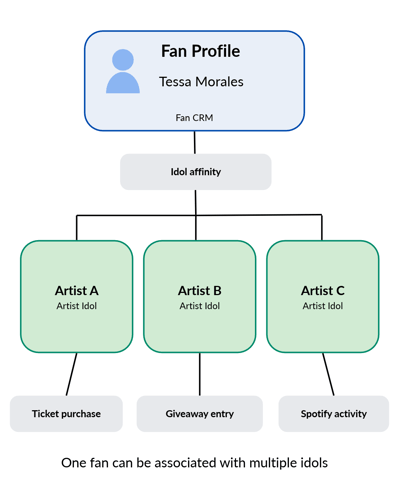
Think of an Idol as the interest itself, and Idol Affinity as the connection between that interest and an individual fan.
Imagine this scenario: you're a music festival collecting fan data through ticket purchases and Engagement Campaigns. Over time, you might discover that a particular fan:
- Purchased tickets to see Artist A.
- Entered a giveaway to meet Artist B.
- Engaged with a campaign promoting Artist C.
By collecting Idol Affinity through these activities, you can start to get a sense of which artists that fan is likely to be interested in, rather than simply knowing that they love your festival.
A fan can have an affinity for multiple Idols, and these connections can be viewed within their individual Fan CRM profile.
Where can I find Idols in Tradable Bits?
To access your Idols Dashboard:
- Hover over the Idols icon in the top navigation bar.
- Select Dashboard.
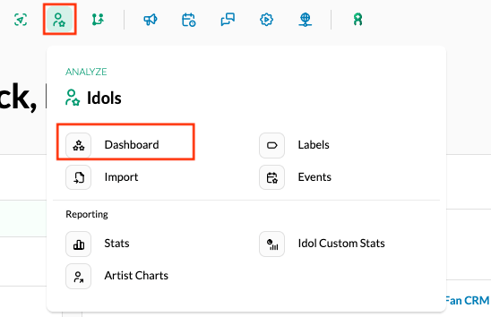
From your Idols Dashboard, you can view and search your existing Idols, create new ones, and access their individual profiles.
Idols are account-wide, meaning they are shared across all of the Businesses within your Tradable Bits account. You don't need to create a separate Idol for each Business or campaign associated with it.
What types of Idols can I create?
There are five types of Idols you can create in Tradable Bits:
| Idol Type | Example use cases |
|---|---|
| Artist | A solo musician, band, DJ or recording artist. Artist Idols can be connected to a Spotify ID. |
| Sponsor | A commercial partner, event sponsor or official merchandise partner. |
| Team | A professional sports team or another team within your organization. |
| Podcast | A podcast or show that your audience listens to. |
| Other | An interest that doesn't fit into the categories above, such as an individual athlete or player. |
You can create Idols individually from your Idols Dashboard or use the Import tool to add multiple Idols at once.
For step-by-step instructions, check out our How to Create a New Idol and How to Bulk Import Idols guides.
How is Idol Affinity collected?
There are several ways fans can become associated with Idols in your Tradable Bits account. Depending on how you've configured your campaigns, integrations and data sources, affinity can be collected through activities such as:
- Engagement Campaigns: Automatically associate participants with one or more Idols when they enter a campaign.
- Spotify activity: Collect insights into the artists your fans listen to through campaigns that use Spotify authentication.
- Ticket purchases: Associate fans with artists based on their purchase history when the artists in your ticketing data are matched to your Idols.
- Social activity: Collect affinity through relevant social engagement data.
Applying Idol Affinity to your Engagement Campaigns
One of the easiest ways to start collecting Idol Affinity is through the Engagement Campaigns you're already running.
For example, if you're running a giveaway for signed merchandise from a particular player, you might associate that campaign with the player's Idol. Fans who enter the giveaway will automatically be associated with that Idol in your Fan CRM.
You can configure Idol Affinity at two levels:
- Campaign level: Associate participants of an individual campaign with one or more Idols.
- Business level: Set default Idols for campaigns created within a particular Business. This is particularly useful if you regularly run campaigns related to the same artist, team or sponsor.
You can also apply Idol Affinity to previous campaign participants if you didn't configure it before launching your campaign.
Learn more in our guides on Applying Idol Affinity at the Campaign or Business Level and Assigning Idol Affinity Retroactively.
What can I do with Idols?
Once you've started collecting Idol Affinity, you can put that data to work in several areas of Tradable Bits.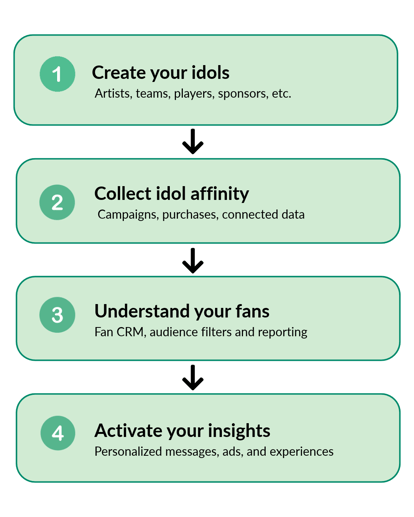
Build targeted audiences in your Fan CRM
Use Idol Affinity to find fans who have shown an interest in a particular artist, player, team or sponsor.
You can combine this information with other fan data to create more specific audiences. For example, you might want to find fans who are interested in a particular artist and live within a city where that artist has an upcoming show.
Personalize your marketing
Use what you've learned about your fans to make your communications and advertising more relevant to them.
Rather than promoting every upcoming event, artist or sponsor activation to your entire fanbase, you can build audiences based on their interests and tailor your marketing accordingly.
This might include:
- Sending relevant concert announcements.
- Promoting player-specific merchandise.
- Retargeting interested fans through ads.
- Inviting fans to participate in campaigns featuring their favourite artists.
- Sharing relevant sponsor promotions with eligible audiences.
Collect Idol-specific marketing opt-ins
You can associate a Secondary Subscription with an Idol, allowing fans to opt into communications related to a particular artist, sponsor or other interest.
For example, a record label can create a separate subscription for each artist on its roster without needing to create a separate Business for every artist.
Good to know: Idol Affinity and marketing subscriptions are two different things. A fan may show interest in an Idol without having opted into marketing communications related to it.
Learn more about how to create a new secondary subscription.
Organize related Idols using Labels
Idol Labels allow you to group related Idols together based on criteria that are relevant to your organization.
For example, you might create Labels for:
- Artists on your current festival lineup.
- Players on your current team roster.
- Artists within a particular music genre.
- Sponsors associated with a specific event.
You can use these Labels in your Fan CRM to build audiences based on shared interests, or in your Idol reporting to analyze related groups of Idols together.
Learn more in our How to Create an Idol Label guide.
Better understand your fanbase through reporting
Idol reporting helps you explore which Idols your fans are connecting with and identify patterns in your audience's interests.
Navigate to Idols > Reporting > Stats to explore affinity data across different Idols, Labels and time periods.
These insights can help inform decisions about upcoming campaigns, event programming, artist bookings, merchandise promotions and sponsorship opportunities.
You can also generate shareable reports and import additional statistics about your Idols to bring more of your data together in one place.
Learn more in our guides on Idol Stats and Reporting and Idol Custom Stats.
Examples of ways to use Idols in fan marketing
How you use Idols will depend on your organization, the types of experiences you create for your fans, and your marketing goals.
Here are a few examples to get you thinking.
Sports: Get to know your fans' favourite players
A hockey team runs a series of giveaways featuring signed jerseys from different players. Each giveaway is associated with the relevant player's Idol.
Over the season, the team builds a better understanding of which players different fans are interested in. They can use these insights to promote player-specific merchandise, create more relevant fan experiences and personalize future marketing campaigns.
Music: Reach the right fans for an upcoming tour
A record label creates Idols for the artists on its roster and collects artist affinity through campaigns and Spotify integrations.
When an artist announces a tour, the label can build an audience of fans who have shown an interest in that artist and live near an upcoming tour stop. This allows the label to focus its marketing on fans who are more likely to be interested in attending.
Festivals: Turn past engagement into future ticket sales
A music festival collects affinity for artists across its lineup through ticketing data and Engagement Campaigns.
When planning its next festival, the team can explore which artists its audience has connected with, use those insights to inform booking decisions, and promote its new lineup to relevant groups of fans.
Sponsorship: Build more meaningful sponsor activations
A sports organization creates Idols for its commercial partners and associates them with relevant sponsored campaigns.
Over time, the organization can better understand which fans have engaged with its sponsors, build audiences for future activations, and use aggregated insights to inform conversations with its commercial partners.
Getting started with Idols
You don't need to create an Idol for every possible interest your fans might have. Start by thinking about the information that would be most valuable to your organization and how you might use it in your future marketing efforts.
Questions to consider:
- Which artists, players, teams or sponsors would we like to better understand fan interest in?
- What opportunities do we already have to collect that information?
- How could knowing more about these interests improve our future campaigns and communications?
Once you've identified a few key interests, you're ready to start creating your Idols and collecting affinity.
Start here: How to Create a New Idol
Still need assistance? Please reach out to your Customer Success Team or contact support@tradablebits.com