![tradable-bits-long-logo-for-download.png]](https://resources.tradablebits.com/hs-fs/hubfs/tradable-bits-long-logo-for-download.png?height=40&name=tradable-bits-long-logo-for-download.png)
Custom subscription objects allow you to capture specific Email or SMS opt-ins for your Business or Sponsor directly through your campaign entry forms. Once collected, you can utilise the FanCRM Search tool to filter your audience by these subscription fields, ensuring you can identify and export the exact lists you need.
Creating an additional subscription/opt-in
- From your Tradable Bits Homepage, go to the Top Navigation Bar, and navigate to FanCRM > Subscriptions/Opt-ins.
%204.13.21%20p.m..png?width=416&height=377&name=Captura%20de%20pantalla%202026-07-31%20a%20la(s)%204.13.21%20p.m..png)
- Click + New Subscription to add a new subscription object
- Fill in the required fields:
-
Subscription Key: Name of the subscription object
-
Subscription Type: Email, SMS or combined subscriber list
-
Subscription Object: Business or Idol
%204.16.02%20p.m..png?width=499&height=457&name=Captura%20de%20pantalla%202026-07-31%20a%20la(s)%204.16.02%20p.m..png)
How to add to a Subscription field to an Engagement Campaign
-
Open your campaign and navigate to General Setup > Entry Form Fields
-
Click + Additional Fields > Subscription Field to select your desired subscription object.

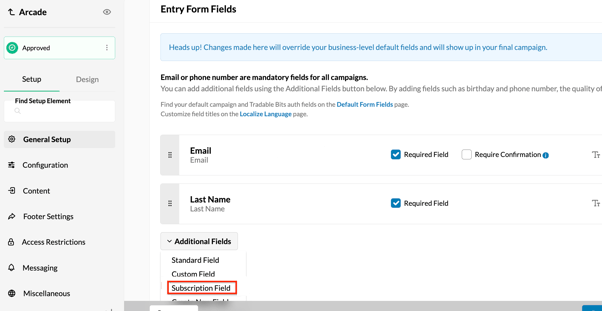
Note: You can only have one subscription to a specific business.
How to export subscriptions/opt-ins in the FanCRM
-
From your Tradable Bits Homepage, go to the Top Navigation Bar, and navigate to FanCRM > Search.
-
Click + Add Parameter to open the parameter menu, look for the Campaign Activity dropdown to find the CRM Subscription field, or locate it by using the top search bar.
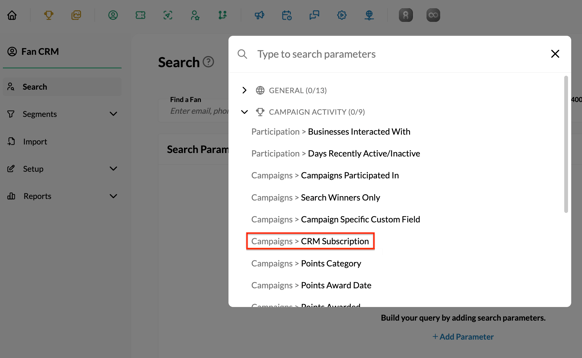
- Create a filter by using the CRM Subscription, selecting whether to include Phone, Email, or Both options.
- Save your filter.
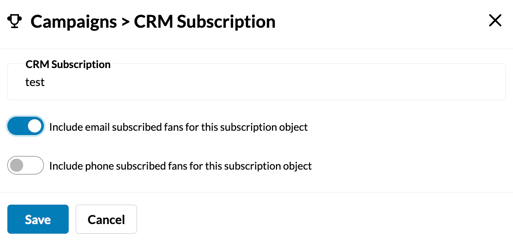
- Confirm your CRM Subscription field.
- Click Search Fans
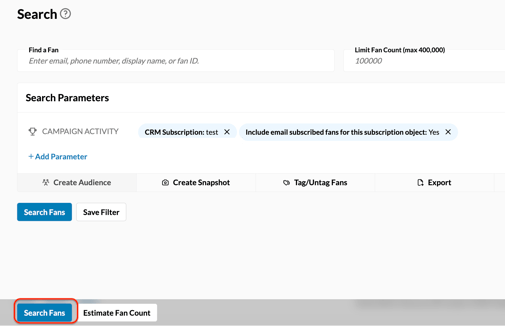
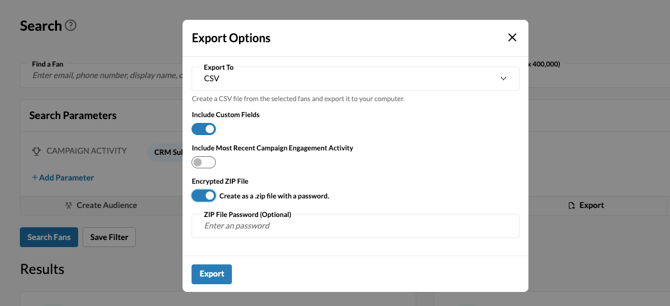
- Select Export to choose either downloading immediately as a CSV file or routing it to an existing outgoing integration.
- Click Export, and that's it!
This will allow you to search and estimate the number of fans who have opted in to receive
email and/or SMS communications from a specific business or idol.
Still need assistance? Please reach out to your Customer Success Team or contact support@tradablebits.com