---
title: How do I set up a Spin to Win campaign?
description: The following guide will walk you through how to set up your first “Spin to Win” Campaign.
---
[Skip to content](https://resources.tradablebits.com/support/spin-to-win#main-content)
English
Show submenu for translations
![tradable-bits-long-logo-for-download.png\]](https://resources.tradablebits.com/hs-fs/hubfs/tradable-bits-long-logo-for-download.png?height=40&name=tradable-bits-long-logo-for-download.png)
Open main navigation
Close main navigation
- English
Show submenu for translations
How can we help?
- There are no suggestions because the search field is empty.
1. [Resources](https://resources.tradablebits.com/support?hsLang=en)
2. [Engagement Campaigns](https://resources.tradablebits.com/support/engagement-campaigns?hsLang=en)
3. [Creating Campaigns](https://resources.tradablebits.com/support/engagement-campaigns?hsLang=en#creating-campaigns)
# How do I set up a Spin to Win campaign?
## The following guide will walk you through how to set up your first “Spin to Win” Campaign.
Spin to Win is a prize campaign that’s a great way to draw fans into your database. Spin to Win can serve as a great way to incentivize fans to enter their details. Spin to Win is also uniquely positioned to be a great sponsorship campaign.
### **When to use Spin to Win:**
There are many ways you can leverage this incentive to your advantage, such as:
- Asking more detailed prospecting questions
- Requiring fans to authenticate through Spotify to gather affinity data
- Getting fans to visit your properties in person to collect their prize
- Asking fans to come back daily for the chance to win a prize (staying top of their mind)
- Including your sponsor in the branding of the campaign, and having them cover the major prize.
**We're outlining some campaign-specific details below. Follow [this guide](https://resources.tradablebits.com/support/getting-started-with-campaigns?hsLang=en) for more info on General Setup and other campaign basics.**
### Configuration
Under the Configuration tab, you can:
- Set the colour palette or upload a background image for your wheel
- Configure fan wallet options
- Select a title, image, and descriptions for what displays when prizes run out.
### Content
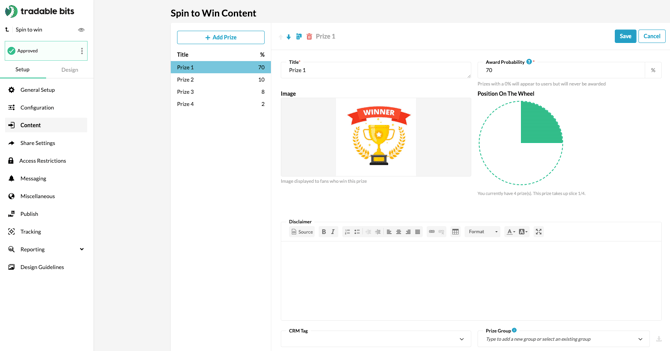
This section allows you to configure your prize details, including how many prizes you'll award in total, how many prizes can be awarded in a day, win percentages, and more.
#### Win Percentage (%)
This is where you set the probability of winning each prize. The total for *all* prizes should add up to 100%.
**Please note:** Spin to Win works on a dice-style probability. This means that **each fan has the same chance of winning, no matter how many fans have entered before or after them**. With this in mind, make sure that your odds are in alignment with the number of prizes and the duration of the campaign.
**For example:**
Let’s say that you’re running a week-long campaign. You first set the odds for each prize in your spinning wheel - which is the probability out of 100% that each participant will land on that prize.
Then, you look at your prizing stock. You have 20 units of each prize to give out. The way the probability of winning in this campaign works is as follows:
*If the odds of winning are set to 5%, every time I spin, I have a 5% chance of winning X, and the next participant who plays after me also has a 5% chance of winning X and so on (as long as there are still prizes available in the pool). Once all of X’s prizes have been given out, X now has a 0% chance of being won.*
So, if you have a small pool of prizes to give, consider running a shorter campaign to keep it interesting (and winnable) for fans.
**
#### Order of Prizes
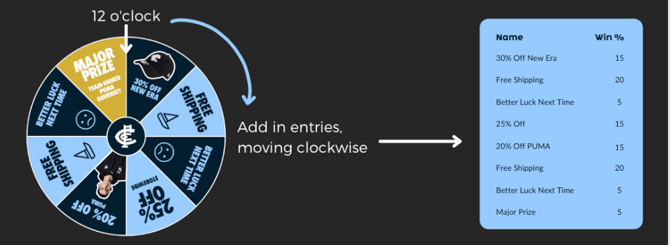
To match your prizes up correctly with your spinning wheel, start at 12 o’clock for your first prize, and then move clockwise around your wheel, adding your prizes as you go.
#### **Image, Title, Description**
This is what appears for fans once their spinner lands on a prize. If you don’t want a prize image to appear, you can leave the image section blank, and fans will only see the title and description. The description is also optional but is useful for informing fans about how to claim their prize.
#### CRM Tag
Using this section, you can tag your fans based on the prize that they won. To tag your lower-tier prizes, you will need to first set up your CRM tag in the FanCRM section of the platform. Once you do, the option will appear on the drop-down for you
#### Win Daily Limit + Overall Win Limit
If you have a limited number of prizes you want to give out, this is where you set your limits. We recommend adding prize codes for more limited prizes, so you can see exactly which prize has been won, by who.
#### Prize Redemption Code
Use this section to create multi-use or single-use codes for fans to use when they win their prizes. For example, you can add codes that match up to a discount code you are offering on your online merch store. Add each code in on a separate line.
### Design
Here are our best practices for your spin wheel creative:
1. The first segment of your spin wheel prizing should start at 12, and the number of segments on your spin wheel should match the number of prize options you set in the “Entries Tab”
2. We recommend going with a minimum of 4 prizes and 4 sections on your wheel. 8-10 is the sweet spot.
3. When you’re testing the campaign, worry not - the spin wheel line overlays can be removed with CSS if you don’t want them there.
4. As for prizing, we recommend having one major prize to draw people in, and a number of middle-tier prizes that influence fans to spend (i.e. 25% off a brand, merch or product range)
5. The key to a great spin wheel is keeping it simple, but upbeat! In our opinion, leaning into the kitschiness of a “spinning wheel” campaign is a great way to keep it fun for fans
### **Best Practice Example Spin Wheels**
#### Secret Sounds Spin to Win
This Spin to Win Campaign is bright, clear and perfectly branded to draw a fan in.
**What works well:**
- The 10 sections on the spinning wheel are within that sweet spot of prizing
- The prizes are simple and easy to read
- Each prize showcases a great incentive for fans to enter, with one “major prize” to draw more entries
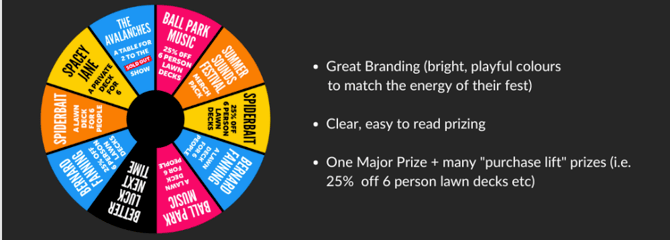*Secret Sounds - Summer Sounds Festival Spin to Win*
#### Carlton FC Spin to Win
This Spin to Win Campaign is perfectly branded and integrates sponsor prizing:
- The 8 sections in the spinning wheel are within that sweet spot of prizing
- The graphics included on the Spin-to-Win bring a great design element while keeping it light and fun
- Great branding by the team with their logo centre stage
- One major prize as a call to action
- Symmetry on the wheel between the “free shipping,” “better luck next times” and discounts off of merchandise
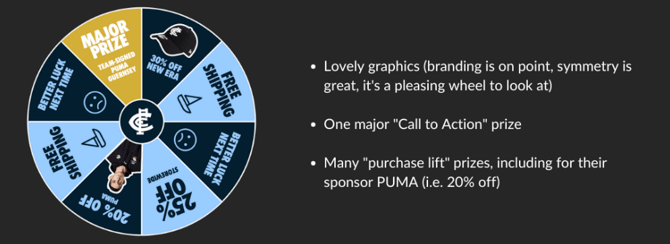
*Carlton FC - Spin to Win*
**Before publishing your campaign, be sure to review our[Campaign Publishing Checklist](https://resources.tradablebits.com/support/campaign-publishing-checklist?hsLang=en)for a smooth launch.**
You’re all set, let the spinning begin!
**Still need assistance? Please reach out to your Customer Success Team or contact [support@tradablebits.com](mailto:support@tradablebits.com)**
- [Getting started](https://resources.tradablebits.com/support/getting-started?hsLang=en)
- [Account](https://resources.tradablebits.com/support/account?hsLang=en#main-content)
- [Security](https://resources.tradablebits.com/support/account?hsLang=en#security)
- [Engagement Campaigns](https://resources.tradablebits.com/support/engagement-campaigns?hsLang=en#main-content)
- [Campaign Basics](https://resources.tradablebits.com/support/engagement-campaigns?hsLang=en#campaign-basics)
- [Campaign Management](https://resources.tradablebits.com/support/engagement-campaigns?hsLang=en#campaign-management)
- [Creating Campaigns](https://resources.tradablebits.com/support/engagement-campaigns?hsLang=en#creating-campaigns)
- [Best Practices and Troubleshooting](https://resources.tradablebits.com/support/engagement-campaigns?hsLang=en#best-practices-and-troubleshooting)
- [Fan CRM](https://resources.tradablebits.com/support/fan-crm?hsLang=en)
- [UGC](https://resources.tradablebits.com/support/ugc?hsLang=en)
- [Sales](https://resources.tradablebits.com/support/sales?hsLang=en)
- [Trackers](https://resources.tradablebits.com/support/trackers?hsLang=en)
- [Idols](https://resources.tradablebits.com/support/idols?hsLang=en)
- [Integrations](https://resources.tradablebits.com/support/integrations?hsLang=en#main-content)
- [Outgoing Integrations](https://resources.tradablebits.com/support/integrations?hsLang=en#outgoing-integrations)
- [Incoming Integrations](https://resources.tradablebits.com/support/integrations?hsLang=en#incoming-integrations)
- [Salesforce Marketing Cloud](https://resources.tradablebits.com/support/integrations?hsLang=en#salesforce-marketing-cloud)
- [Ads](https://resources.tradablebits.com/support/ads?hsLang=en)
- [Messaging](https://resources.tradablebits.com/support/messaging?hsLang=en#main-content)
- [SMS](https://resources.tradablebits.com/support/messaging?hsLang=en#sms)
- [Email](https://resources.tradablebits.com/support/messaging?hsLang=en#email)
- [Push Notifications](https://resources.tradablebits.com/support/messaging?hsLang=en#push-notifications)
- [Instagram](https://resources.tradablebits.com/support/messaging?hsLang=en#instagram)
- [Octane](https://resources.tradablebits.com/support/octane?hsLang=en)
- [FAQs](https://resources.tradablebits.com/support/faqs?hsLang=en)
- [Troubleshooting](https://resources.tradablebits.com/support/troubleshooting?hsLang=en#main-content)
- [CSS/JS](https://resources.tradablebits.com/support/troubleshooting?hsLang=en#css-js)
- [Reports](https://resources.tradablebits.com/support/reports?hsLang=en)
- [Product Updates](https://resources.tradablebits.com/support/product-updates?hsLang=en)
[](https://tradablebits.com/)
Copyright © 2026, Tradable Bits