![tradable-bits-long-logo-for-download.png]](https://resources.tradablebits.com/hs-fs/hubfs/tradable-bits-long-logo-for-download.png?height=40&name=tradable-bits-long-logo-for-download.png)
We're big fans of proper data handling and know that sometimes campaigns aren't for the whole family. Whether you need an age gate to be compliant with regional data regulations or for an adult-focused corporate partner, we can help keep your campaign running smoothly.
- In the Tradable Bits Homepage, hover over the Campaigns section in the Top Navigation Bar, select your desired business and click on Dashboard.
- Find and click on your campaign
- On the left-hand side of the page under Setup, click Access Restrictions
- Scroll down to Age Gate section at the bottom of the page
- Select or customize your age requirements
- Hit Save Setup in the bottom right corner
That's it!
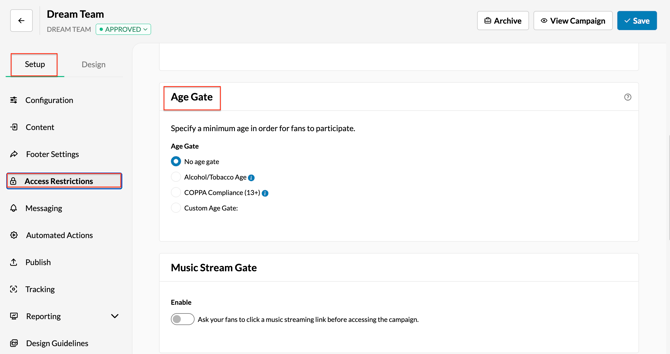
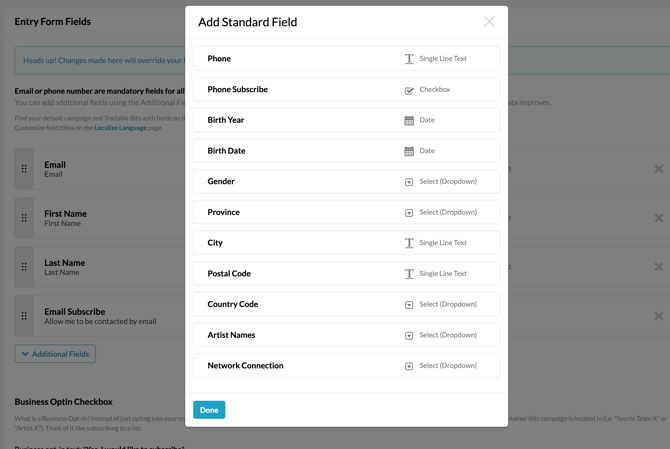
Please note, this information will not be saved on their fan profile. If you wish to capture this information for reporting purposes later, include a Date of Birth field in your Entry form when configuring your campaign.
Go to General Setup> Entry Form Fields> Additional Fields and choose either the Birth Year or Birth Date field to be added to your campaign.
Once your age gate is live, you're all set to keep age-restricted promos on track. Since legal requirements and age thresholds often vary by location, you can also pair your age gate with regional rules. Check out our guide on how to set regional restrictions for your campaign.
Still need assistance? Please reach out to your Customer Success Team or contact support@tradablebits.com