![tradable-bits-long-logo-for-download.png]](https://resources.tradablebits.com/hs-fs/hubfs/tradable-bits-long-logo-for-download.png?height=40&name=tradable-bits-long-logo-for-download.png)
When it comes to the music industry, we know that early momentum is everything. Streaming platform algorithms heavily favour the tracks that get immediate, concentrated engagement. By using a music stream gate on your highly desirable campaign, you can drive a massive spike in song streams, pushing the track to an even wider audience. Unlike a pre-save campaign like Tune Link, this approach encourages your fans to interact with the music right now, increasing the chances that they will love it, share it, and add it to their personal playlists.
- From the Tradable Bits Homepage, hover over the Campaigns section in the Top Navigation Bar, select your desired business and click on Dashboard.
- Locate and click on the campaign you’d like to configure
- On the left-hand side of the page, under Setup, click Access Restrictions
- Scroll down to the Music Stream Gate section of the page
- Toggle on to enable this setting
- Paste in at least one of the DSP (Digital Service Provider) links to your chosen song from Spotify, Apple Music, Amazon Music, and/or Deezer.
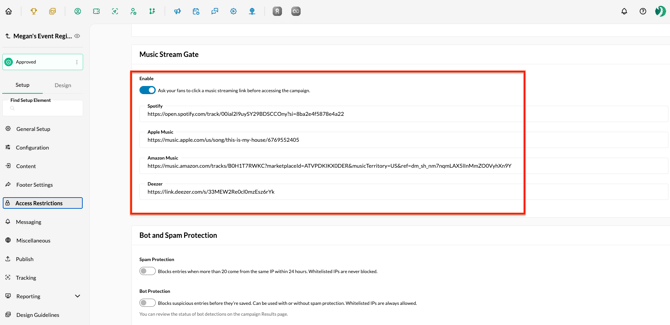
Please note: If you include links to more than one digital service provider, each will be displayed as an option on the campaign; however, the fan will only need to select one to fulfill the song-listening requirement.
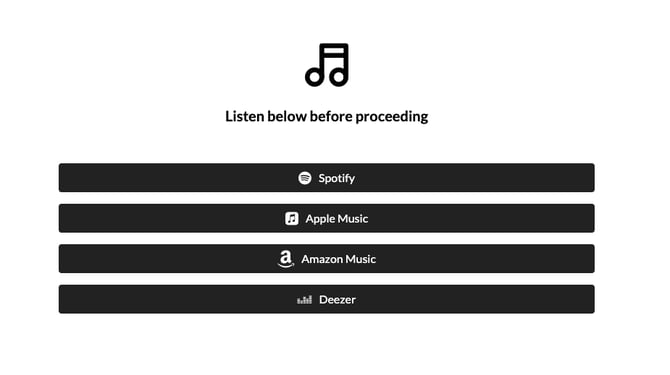
Once the fan has clicked to listen to the song, they will be granted access to enter the campaign.
Tip: When testing this feature, it is expected that if you have already clicked on one of the song listening links, you will no longer see these options when visiting the campaign URL. Try opening the campaign from an incognito or private browsing window to see how it will appear to fans.
Still need assistance? Please reach out to your Customer Success Team or contact support@tradablebits.com