![tradable-bits-long-logo-for-download.png]](https://resources.tradablebits.com/hs-fs/hubfs/tradable-bits-long-logo-for-download.png?height=40&name=tradable-bits-long-logo-for-download.png)
Horoscope is a highly shareable, personality-driven campaign that has a big impact. It's a great way to engage fans with entertaining insights based on their astrological sign. You can also match signs with artists, brands, and even embeddable media like Spotify tracks or product galleries to deepen brand interaction. Astrology quizzes offer high-value exchange, encouraging fans to happily share qualitative zero-party data without feeling like they're filling out a dry lead form. 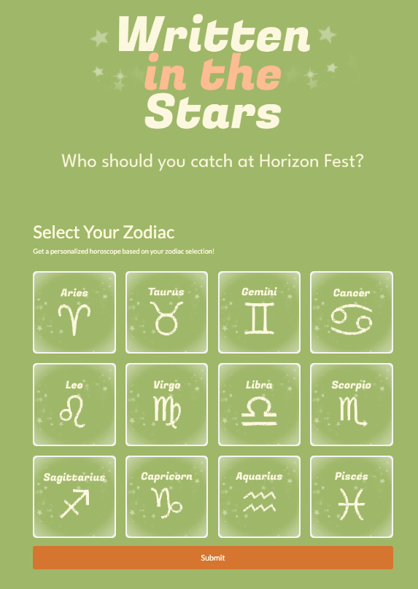
When to use Horoscope campaign
Tap into the power of personalized marketing by using star signs to deliver tailored content, boost discovery, and increase conversions.
- Album & Music Launches: Engage fans by helping them discover which song or track off a new release matches their personality based on their astrological sign.
- Music Festivals & Live Events: Drive schedule discovery by recommending specific performers, stages, or line-up acts for fans to check out based on their sign.
- Sports & Franchise Fan Engagement: Build fun affinity with fans by matching them with their "twin player" or athlete who shares their astrological sign.
- E-Commerce & Product Recommendations: Pair each sign with tailored merchandise or product recommendations using the Merchant Product Grid to lift purchase intent and cross-sell relevancy.
We're outlining some campaign-specific details below. Follow this guide for more info on General Setup and other campaign basics.
Setting up Content
When you create your Horoscope campaign and set the start and end dates, you'll see the Content section. You can find this section any time in the left menu under Setup.
Each astrological sign is listed on the left, and you'll click into each one to update the specific images and results content.
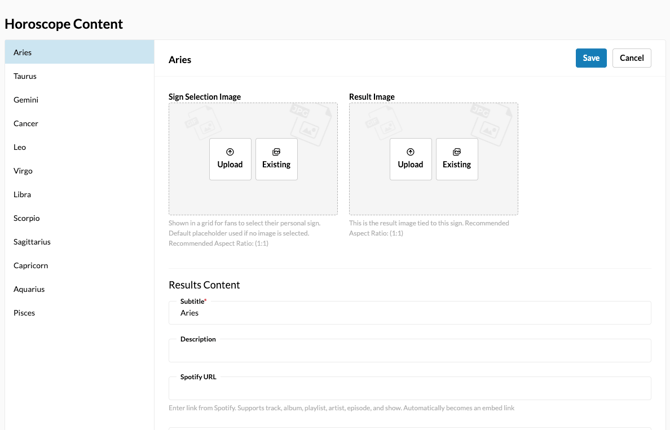
To set up the campaign content:
- Click an astrological sign in the left menu
- Upload your Sign Selection Image - this will be the image the fan will click on to reveal their personal horoscope. We recommend using an image with an aspect ratio of 1:1.
Note: If you do not add an image, we will display a default placeholder. - Upload your Result Image - this will appear on the result page, and it should also have an aspect ratio of 1:1.
- Fill out the following Results Content fields
- Subtitle (required) - by default, we've set this as the astrological sign, but you can update it to any text you wish.
- Description
- Spotify URL - you can choose a track, album, playlist, artist, episode, or show to feature here as an embed link
- Click Save to lock in your changes.
- Repeat the process for each astrological sign
You can also feature products for fans to purchase using the Merchant Product Grid section for each sign. Read more about how in How do I set up the Merchant Product Grid?
Before publishing your campaign, be sure to review our Campaign Publishing Checklist for a smooth launch.
Still need assistance? Please reach out to your Customer Success Team or contact support@tradablebits.com