---
title: How do I template an engagement campaign?
description: This guide will provide a quick overview on how and when to use an engagement campaign template.
---
[Skip to content](https://resources.tradablebits.com/support/template-a-campaign#main-content)
English
Show submenu for translations
![tradable-bits-long-logo-for-download.png\]](https://resources.tradablebits.com/hs-fs/hubfs/tradable-bits-long-logo-for-download.png?height=40&name=tradable-bits-long-logo-for-download.png)
Open main navigation
Close main navigation
- English
Show submenu for translations
How can we help?
- There are no suggestions because the search field is empty.
1. [Resources](https://resources.tradablebits.com/support?hsLang=en)
2. [Engagement Campaigns](https://resources.tradablebits.com/support/engagement-campaigns?hsLang=en)
3. [Campaign Management](https://resources.tradablebits.com/support/engagement-campaigns?hsLang=en#campaign-management)
# How do I template an engagement campaign?
## This guide will provide a quick overview on how and when to use an engagement campaign template.
Templating is a helpful tool when you have built an engagement campaign in one business that you want to activate in a different business or Tradable Bits account (ie, a child account).
Note: Cloning a campaign automatically duplicates the campaign right in the same business, whereas **templating a campaign creates a downloadable file that you can then upload into any business or Tradable Bits account.**
Follow along below for a step-by-step guide to download or upload an engagement campaign template. If you already frequently use templates, please scroll to the bottom for important updates to this tool.
#### Campaign Templating Steps:
**1.** In the **Tradable Bits Homepage**, hover over the **Campaigns** section in the **Top Navigation Bar,** choose your desired business and click on **Dashboard.**
**2.** Click on the three dots at the far right of the campaign that you wish to template to expand the campaign menu
**3.** Click on the **template** icon
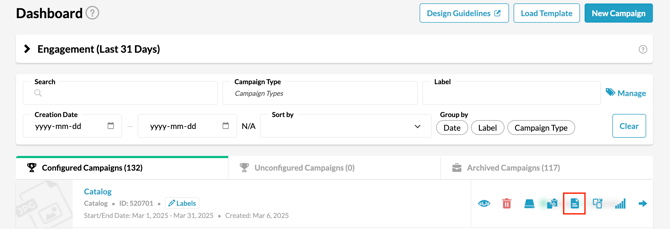
**4**. Click **Create Template** in the pop-up
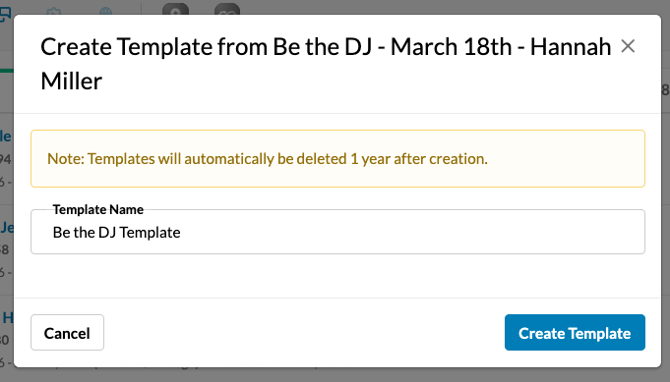
**5.** It will then be saved in a cloud environment and given a template ID. You will be able to find any Campaign Template (and template ID) you've created in the Campaign Template section of your account for up to 1 year.
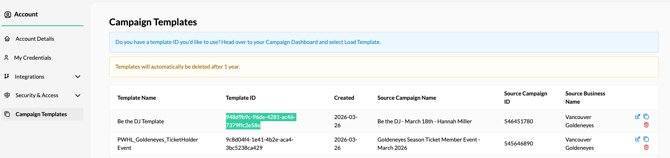
**6.** To load a template into a new Business or Account, copy the template ID and then go to the Business that you want to load this engagement campaign template into and navigate to the **Campaign Dashboard** again.
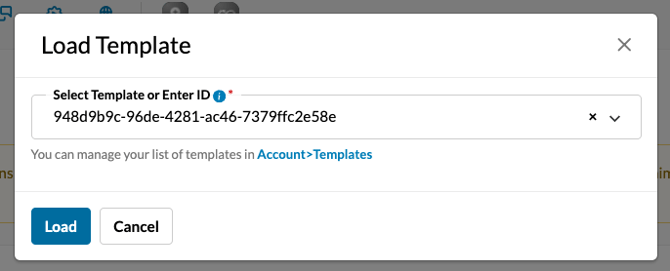
**7.** Click the **Load Template** button at the top right of the dashboard
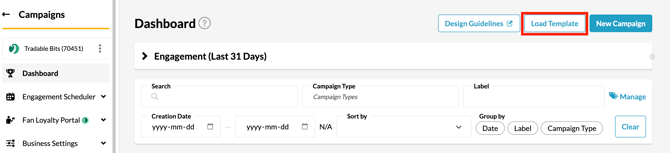
**8**. Paste the template ID and click **Load**
****
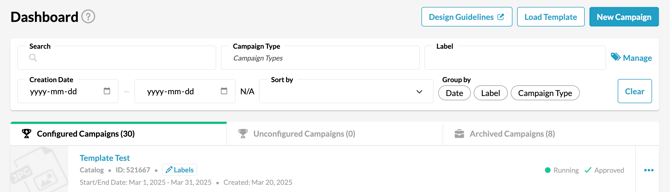
9\. Your new template will now appear at the top of your campaign dashboard for you to edit and activate
****
#### **Updates to Template Functionality:**
As of March 20, 2025, we have updated our templating functionality to be more robust and overall easier to use. The following changes have taken effect:
- Previous campaign template files will **no longer be supported**
- Any campaign **created from a template** that already exists will **be unaffected**
- If you try to upload an old template (with the previous file type), it **will not work**
- To continue using templates, you will need to **create a new version of the template**
**Still need assistance? Please reach out to your Customer Success Team or contact [support@tradablebits.com](mailto:support@tradablebits.com)**
- [Getting started](https://resources.tradablebits.com/support/getting-started?hsLang=en)
- [Account](https://resources.tradablebits.com/support/account?hsLang=en#main-content)
- [Security](https://resources.tradablebits.com/support/account?hsLang=en#security)
- [Engagement Campaigns](https://resources.tradablebits.com/support/engagement-campaigns?hsLang=en#main-content)
- [Campaign Basics](https://resources.tradablebits.com/support/engagement-campaigns?hsLang=en#campaign-basics)
- [Campaign Management](https://resources.tradablebits.com/support/engagement-campaigns?hsLang=en#campaign-management)
- [Creating Campaigns](https://resources.tradablebits.com/support/engagement-campaigns?hsLang=en#creating-campaigns)
- [Best Practices and Troubleshooting](https://resources.tradablebits.com/support/engagement-campaigns?hsLang=en#best-practices-and-troubleshooting)
- [Fan CRM](https://resources.tradablebits.com/support/fan-crm?hsLang=en)
- [UGC](https://resources.tradablebits.com/support/ugc?hsLang=en)
- [Sales](https://resources.tradablebits.com/support/sales?hsLang=en)
- [Trackers](https://resources.tradablebits.com/support/trackers?hsLang=en)
- [Idols](https://resources.tradablebits.com/support/idols?hsLang=en)
- [Integrations](https://resources.tradablebits.com/support/integrations?hsLang=en#main-content)
- [Outgoing Integrations](https://resources.tradablebits.com/support/integrations?hsLang=en#outgoing-integrations)
- [Incoming Integrations](https://resources.tradablebits.com/support/integrations?hsLang=en#incoming-integrations)
- [Salesforce Marketing Cloud](https://resources.tradablebits.com/support/integrations?hsLang=en#salesforce-marketing-cloud)
- [Ads](https://resources.tradablebits.com/support/ads?hsLang=en)
- [Messaging](https://resources.tradablebits.com/support/messaging?hsLang=en#main-content)
- [SMS](https://resources.tradablebits.com/support/messaging?hsLang=en#sms)
- [Email](https://resources.tradablebits.com/support/messaging?hsLang=en#email)
- [Push Notifications](https://resources.tradablebits.com/support/messaging?hsLang=en#push-notifications)
- [Instagram](https://resources.tradablebits.com/support/messaging?hsLang=en#instagram)
- [Octane](https://resources.tradablebits.com/support/octane?hsLang=en)
- [FAQs](https://resources.tradablebits.com/support/faqs?hsLang=en)
- [Troubleshooting](https://resources.tradablebits.com/support/troubleshooting?hsLang=en#main-content)
- [CSS/JS](https://resources.tradablebits.com/support/troubleshooting?hsLang=en#css-js)
- [Reports](https://resources.tradablebits.com/support/reports?hsLang=en)
- [Product Updates](https://resources.tradablebits.com/support/product-updates?hsLang=en)
[](https://tradablebits.com/)
Copyright © 2026, Tradable Bits