---
title: "Access Restrictions: How do I prevent bots from entering engagement campaigns?"
description: This guide will review how our system has built-in bot protection and how you can enable spam protection or bot protection on your engagement campaigns.
---
[Skip to content](https://resources.tradablebits.com/support/prevent-bots-from-entering-campaigns#main-content)
English
Show submenu for translations
![tradable-bits-long-logo-for-download.png\]](https://resources.tradablebits.com/hs-fs/hubfs/tradable-bits-long-logo-for-download.png?height=40&name=tradable-bits-long-logo-for-download.png)
Open main navigation
Close main navigation
- English
Show submenu for translations
How can we help?
- There are no suggestions because the search field is empty.
1. [Resources](https://resources.tradablebits.com/support?hsLang=en)
2. [Engagement Campaigns](https://resources.tradablebits.com/support/engagement-campaigns?hsLang=en)
3. [Campaign Setup & Configuration](https://resources.tradablebits.com/support/engagement-campaigns?hsLang=en#campaign-setup-configuration)
# Access Restrictions: How do I prevent bots from entering engagement campaigns?
## This guide covers the two protections available on engagement campaigns, how to choose between them, and how to read your protection results.
Running a contest or public campaign backed by sponsors or offering high-value prizes makes your campaign a primary target for automated scripts, fraud, and bad actors entry-farming prize codes. Tradable Bits provides multiple layers of defence: **Spam Protection**, **Bot Protection**, **User Access Management**, and **Fan Entry Limits**.
Navigate to **Campaign Setup \> Access Restrictions** (or **General Setup \> Access Restrictions**) to configure these settings.
### **🛡️ Protection Levels Overview**
You can configure protection modes depending on how fans enter your campaign. Spam Protection and Bot Protection are independent and check for different behaviours—you can enable either, both, or neither.
#### **🔓 1. No Protection (Level 0)**
- **What it does:** Disables automatic entry filtering.
- **When to use:** Ideal for **in-venue kiosks**, **staff-assisted entries**, or **in-venue QR codes**, where traffic is physically controlled, and the campaign URL is not public.
#### **🛡️ 2. Spam Protection (Level 1)**
- **What it does:** Monitors high-frequency entry volume originating from the same IP address or identity pattern within a rolling 24-hour window. Blocked users receive a clear error message on their screen, and the attempt is completely rejected.
- **Specific Enforced Thresholds:**
- **Device/IP Volume:** Limits entries if a device/IP submits **60 activities within a 20-minute timeframe**.
- **Identity Pattern Matching:** Limits entries where different emails are submitted with the same First Name and Last Name **more than 10 times**.
- **Background Monitoring:** Even when Bot Protection is turned off, Spam Protection logs background behavioural detections to build a historical profile on the[Results \> Bot Status](https://resources.tradablebits.com/support/prevent-bots-from-entering-campaigns) page.
- **When to use:** Public campaigns where fans enter from their own devices and separate networks.
- **⚠️ Warning:** **Do NOT use for in-venue campaigns** sharing venue Wi-Fi or a single IP address without safelisting/whitelisting the venue IP first. Otherwise, legitimate fans sharing the connection will be blocked partway through an event.
#### **🤖 3. Bot Protection (Level 2)**
- **What it does:** Analyzes entry behaviour in real-time across your entire campaign to block automated scripts and sophisticated fraud algorithms without interrupting real fans.
- **Detection Signals Analyzed:**
- **IP vs. Identity Relationships:** Single IP addresses submitting under dozens of distinct emails or phone numbers.
- **Identity Movement Across Locations:** Single emails or phone numbers moving rapidly between different IP addresses.
- **Invalid Identity Pairs:** One phone number attached to many emails (or vice versa)—a key signature of artificially generated contact details.
- **Contact Quality Characteristics:** Presence of temporary or disposable email domains.
- **Accuracy & Fine-Tuning:** Bot Protection uses weighted signal combinations rather than single triggers, but it is tuned for high security and will err on the side of blocking or flagging. Always whitelist staff and venue IPs before activation.
- **🕵️ Silent Blocking Strategy:**
- When Bot Protection rejects a non-human attempt, **the bot is quietly blocked**.
- The user interface still renders a standard **"Success" screen**.
- Behind the scenes, **no activity or data is recorded** in your campaign database.
- *Why?* CAPTCHAs and error popups alert script creators to adapt their code. A false success screen causes bots to exhaust their resources on attempts that yield zero data.
### **🎛️ Manual User & IP Access Management**
Beyond automated detection, you can set granular rules under **General Setup \> Access Restrictions \> User Access Management**:
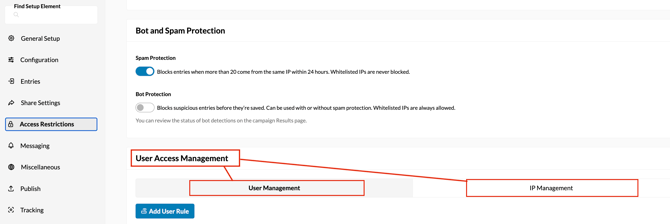
#### **1. User Management Tab**
To allow or block specific identities:
1. Select **Add User Rule** under **User Management**.
2. Under **Action**, select **Allow** or **Block**.
3. Under **Type**, choose **Email Address**, **Phone Number**, or **Domain**.
4. Enter the matching value and click **Confirm**.

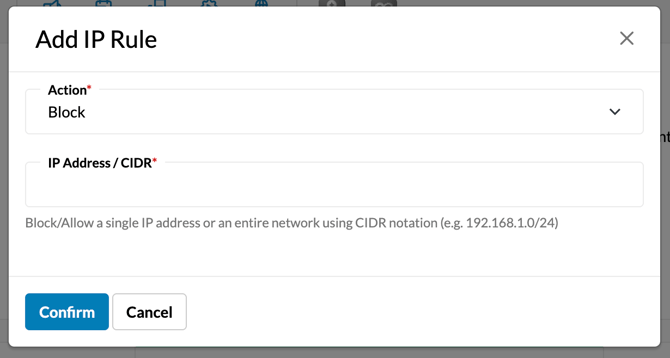
#### **2. IP Management Tab**
To control access by network location:
1. Select **Add IP Rule** under **IP Management**.
2. Choose **Allow** (Whitelist/Safelist) or **Block** (Blacklist).
3. Input either a single **IP Address** or an entire network block using **CIDR Notation** (e.g., 192.168.1.0/24).
4. Click **Confirm**. *Note: Whitelisted/Safelisted IPs bypass both Spam and Bot Protection checks completely.*
#### 
### **⏱️ Limit Fan Entries**
In the **Authentication** tab under **Limit Fan Entries**, enforce participation limits by:
- **Email Address**
- **User Browser Session**
**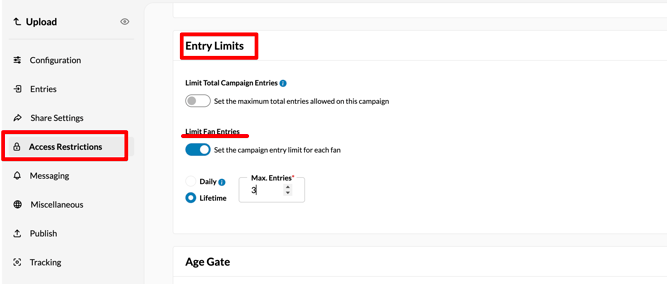**
Use these caps to restrict daily or lifetime entries per fan to match your official contest rules and discourage bot farming across sessions.
### **📋 Recommended Setup Matrix**
Here are the types of campaigns and scenarios along with different protection steps we would advise.
| **Campaign Type** | **Recommended Protection Setup** | **Key Action** |
| --- | --- | --- |
| **In-Venue Kiosk / Staff Device / Event QR** | No Protection (Level 0) | Whitelist venue/staff IPs if protection is needed. |
| **Public Link (Standard Lead Gen / Low-Value Prize)** | Spam Protection (Level 1) | Blocks rate-limit abusers with visible error screens. |
| **Public Link (High-Value Prize / Major Sponsor)** | Bot Protection (Level 2) or Level 1 + Level 2 | Quietly discards fraudulent submissions. |
### **🚀 Monitoring Strategy for Long-Running Campaigns**
For high-reward campaigns, use a two-phase rollout to optimize detection accuracy:
1. **Phase 1 (Cataloging):** Turn on **Spam Protection** early. The system begins cataloging suspicious background signatures across recent campaign history without blocking non-spam traffic.
2. **Phase 2 (Enforcement):** Switch on **Bot Protection**. The algorithm leverages the existing cataloged history to immediately flag and silently block suspicious entries.
### **📊 Reading Your Bot Status Report**
To audit campaign security, navigate to **Results \> Bot Status**. You can search by email, phone number, or partial match to inspect individual submission attempts.
| **Status** | **Meaning** | **Live in Campaign Results?** |
| --- | --- | --- |
| **✅ Good / Accepted** | Passed all checks. Legitimate entry. | **Yes** |
| **🚧 Questionable / Flagged** | Entry was allowed through, but triggered suspicious patterns. Flagged for secondary review. | **Yes** *(Review before drawing winners)* |
| **❌ Rejected / Blocked** | Stopped by Bot Protection. User saw a "Success" screen, but no activity was saved. | **No** |
*Note: If only Spam Protection is active, bot detections are cataloged and logged in the Bot Status report, but are not actively blocked.*
Combining automated protection with ongoing review helps keep your entries clean and your data reliable as your campaign runs. For broader account-level controls, or extra ways to shape who can enter your campaigns, check out [user moderation](https://resources.tradablebits.com/support/how-to-set-user-access-management?hsLang=en), [regional restrictions](https://resources.tradablebits.com/support/access-restrictions-how-do-i-set-regional-restrictions?hsLang=en), [age gates](https://resources.tradablebits.com/support/how-to-age-gate-a-campaign?hsLang=en), and [draft mode for campaigns](https://resources.tradablebits.com/support/draft-mode-campaign?hsLang=en).
**Still need assistance? Please reach out to your Customer Success Team or contact support@tradablebits.com**
- [Getting started](https://resources.tradablebits.com/support/getting-started?hsLang=en)
- [Account](https://resources.tradablebits.com/support/account?hsLang=en#main-content)
- [Account Admin](https://resources.tradablebits.com/support/account?hsLang=en#account-admin)
- [Security & Data Practices](https://resources.tradablebits.com/support/account?hsLang=en#security-data-practices)
- [Engagement Campaigns](https://resources.tradablebits.com/support/engagement-campaigns?hsLang=en#main-content)
- [Campaign Basics](https://resources.tradablebits.com/support/engagement-campaigns?hsLang=en#campaign-basics)
- [Campaign Setup & Configuration](https://resources.tradablebits.com/support/engagement-campaigns?hsLang=en#campaign-setup-configuration)
- [Campaign Styling & Design](https://resources.tradablebits.com/support/engagement-campaigns?hsLang=en#campaign-styling-design)
- [Lead Generation Campaigns](https://resources.tradablebits.com/support/engagement-campaigns?hsLang=en#lead-generation-campaigns)
- [User-Generated Content Campaigns](https://resources.tradablebits.com/support/engagement-campaigns?hsLang=en#user-generated-content-campaigns)
- [Music Campaigns](https://resources.tradablebits.com/support/engagement-campaigns?hsLang=en#music-campaigns)
- [Quiz Campaigns](https://resources.tradablebits.com/support/engagement-campaigns?hsLang=en#quiz-campaigns)
- [Events/Ticketing Campaigns](https://resources.tradablebits.com/support/engagement-campaigns?hsLang=en#events-ticketing-campaigns)
- [Game Campaigns](https://resources.tradablebits.com/support/engagement-campaigns?hsLang=en#game-campaigns)
- [Voting/Polling Campaigns](https://resources.tradablebits.com/support/engagement-campaigns?hsLang=en#voting-polling-campaigns)
- [Prize Giveaway Campaigns](https://resources.tradablebits.com/support/engagement-campaigns?hsLang=en#prize-giveaway-campaigns)
- [Incentivize Campaigns](https://resources.tradablebits.com/support/engagement-campaigns?hsLang=en#incentivize-campaigns)
- [Best Practices for Campaigns](https://resources.tradablebits.com/support/engagement-campaigns?hsLang=en#best-practices-for-campaigns)
- [Campaign Reporting](https://resources.tradablebits.com/support/engagement-campaigns?hsLang=en#campaign-reporting)
- [User-Generated Content (UGC)](https://resources.tradablebits.com/support/user-generated-content-ugc?hsLang=en)
- [Fan CRM](https://resources.tradablebits.com/support/fan-crm?hsLang=en#main-content)
- [Tags](https://resources.tradablebits.com/support/fan-crm?hsLang=en#tags)
- [Filters](https://resources.tradablebits.com/support/fan-crm?hsLang=en#filters)
- [Exports](https://resources.tradablebits.com/support/fan-crm?hsLang=en#exports)
- [Fan Profiles](https://resources.tradablebits.com/support/fan-crm?hsLang=en#fan-profiles)
- [Sales](https://resources.tradablebits.com/support/sales?hsLang=en#main-content)
- [Data Library](https://resources.tradablebits.com/support/sales?hsLang=en#data-library)
- [Trackers](https://resources.tradablebits.com/support/trackers?hsLang=en)
- [Idols](https://resources.tradablebits.com/support/idols?hsLang=en)
- [Integrations](https://resources.tradablebits.com/support/integrations?hsLang=en#main-content)
- [Outgoing Integrations](https://resources.tradablebits.com/support/integrations?hsLang=en#outgoing-integrations)
- [Incoming Integrations](https://resources.tradablebits.com/support/integrations?hsLang=en#incoming-integrations)
- [Salesforce Marketing Cloud](https://resources.tradablebits.com/support/integrations?hsLang=en#salesforce-marketing-cloud)
- [Ads](https://resources.tradablebits.com/support/ads?hsLang=en#main-content)
- [Meta (Facebook & Instagram)](https://resources.tradablebits.com/support/ads?hsLang=en#meta-facebook-instagram)
- [Google Ads](https://resources.tradablebits.com/support/ads?hsLang=en#google-ads)
- [Snapchat](https://resources.tradablebits.com/support/ads?hsLang=en#snapchat)
- [TikTok](https://resources.tradablebits.com/support/ads?hsLang=en#tiktok)
- [Spotify & Reddit](https://resources.tradablebits.com/support/ads?hsLang=en#spotify-reddit)
- [Messaging](https://resources.tradablebits.com/support/messaging?hsLang=en#main-content)
- [SMS](https://resources.tradablebits.com/support/messaging?hsLang=en#sms)
- [Email](https://resources.tradablebits.com/support/messaging?hsLang=en#email)
- [Push Notifications](https://resources.tradablebits.com/support/messaging?hsLang=en#push-notifications)
- [Instagram](https://resources.tradablebits.com/support/messaging?hsLang=en#instagram)
- [Automations](https://resources.tradablebits.com/support/messaging?hsLang=en#automations)
- [Custom Networks](https://resources.tradablebits.com/support/messaging?hsLang=en#custom-networks)
- [Octane](https://resources.tradablebits.com/support/octane?hsLang=en)
- [FAQs](https://resources.tradablebits.com/support/faqs?hsLang=en)
[](https://tradablebits.com/)
Copyright © 2026, Tradable Bits