![tradable-bits-long-logo-for-download.png]](https://resources.tradablebits.com/hs-fs/hubfs/tradable-bits-long-logo-for-download.png?height=40&name=tradable-bits-long-logo-for-download.png)
Who is Octavia?
Octavia is an AI-powered assistant built directly into the Tradable Bits platform. Designed as an on-demand resource for our partners, Octavia can instantly answer your questions, troubleshoot common issues, and help guide you through the platform.What Octavia can and can't do
While Octavia is highly knowledgeable about all things Tradable Bits, it has some limitations.
What it CAN do:
- Answer general and specific questions about creating and managing campaigns.
- Explain how different features work (e.g., Fan CRM, integrations, idols, trackers).
- Point you toward relevant best practices and knowledge base articles.
What it CAN'T do:
- Take action on your behalf: Octavia cannot do things like build a campaign for you, change your account settings, or export data, for example.
- Access specific account data: Currently, Octavia provides general platform guidance rather than diagnosing issues specific to your active campaigns or audience data.
Note: If you have a question and Octavia doesn't know the answer, or if you need a hand with something specific to your account, we have a fantastic support team here to help. Just ask Octavia to speak to an agent, or write to support@tradablebits.com for personalized assistance.
Best practices for helpful responses
Because Octavia is an AI agent, the quality of its answers can depend greatly on how you ask the question. Here are a few tips to get the most helpful responses:
- Be specific: Instead of asking "How do campaigns work?", try asking something like "How do I set up a Spin to Win campaign?"
- Use platform terminology: Try to use common Tradable Bits terms (like Fan CRM, Idols, or Engagement Campaigns) to help Octavia understand exactly what you are referring to.
- Keep it conversational: You can always ask follow-up questions if you need more clarification on Octavia's initial response.
Viewing your chat history
Need to look back at a previous conversation or review a solution Octavia gave earlier?
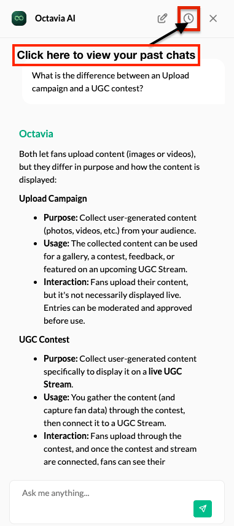
- Open the Octavia panel by clicking the icon at the top right of your screen.
- Click the Clock icon at the top of the chat window.
- Browse your past chat threads and select any conversation to re-open it, or scroll down to the green New Chat button to start a new conversation.
Examples of things you can ask Octavia
Not sure where to start? Try asking Octavia questions like:
- "What is the difference between an Upload campaign and a UGC contest?"
- "How do I change the status of a performance?"
- "How do I connect my Salesforce Marketing Cloud integration?"
- "Can you give me a summary of how probability-based prizing works?"
Why the switch? (Can we go back to the old chatbot?)
We are fully transitioning to Octavia and cannot switch back to the previous legacy chatbot.
Why? Octavia is designed to learn and grow! We know there may be a bit of a learning curve as Octavia gets up to speed, but the more you and your team use Octavia, the better it will understand how to help you use the Tradable Bits platform. We're also actively training Octavia and making improvements regularly.
How you can help us train Octavia
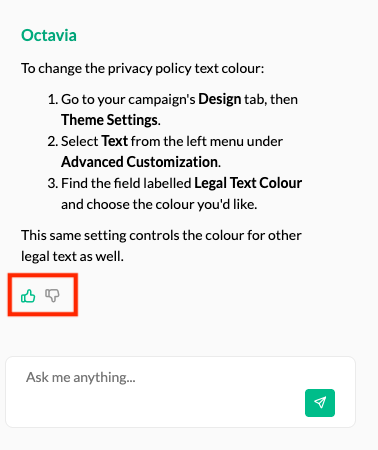
Octavia learns from your input! Whenever Octavia answers a question, you can rate the response. Click on the thumbs-up icon if the answer was helpful or correct, or choose thumbs-down if it missed the mark.
We'd love it if you left a quick note, too. After clicking a thumbs-up or thumbs-down icon, a prompt will appear where you can share a brief comment explaining what worked or what could be improved. Your feedback goes straight to our team so we can teach Octavia to provide better answers in the future.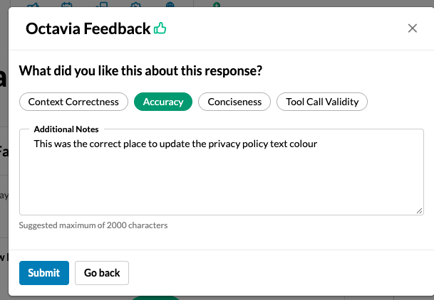
Remember, our support team is here to help whenever Octavia doesn't have the answer. Just ask to speak to an agent, or send us a note at support@tradablebits.com. Happy chatting!
Still need assistance? Please reach out to your Customer Success Team or contact support@tradablebits.com