---
title: How do I Create Meta Ad Templates?
description: This guide will get you started on creating Meta Ad templates.
---
[Skip to content](https://resources.tradablebits.com/support/meta-ads-templates#main-content)
English
Show submenu for translations
![tradable-bits-long-logo-for-download.png\]](https://resources.tradablebits.com/hs-fs/hubfs/tradable-bits-long-logo-for-download.png?height=40&name=tradable-bits-long-logo-for-download.png)
Open main navigation
Close main navigation
- English
Show submenu for translations
How can we help?
- There are no suggestions because the search field is empty.
1. [Resources](https://resources.tradablebits.com/support?hsLang=en)
2. [Ads](https://resources.tradablebits.com/support/ads?hsLang=en)
3. [Meta (Facebook & Instagram)](https://resources.tradablebits.com/support/ads?hsLang=en#meta-facebook-instagram)
# How do I Create Meta Ad Templates?
## This guide will get you started on creating Meta Ad templates.
*Working Twice As Hard With Half The Resources.*
You'll hear us say that above statement over and over again. We're huge proponents of the old adage that it's about working smart, not hard. And the Templates tool helps with exactly that.
Templates help make the creation of Meta Ads exponentially faster.
### Creating Templates
Follow the steps outlined below to create your templates.
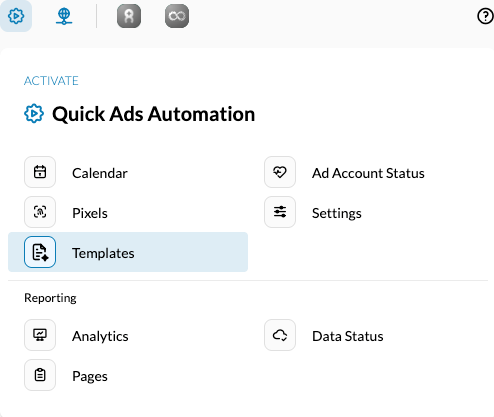
1. In the **Tradable Bits Homepage,** hover over the **Quick** **Ads Automation** section in the **Top Navigation Bar** and click **Templates**.
****
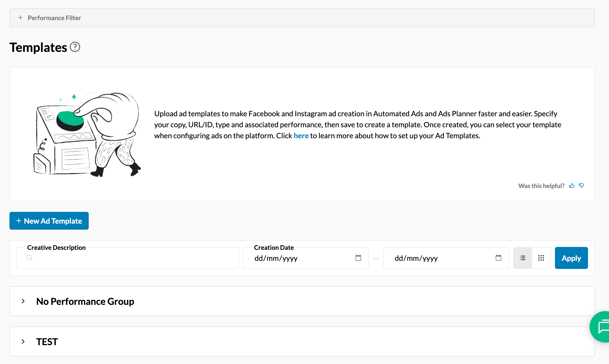
2. Click "New Ad Template"
3. Fill in the following fields on the page that opens up
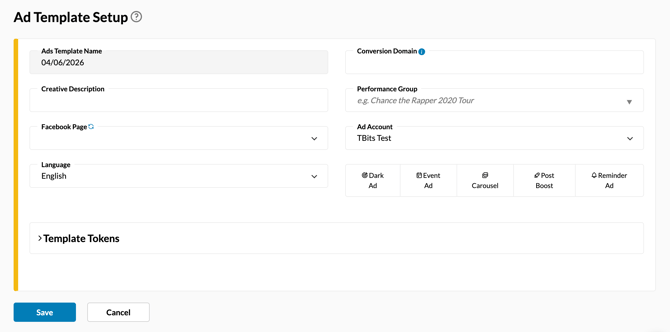
- **Creative Description:** The internal description of the ads template
- **Performance Group:** Name of the larger advertising group that this particular asset belongs to
- **Facebook Page:** The Facebook Page that will be running the ads
- **Ad Account:** The Business Manager Account that will be running the ads
- **Language:** Language that the ad will run in
#### Ad-Type Specific Configurations
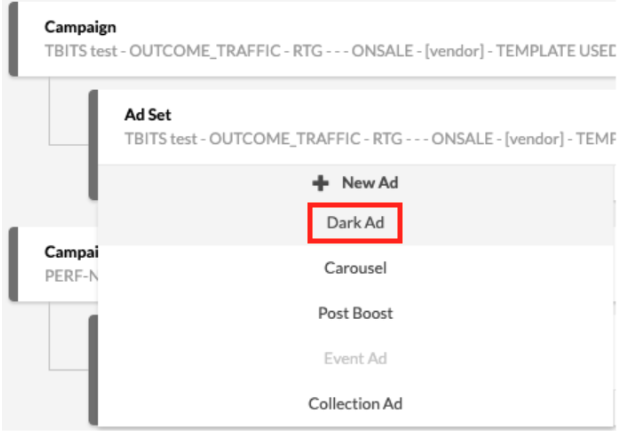
### *Dark Ad*
- **Call to Action**: The prompt associated with the Ad
- **URL**: The page that you would like fans to be driven to
- **Ad Body**: The text body associated with the Ad. You can use "tokens" here to replace certain placeholders with Artist Names, Venue Names, Cities etc. Expand the "Template Token" section to see the various tokens that you can use and the placeholders that need to be added to the Ad Body for the same.
- **Headline & Link Description**: The headline and description associated with the link to be displayed as part of the Ad.
- **Media:** Add the Images/Videos that you would like to use for the ads. For different placement types, click on "Add Media by Placement" and choose the Placement type. All ads will need to have the "Default" placement type set up as the first image/video.
### *Event Ad*
- **Ad Body:** The text body associated with the Ad. You can use "tokens" here to replace certain placeholders with Artist Names, Venue Names, Cities etc. Expand the "Template Token" section to see the various tokens that you can use and the placeholders that need to be added to the Ad Body for the same.
- **Event ID:** When you create an event on Meta, your event is given an event ID. The Event ID is a string of numbers at the end of a Meta event’s URL.
- **URL**: The page that you would like fans to be driven to
- **Media:** Add the Images/Videos that you would like to use for the ads.
### *Carousel Ad*
- **Primary Text**: The text body associated with the Ad. You can use "tokens" here to replace certain placeholders with Artist Names, Venue Names, Cities etc. Expand the "Template Token" section to see the various tokens that you can use and the placeholders that need to be added to the Ad Body for the same.
- **Call to Action**: The prompt associated with the Ad
- **URL**: The page that you would like fans to be driven to. You will see a "Fill Down" option next to this field. Clicking this would automatically set this URL to be the URL that each Card in the Carousel Ad refers to.
- **Display URL**: The URL to be displayed as part of the ad.
- **Add Page Profile Picture Card**: If this toggle is enabled, a card is added to the end of the Carousel with your Page's profile picture.
- **Best Performing Card First**: If this toggle is enabled, the cards that lead to the most amount of conversions are prioritized and displayed first.
- **Cards**
- Media: Add the Images/Videos that you would like to use for the ads.
- Card URL: The URL associated with the specific card.
- Link Headline & Description: The headline and description associated with the link to be displayed as part of the card.
- Arrows: Click the arrows to shuffle the order of the cards.
- Copy: Click the copy icon in case you would like to use the cards again. Click the "Paste Card" button after you've copied a card.
- Delete: Click the delete icon to delete a card from the carousel.
- Add Card: Click the "Add Card" button to add a new card to the carousel.
### *Post Boost*
- **Meta Post ID**: Choose any post made from your Facebook Page from the Dropdown to promote.
### *Reminder Ad*
- **Call to Action**: The prompt associated with the Ad
- **URL**: The page that you would like fans to be driven to
- **Ad Body**: The text body associated with the Ad. You can use "tokens" here to replace certain placeholders with Artist Names, Venue Names, Cities, etc. Expand the "Template Token" section to see the various tokens that you can use and the placeholders that need to be added to the Ad Body for the same.
For your associated "Event," you have two options to configure it:
- **Option One: New Event**
- **Event Name:** name of your event
- **Start & End Date Time:** This is where you will set the period when you would like your event to occur.
- **Timezone:** The timezone that you would like considered for the aforementioned Start Date/Time & End Date/Time. The Default Timezone of the platform is PST.
- **Option Two: Select Event**
- If your page linked above in the template setup has events already configured in Meta, you can select from those events.
- **Media:** Add the Images/Videos that you would like to use for the ads. For different placement types, click on "Add Media by Placement" and choose the Placement type. All ads will need to have the "Default" placement type set up as the first image/video.
**Still need assistance? Please reach out to your Customer Success Team or contact [support@tradablebits.com](mailto:support@tradablebits.com)**
- [Getting started](https://resources.tradablebits.com/support/getting-started?hsLang=en)
- [Account](https://resources.tradablebits.com/support/account?hsLang=en#main-content)
- [Account Admin](https://resources.tradablebits.com/support/account?hsLang=en#account-admin)
- [Security & Data Practices](https://resources.tradablebits.com/support/account?hsLang=en#security-data-practices)
- [Engagement Campaigns](https://resources.tradablebits.com/support/engagement-campaigns?hsLang=en#main-content)
- [Campaign Basics](https://resources.tradablebits.com/support/engagement-campaigns?hsLang=en#campaign-basics)
- [Campaign Setup & Configuration](https://resources.tradablebits.com/support/engagement-campaigns?hsLang=en#campaign-setup-configuration)
- [Campaign Styling & Design](https://resources.tradablebits.com/support/engagement-campaigns?hsLang=en#campaign-styling-design)
- [Lead Generation Campaigns](https://resources.tradablebits.com/support/engagement-campaigns?hsLang=en#lead-generation-campaigns)
- [User-Generated Content Campaigns](https://resources.tradablebits.com/support/engagement-campaigns?hsLang=en#user-generated-content-campaigns)
- [Music Campaigns](https://resources.tradablebits.com/support/engagement-campaigns?hsLang=en#music-campaigns)
- [Quiz Campaigns](https://resources.tradablebits.com/support/engagement-campaigns?hsLang=en#quiz-campaigns)
- [Events/Ticketing Campaigns](https://resources.tradablebits.com/support/engagement-campaigns?hsLang=en#events-ticketing-campaigns)
- [Game Campaigns](https://resources.tradablebits.com/support/engagement-campaigns?hsLang=en#game-campaigns)
- [Voting/Polling Campaigns](https://resources.tradablebits.com/support/engagement-campaigns?hsLang=en#voting-polling-campaigns)
- [Prize Giveaway Campaigns](https://resources.tradablebits.com/support/engagement-campaigns?hsLang=en#prize-giveaway-campaigns)
- [Incentivize Campaigns](https://resources.tradablebits.com/support/engagement-campaigns?hsLang=en#incentivize-campaigns)
- [Best Practices for Campaigns](https://resources.tradablebits.com/support/engagement-campaigns?hsLang=en#best-practices-for-campaigns)
- [Campaign Reporting](https://resources.tradablebits.com/support/engagement-campaigns?hsLang=en#campaign-reporting)
- [User-Generated Content (UGC)](https://resources.tradablebits.com/support/user-generated-content-ugc?hsLang=en)
- [Fan CRM](https://resources.tradablebits.com/support/fan-crm?hsLang=en#main-content)
- [Tags](https://resources.tradablebits.com/support/fan-crm?hsLang=en#tags)
- [Filters](https://resources.tradablebits.com/support/fan-crm?hsLang=en#filters)
- [Exports](https://resources.tradablebits.com/support/fan-crm?hsLang=en#exports)
- [Fan Profiles](https://resources.tradablebits.com/support/fan-crm?hsLang=en#fan-profiles)
- [Sales](https://resources.tradablebits.com/support/sales?hsLang=en#main-content)
- [Data Library](https://resources.tradablebits.com/support/sales?hsLang=en#data-library)
- [Trackers](https://resources.tradablebits.com/support/trackers?hsLang=en)
- [Idols](https://resources.tradablebits.com/support/idols?hsLang=en)
- [Integrations](https://resources.tradablebits.com/support/integrations?hsLang=en#main-content)
- [Outgoing Integrations](https://resources.tradablebits.com/support/integrations?hsLang=en#outgoing-integrations)
- [Incoming Integrations](https://resources.tradablebits.com/support/integrations?hsLang=en#incoming-integrations)
- [Salesforce Marketing Cloud](https://resources.tradablebits.com/support/integrations?hsLang=en#salesforce-marketing-cloud)
- [Ads](https://resources.tradablebits.com/support/ads?hsLang=en#main-content)
- [Meta (Facebook & Instagram)](https://resources.tradablebits.com/support/ads?hsLang=en#meta-facebook-instagram)
- [Google Ads](https://resources.tradablebits.com/support/ads?hsLang=en#google-ads)
- [Snapchat](https://resources.tradablebits.com/support/ads?hsLang=en#snapchat)
- [TikTok](https://resources.tradablebits.com/support/ads?hsLang=en#tiktok)
- [Spotify & Reddit](https://resources.tradablebits.com/support/ads?hsLang=en#spotify-reddit)
- [Messaging](https://resources.tradablebits.com/support/messaging?hsLang=en#main-content)
- [SMS](https://resources.tradablebits.com/support/messaging?hsLang=en#sms)
- [Email](https://resources.tradablebits.com/support/messaging?hsLang=en#email)
- [Push Notifications](https://resources.tradablebits.com/support/messaging?hsLang=en#push-notifications)
- [Instagram](https://resources.tradablebits.com/support/messaging?hsLang=en#instagram)
- [Automations](https://resources.tradablebits.com/support/messaging?hsLang=en#automations)
- [Custom Networks](https://resources.tradablebits.com/support/messaging?hsLang=en#custom-networks)
- [Octane](https://resources.tradablebits.com/support/octane?hsLang=en)
- [FAQs](https://resources.tradablebits.com/support/faqs?hsLang=en)
[](https://tradablebits.com/)
Copyright © 2026, Tradable Bits