---
title: How do I manually import fans into my Fan CRM?
description: A quick guide on how to upload your existing lists or a single fan into the Fan CRM.
---
[Skip to content](https://resources.tradablebits.com/support/manually-import-fans-into-fancrm#main-content)
English
Show submenu for translations
![tradable-bits-long-logo-for-download.png\]](https://resources.tradablebits.com/hs-fs/hubfs/tradable-bits-long-logo-for-download.png?height=40&name=tradable-bits-long-logo-for-download.png)
Open main navigation
Close main navigation
- English
Show submenu for translations
How can we help?
- There are no suggestions because the search field is empty.
1. [Resources](https://resources.tradablebits.com/support?hsLang=en)
2. [Fan CRM](https://resources.tradablebits.com/support/fan-crm?hsLang=en)
# How do I manually import fans into my Fan CRM?
## A quick guide on how to upload your existing lists or a single fan into the Fan CRM.
While most of the data in your Fan CRM will be generated through engagement campaigns or automated sales integrations, the Tradable Bits system also facilitates the ability to manually import any data that you have on hand. This could be either ticketing data from your previous shows or past merch sales or data that you physically collected at your venue.
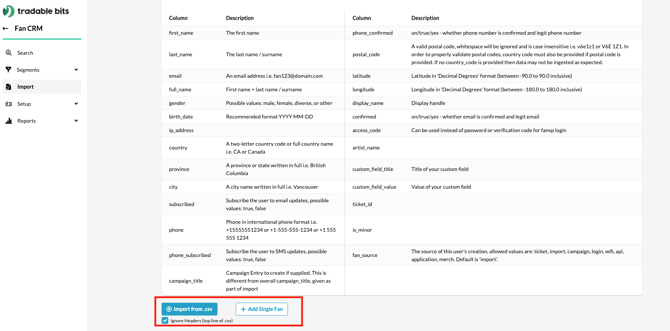
This can be done with the Import section in your Fan CRM. Go to the top bar navigation and find Fan CRM and click on +Import.
Once in the section, you can either upload a list of fans or a single fan.
#### 
#### **Uploading a List of Fans**
In order to upload a list of fans, click on "Import .csv" and upload a CSV file with the necessary data. If your CSV contains a header in the first row, click on the checkbox next to "Ignore Headers (top line of spreadsheet)".
The following are the columns that are supported.
| **Column Name** | **Description** |
| --- | --- |
| first\_name | First Name |
| last\_name | Last Name |
| email | Email of the Fan |
| full\_name | Full Name of the fan (First Name + Last Name) |
| gender | Gender of the fan (Allowed values: male/female) |
| birth\_date | Birth Date (Recommended format YYYY-MM-DD) |
| ip\_address | IP Address of the fan's device |
| country | Country (Can either be a two-letter code or the full country name) |
| province | Province/State (Recommend this be written in full and not in code) |
| city | City (Recommend this be written in full and not in code) |
| subscribed | Whether the fan is subscribed to your email updates (True/Yes) |
| phone | Phone Number of the fan with area codes (no dashes or spaces) |
| phone\_subscribed | Whether the fan is subscribed to SMS updates (True/Yes) |
| postal\_code | Postal Code of the fan (no dashes or spaces) |
| latitude | Latitude corresponding to fan's location |
| longitude | Longitude corresponding to fan's location |
| display\_name | Name to be used as the "Display Name" for the fan in FanXP |
| confirmed | Whether the email has been confirmed to be legitimate (On/True/Yes) |
| access\_code | A code that can be used in place of password or verification for FanXP login |
| add\_phone | An additional phone number for the fan |
After importing the file, you will be asked to allocate your data against pre-defined fields.
#### **Adding a Single Fan**

To add a single fan, click on "+Add Single Fan" and then fill the following fields in the modal that pops up.
- First Name
- Last Name
- Email
- Phone Number
- Country (select from the dropdown)
- Access Code (A code that can be used in place of password or verification for FanXP login)
- Idol Affinity
- Fan Source (Method for tracking how fans entered your database)
**Click "Save" once the necessary fields have been filled**
**Still need assistance? Please reach out to your Customer Success Team or contact** [**support@tradablebits.com**](mailto:support@tradablebits.com)
- [Getting started](https://resources.tradablebits.com/support/getting-started?hsLang=en)
- [Account](https://resources.tradablebits.com/support/account?hsLang=en#main-content)
- [Account Admin](https://resources.tradablebits.com/support/account?hsLang=en#account-admin)
- [Security & Data Practices](https://resources.tradablebits.com/support/account?hsLang=en#security-data-practices)
- [Engagement Campaigns](https://resources.tradablebits.com/support/engagement-campaigns?hsLang=en#main-content)
- [Campaign Basics](https://resources.tradablebits.com/support/engagement-campaigns?hsLang=en#campaign-basics)
- [Campaign Setup & Configuration](https://resources.tradablebits.com/support/engagement-campaigns?hsLang=en#campaign-setup-configuration)
- [Campaign Styling & Design](https://resources.tradablebits.com/support/engagement-campaigns?hsLang=en#campaign-styling-design)
- [Lead Generation Campaigns](https://resources.tradablebits.com/support/engagement-campaigns?hsLang=en#lead-generation-campaigns)
- [User-Generated Content Campaigns](https://resources.tradablebits.com/support/engagement-campaigns?hsLang=en#user-generated-content-campaigns)
- [Music Campaigns](https://resources.tradablebits.com/support/engagement-campaigns?hsLang=en#music-campaigns)
- [Quiz Campaigns](https://resources.tradablebits.com/support/engagement-campaigns?hsLang=en#quiz-campaigns)
- [Events/Ticketing Campaigns](https://resources.tradablebits.com/support/engagement-campaigns?hsLang=en#events-ticketing-campaigns)
- [Game Campaigns](https://resources.tradablebits.com/support/engagement-campaigns?hsLang=en#game-campaigns)
- [Voting/Polling Campaigns](https://resources.tradablebits.com/support/engagement-campaigns?hsLang=en#voting-polling-campaigns)
- [Prize Giveaway Campaigns](https://resources.tradablebits.com/support/engagement-campaigns?hsLang=en#prize-giveaway-campaigns)
- [Incentivize Campaigns](https://resources.tradablebits.com/support/engagement-campaigns?hsLang=en#incentivize-campaigns)
- [Best Practices for Campaigns](https://resources.tradablebits.com/support/engagement-campaigns?hsLang=en#best-practices-for-campaigns)
- [Campaign Reporting](https://resources.tradablebits.com/support/engagement-campaigns?hsLang=en#campaign-reporting)
- [User-Generated Content (UGC)](https://resources.tradablebits.com/support/user-generated-content-ugc?hsLang=en)
- [Fan CRM](https://resources.tradablebits.com/support/fan-crm?hsLang=en#main-content)
- [Tags](https://resources.tradablebits.com/support/fan-crm?hsLang=en#tags)
- [Filters](https://resources.tradablebits.com/support/fan-crm?hsLang=en#filters)
- [Exports](https://resources.tradablebits.com/support/fan-crm?hsLang=en#exports)
- [Fan Profiles](https://resources.tradablebits.com/support/fan-crm?hsLang=en#fan-profiles)
- [Sales](https://resources.tradablebits.com/support/sales?hsLang=en#main-content)
- [Data Library](https://resources.tradablebits.com/support/sales?hsLang=en#data-library)
- [Trackers](https://resources.tradablebits.com/support/trackers?hsLang=en)
- [Idols](https://resources.tradablebits.com/support/idols?hsLang=en)
- [Integrations](https://resources.tradablebits.com/support/integrations?hsLang=en#main-content)
- [Outgoing Integrations](https://resources.tradablebits.com/support/integrations?hsLang=en#outgoing-integrations)
- [Incoming Integrations](https://resources.tradablebits.com/support/integrations?hsLang=en#incoming-integrations)
- [Salesforce Marketing Cloud](https://resources.tradablebits.com/support/integrations?hsLang=en#salesforce-marketing-cloud)
- [Ads](https://resources.tradablebits.com/support/ads?hsLang=en#main-content)
- [Meta (Facebook & Instagram)](https://resources.tradablebits.com/support/ads?hsLang=en#meta-facebook-instagram)
- [Google Ads](https://resources.tradablebits.com/support/ads?hsLang=en#google-ads)
- [Snapchat](https://resources.tradablebits.com/support/ads?hsLang=en#snapchat)
- [TikTok](https://resources.tradablebits.com/support/ads?hsLang=en#tiktok)
- [Spotify & Reddit](https://resources.tradablebits.com/support/ads?hsLang=en#spotify-reddit)
- [Messaging](https://resources.tradablebits.com/support/messaging?hsLang=en#main-content)
- [SMS](https://resources.tradablebits.com/support/messaging?hsLang=en#sms)
- [Email](https://resources.tradablebits.com/support/messaging?hsLang=en#email)
- [Push Notifications](https://resources.tradablebits.com/support/messaging?hsLang=en#push-notifications)
- [Instagram](https://resources.tradablebits.com/support/messaging?hsLang=en#instagram)
- [Automations](https://resources.tradablebits.com/support/messaging?hsLang=en#automations)
- [Custom Networks](https://resources.tradablebits.com/support/messaging?hsLang=en#custom-networks)
- [Octane](https://resources.tradablebits.com/support/octane?hsLang=en)
- [FAQs](https://resources.tradablebits.com/support/faqs?hsLang=en)
[](https://tradablebits.com/)
Copyright © 2026, Tradable Bits