---
title: How do I set up a Jersey Generator campaign?
description: Here's a quick guide on how to set up your jersey generator campaign.
---
[Skip to content](https://resources.tradablebits.com/support/jersey-generator#main-content)
English
Show submenu for translations
![tradable-bits-long-logo-for-download.png\]](https://resources.tradablebits.com/hs-fs/hubfs/tradable-bits-long-logo-for-download.png?height=40&name=tradable-bits-long-logo-for-download.png)
Open main navigation
Close main navigation
- English
Show submenu for translations
How can we help?
- There are no suggestions because the search field is empty.
1. [Resources](https://resources.tradablebits.com/support?hsLang=en)
2. [Engagement Campaigns](https://resources.tradablebits.com/support/engagement-campaigns?hsLang=en)
3. [Creating Campaigns](https://resources.tradablebits.com/support/engagement-campaigns?hsLang=en#creating-campaigns)
# How do I set up a Jersey Generator campaign?
## Here's a quick guide on how to set up your jersey generator campaign.
Jersey Generator campaigns give fans the tools to create their own branded gear!
Fans can edit and personalise branded jersey templates by inputting custom display text, such as their last name and favourite jersey number. This user-generated content strengthens brand engagement and builds team pride.
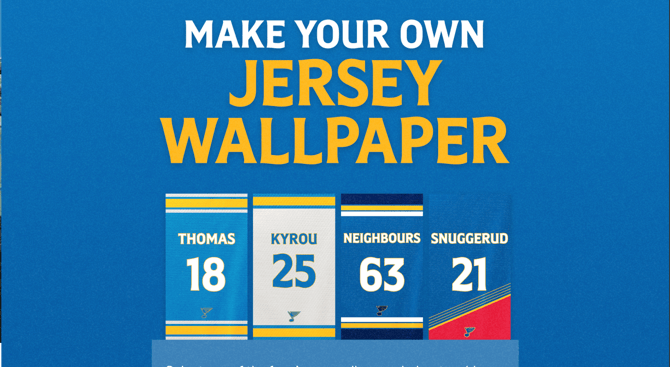
**We're outlining some campaign-specific details below. Follow [this guide](https://resources.tradablebits.com/support/getting-started-with-campaigns?hsLang=en) for more info on General Setup and other campaign basics.**
### **Configuration**
In the Configuration section, you can adjust the following settings:
- **Logo**: Upload a logo image to be shown in a white block underneath the jersey.
- **Custom Font:** Choose a font for the jersey text.
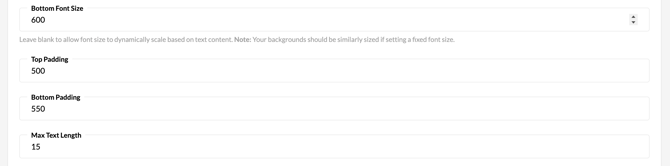
- **Top Font Size:** Input the desired size for the text at the top of the jersey. Alternatively, leave this field blank to allow the font size to dynamically scale based on the text content.
- **Bottom Font Size:** Input the desired size for the text at the bottom of the jersey. Alternatively, leave this field blank to allow the font size to dynamically scale based on the text content.
**Note:** Your backgrounds should be similarly sized if setting a fixed font size.
- **Top Padding:** Distance (px) from the top of the jersey to the top text.
- **Bottom Padding:** Distance (px) from the bottom of the jersey to the bottom text.
- **Max Text Length:** Maximum number of characters allowed in one text line.
- **Invalid Words:** Enter words you would like to censor. Input one word per line.
- **Default Text Top Colour:** Select the default text colour for the top text displayed on the jersey.
- **Default Text Bottom Colour:** Select the default text colour for the top text displayed on the jersey.
- **Default Outline Top Colour:** Select the default outline colour for the top text displayed on the jersey.
- **Default Outline Bottom Colour:** Select the default outline colour for the top text displayed on the jersey.
- **Disable Fan Colour Selection:** Fans must use the default text colours you have selected.
- **Send Jersey via email:** Allow fans to email themselves an image of their personalised jersey.
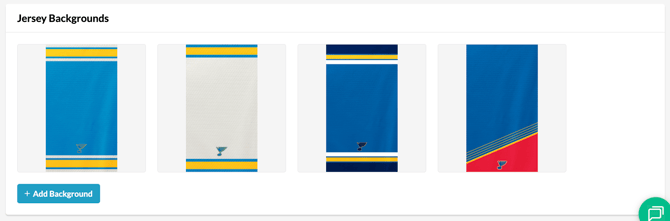
#### **Jersey Backgrounds**
- **Add Background:** Upload at least one jersey background for fans to choose from.
**Before publishing your campaign, be sure to review our[Campaign Publishing Checklist](https://resources.tradablebits.com/support/campaign-publishing-checklist?hsLang=en)for a smooth launch.**
**Still need assistance? Please reach out to your Customer Success Team or contact** [**support@tradablebits.com**](mailto:support@tradablebits.com)
- [Getting started](https://resources.tradablebits.com/support/getting-started?hsLang=en)
- [Account](https://resources.tradablebits.com/support/account?hsLang=en#main-content)
- [Security](https://resources.tradablebits.com/support/account?hsLang=en#security)
- [Engagement Campaigns](https://resources.tradablebits.com/support/engagement-campaigns?hsLang=en#main-content)
- [Campaign Basics](https://resources.tradablebits.com/support/engagement-campaigns?hsLang=en#campaign-basics)
- [Campaign Management](https://resources.tradablebits.com/support/engagement-campaigns?hsLang=en#campaign-management)
- [Creating Campaigns](https://resources.tradablebits.com/support/engagement-campaigns?hsLang=en#creating-campaigns)
- [Best Practices and Troubleshooting](https://resources.tradablebits.com/support/engagement-campaigns?hsLang=en#best-practices-and-troubleshooting)
- [Fan CRM](https://resources.tradablebits.com/support/fan-crm?hsLang=en)
- [UGC](https://resources.tradablebits.com/support/ugc?hsLang=en)
- [Sales](https://resources.tradablebits.com/support/sales?hsLang=en)
- [Trackers](https://resources.tradablebits.com/support/trackers?hsLang=en)
- [Idols](https://resources.tradablebits.com/support/idols?hsLang=en)
- [Integrations](https://resources.tradablebits.com/support/integrations?hsLang=en#main-content)
- [Outgoing Integrations](https://resources.tradablebits.com/support/integrations?hsLang=en#outgoing-integrations)
- [Incoming Integrations](https://resources.tradablebits.com/support/integrations?hsLang=en#incoming-integrations)
- [Salesforce Marketing Cloud](https://resources.tradablebits.com/support/integrations?hsLang=en#salesforce-marketing-cloud)
- [Ads](https://resources.tradablebits.com/support/ads?hsLang=en)
- [Messaging](https://resources.tradablebits.com/support/messaging?hsLang=en#main-content)
- [SMS](https://resources.tradablebits.com/support/messaging?hsLang=en#sms)
- [Email](https://resources.tradablebits.com/support/messaging?hsLang=en#email)
- [Push Notifications](https://resources.tradablebits.com/support/messaging?hsLang=en#push-notifications)
- [Instagram](https://resources.tradablebits.com/support/messaging?hsLang=en#instagram)
- [Octane](https://resources.tradablebits.com/support/octane?hsLang=en)
- [FAQs](https://resources.tradablebits.com/support/faqs?hsLang=en)
- [Troubleshooting](https://resources.tradablebits.com/support/troubleshooting?hsLang=en#main-content)
- [CSS/JS](https://resources.tradablebits.com/support/troubleshooting?hsLang=en#css-js)
- [Reports](https://resources.tradablebits.com/support/reports?hsLang=en)
- [Product Updates](https://resources.tradablebits.com/support/product-updates?hsLang=en)
[](https://tradablebits.com/)
Copyright © 2026, Tradable Bits