![tradable-bits-long-logo-for-download.png]](https://resources.tradablebits.com/hs-fs/hubfs/tradable-bits-long-logo-for-download.png?height=40&name=tradable-bits-long-logo-for-download.png)
TL;DR
Instagram DM lets you distribute Tradable Bits campaigns (or any other weblink) through Instagram direct messages. Here’s how it works:
- You prompt fans to reply to your Instagram story with a specific trigger word in exchange for exclusive content, links, and access to waitlists/contests/etc. OR you have a promotion running that prompts fans to Instagram DM you with a specific trigger word.
- This trigger word kicks off an automation that sends the fan a DM with a link to the promised content.
How Instagram DM helps your Marketing Team
Instagram DM enables easy and direct fan engagement via Instagram stories that expand your reach, while “getting fans off of social” and into your audience lists/owned database.
How to access Instagram DMs
- Log in to your Tradable Bits account and go to Messaging
- Click on Instagram > Campaigns

- You will see two main tabs, IG Connected Businesses and Non IG Connected Businesses. Both tabs refer to the businesses you’ve set up within Tradable Bits.
-
IG Connected Business refers to your Tradable Bits Businesses connected directly to an Instagram Business Account. You must connect a Tradable Bits business to an Instagram Account to use this feature
-
Non-IG Connected Business refers to Tradable Bits businesses that do not have any connection to Instagram. You can “re-authenticate” these businesses to connect them to an Instagram Account

How to connect a new IG Connected Business for Instagram DMs:
- Click on the Connect a new business button
- Click on Add through a Facebook Page and either authenticate through your own Facebook account (if you are a page manager) or through a Facebook Access Token, or you can add a non-Meta business. Make sure that the Instagram account you wish to use is connected to your Meta Business account.

Important: For the connection to be approved by Meta, the user who authenticates their Facebook Account needs to have the proper access level. This means control of the Facebook Page and control of the specific Instagram account.
Before proceeding, there are two things to check:
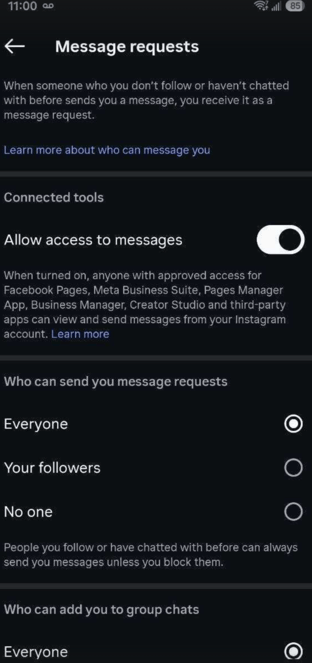
1. Does the Instagram account have "allow access to messages" enabled in the Instagram app?
To manage your Instagram messages connections, take these steps:
-
Go to your profile in the Instagram app and tap the hamburger menu (three stacked horizontal lines) in the top right.
-
Select Messages and story replies
-
Below Connected tools, you must toggle on Allow access to messages
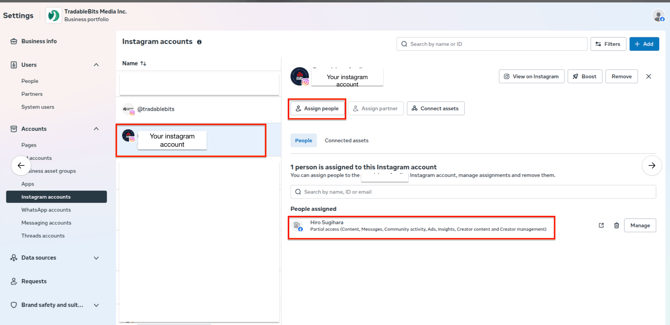
2. Does the authorized user have access to the Instagram account?
You may need to manually assign this person to the Instagram page in your Meta Business Suite from Business Info > Accounts > Instagram accounts as shown below.
Once you've checked that both of these are configured correctly with Instagram and Meta, you're ready to proceed!
How to set up your first Instagram DM Campaign:
Once you have a connected Instagram Page, you can build out different Instagram DM campaigns. Here’s what you have to do:
- Click on + New Campaign

- Fill out all required fields including:
- Trigger Word(s)= the phrase/word your fans to DM you to trigger an automated response. This is the most important part. We recommend keeping your trigger word simple, so you can embed it in your story without it sounding unnatural. For example, if your trigger word is TBits your story might say “Reply with TBits for a chance to win a free dinner with the team”
Note: The trigger word is NOT case-sensitive
- Response Body Copy = the DM reply that fans receive (i.e. your auto-response to fans)
- Engagement Campaign = A direct link to a Tradable Bits Engagement Campaign. These will likely be campaigns like waitlists, SMS sign-up forms, or campaigns that promote exclusive content like Download, Tunelink etc.
- URL (Optional) = If you’d prefer to drive fans to a hidden landing page, or other URL, use this option

Instagram DM Stats: How to report on Success
What metrics should you track for Instagram DM?
Here are some common success metrics we see partners tracking:
- Click-through rate (i.e. the percentage of fans receiving an auto-reply who clicked the link included in the campaign)
- Engagement rate increase (i.e. the increase in the number of fans engaging with your Instagram stories compared to your benchmarks)
- Traffic to dedicated campaign links from Instagram DM (i.e. channel performance)
- Qualitative (fan feedback)
And that's how you set up your first Instagram DM campaign!
If you have any further questions, please reach out to your Customer Success team or contact support@tradablebits.com.