---
title: How do I interpret SMS Stats?
description: This guide will help you measure and understand the results of your SMS campaigns.
---
[Skip to content](https://resources.tradablebits.com/support/how-to-interpret-sms-planner-stats#main-content)
English
Show submenu for translations
![tradable-bits-long-logo-for-download.png\]](https://resources.tradablebits.com/hs-fs/hubfs/tradable-bits-long-logo-for-download.png?height=40&name=tradable-bits-long-logo-for-download.png)
Open main navigation
Close main navigation
- English
Show submenu for translations
How can we help?
- There are no suggestions because the search field is empty.
1. [Resources](https://resources.tradablebits.com/support?hsLang=en)
2. [Messaging](https://resources.tradablebits.com/support/messaging?hsLang=en)
3. [SMS](https://resources.tradablebits.com/support/messaging?hsLang=en#sms)
# How do I interpret SMS Stats?
## This guide will help you measure and understand the results of your SMS campaigns.
***Analyze the performance of your SMS campaigns***
This section is where you can dive into the successes of your SMS campaign, and drill down on your KPIs to share with internal and external stakeholders.
On your **Tradable Bits Homepage**, using the **Top Navigation Bar**, hover over the **Messaging Icon** and from the dropdown select **Campaigns**.
### Section 1: Fill out the required search fields
To start, you will need to fill out the following:
**1.** The campaign name you wish to analyze (optional, but recommended)
**2.** The time period of the campaign (required)
**3.** The audience you were targeting (optional)
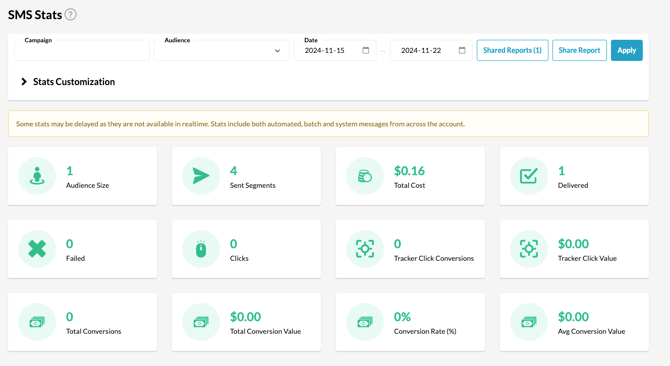
You can drill down on your SMS stats based on the audience you have been targeting over multiple campaigns by filling out the audience field, or you can drill down to campaign-specific stats using the campaign field. Once you’ve filled out what you would like to analyze, click “apply”.
### Section 2: Read your Stats
Once you’ve applied your search, you will see 3 distinct sections for analysis:
#### Summary/Overview of most relevant KPI’s:
This section will give you a quick hit of the success of your SMS campaign. You will be able to track:
- Messages Sent
- Fan Replies to your Messages
- How many STOP Messages you received from fans
- How many fans clicked on your URL
- How many unique clicks you had on your URL
- Total cost of your campaign (including outbound, inbound and auto-replies)
- The number of conversions on your campaign
- The conversion amount in CAD
- How many fans were accurately matched to clicks (i.e. matching individual fan profiles to their conversion action)
#### Campaign ROI Graph
This Graph gives you a quick overview of your ROI on the SMS campaign and allows you to visually see the value of your ROI. Hovering over the circle on the graph, you will be able to drill down on your specific ROI, audience reached and conversion amount
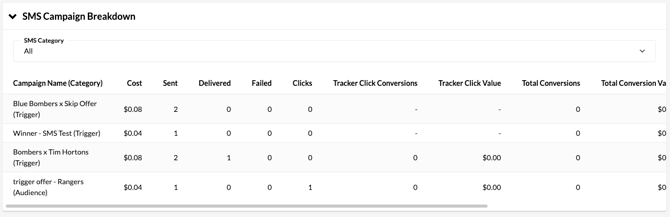
#### SMS Campaign Breakdown
This table is your “drill-down” table. See the performance of your campaign on a day-to-day basis over the period you outlined in your search field in part 1.
#### 
#### Per Day Breakdown
Get even more granular with your campaign stats summaries by tracking per day. 
### Section 3: Share Your Report
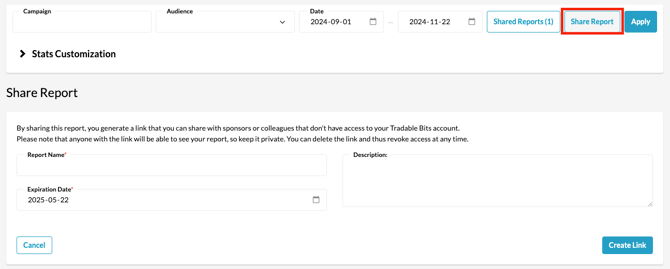
Once you have defined an analysis that you would like to share externally, you can do so with a simple link. This link can be deleted at any time, therefore you can revoke access at any time. To generate a shareable report scroll to the top of the SMS Stats page and hit **Share Report**. You will need to:
1. Define Report Name
2. Give a general description for context
3. Set a date for the link to expire
4. Hit **Create Link**
**If you have any more questions, please reach out to your Customer Success team or contact support@tradablebits.com**
- [Getting started](https://resources.tradablebits.com/support/getting-started?hsLang=en)
- [Account](https://resources.tradablebits.com/support/account?hsLang=en#main-content)
- [Account Admin](https://resources.tradablebits.com/support/account?hsLang=en#account-admin)
- [Security & Data Practices](https://resources.tradablebits.com/support/account?hsLang=en#security-data-practices)
- [Engagement Campaigns](https://resources.tradablebits.com/support/engagement-campaigns?hsLang=en#main-content)
- [Campaign Basics](https://resources.tradablebits.com/support/engagement-campaigns?hsLang=en#campaign-basics)
- [Campaign Setup & Configuration](https://resources.tradablebits.com/support/engagement-campaigns?hsLang=en#campaign-setup-configuration)
- [Campaign Styling & Design](https://resources.tradablebits.com/support/engagement-campaigns?hsLang=en#campaign-styling-design)
- [Lead Generation Campaigns](https://resources.tradablebits.com/support/engagement-campaigns?hsLang=en#lead-generation-campaigns)
- [User-Generated Content Campaigns](https://resources.tradablebits.com/support/engagement-campaigns?hsLang=en#user-generated-content-campaigns)
- [Music Campaigns](https://resources.tradablebits.com/support/engagement-campaigns?hsLang=en#music-campaigns)
- [Quiz Campaigns](https://resources.tradablebits.com/support/engagement-campaigns?hsLang=en#quiz-campaigns)
- [Events/Ticketing Campaigns](https://resources.tradablebits.com/support/engagement-campaigns?hsLang=en#events-ticketing-campaigns)
- [Game Campaigns](https://resources.tradablebits.com/support/engagement-campaigns?hsLang=en#game-campaigns)
- [Voting/Polling Campaigns](https://resources.tradablebits.com/support/engagement-campaigns?hsLang=en#voting-polling-campaigns)
- [Prize Giveaway Campaigns](https://resources.tradablebits.com/support/engagement-campaigns?hsLang=en#prize-giveaway-campaigns)
- [Incentivize Campaigns](https://resources.tradablebits.com/support/engagement-campaigns?hsLang=en#incentivize-campaigns)
- [Best Practices for Campaigns](https://resources.tradablebits.com/support/engagement-campaigns?hsLang=en#best-practices-for-campaigns)
- [Campaign Reporting](https://resources.tradablebits.com/support/engagement-campaigns?hsLang=en#campaign-reporting)
- [User-Generated Content (UGC)](https://resources.tradablebits.com/support/user-generated-content-ugc?hsLang=en)
- [Fan CRM](https://resources.tradablebits.com/support/fan-crm?hsLang=en#main-content)
- [Tags](https://resources.tradablebits.com/support/fan-crm?hsLang=en#tags)
- [Filters](https://resources.tradablebits.com/support/fan-crm?hsLang=en#filters)
- [Exports](https://resources.tradablebits.com/support/fan-crm?hsLang=en#exports)
- [Fan Profiles](https://resources.tradablebits.com/support/fan-crm?hsLang=en#fan-profiles)
- [Sales](https://resources.tradablebits.com/support/sales?hsLang=en#main-content)
- [Data Library](https://resources.tradablebits.com/support/sales?hsLang=en#data-library)
- [Trackers](https://resources.tradablebits.com/support/trackers?hsLang=en)
- [Idols](https://resources.tradablebits.com/support/idols?hsLang=en)
- [Integrations](https://resources.tradablebits.com/support/integrations?hsLang=en#main-content)
- [Outgoing Integrations](https://resources.tradablebits.com/support/integrations?hsLang=en#outgoing-integrations)
- [Incoming Integrations](https://resources.tradablebits.com/support/integrations?hsLang=en#incoming-integrations)
- [Salesforce Marketing Cloud](https://resources.tradablebits.com/support/integrations?hsLang=en#salesforce-marketing-cloud)
- [Ads](https://resources.tradablebits.com/support/ads?hsLang=en#main-content)
- [Meta (Facebook & Instagram)](https://resources.tradablebits.com/support/ads?hsLang=en#meta-facebook-instagram)
- [Google Ads](https://resources.tradablebits.com/support/ads?hsLang=en#google-ads)
- [Snapchat](https://resources.tradablebits.com/support/ads?hsLang=en#snapchat)
- [TikTok](https://resources.tradablebits.com/support/ads?hsLang=en#tiktok)
- [Spotify & Reddit](https://resources.tradablebits.com/support/ads?hsLang=en#spotify-reddit)
- [Messaging](https://resources.tradablebits.com/support/messaging?hsLang=en#main-content)
- [SMS](https://resources.tradablebits.com/support/messaging?hsLang=en#sms)
- [Email](https://resources.tradablebits.com/support/messaging?hsLang=en#email)
- [Push Notifications](https://resources.tradablebits.com/support/messaging?hsLang=en#push-notifications)
- [Instagram](https://resources.tradablebits.com/support/messaging?hsLang=en#instagram)
- [Automations](https://resources.tradablebits.com/support/messaging?hsLang=en#automations)
- [Custom Networks](https://resources.tradablebits.com/support/messaging?hsLang=en#custom-networks)
- [Octane](https://resources.tradablebits.com/support/octane?hsLang=en)
- [FAQs](https://resources.tradablebits.com/support/faqs?hsLang=en)
[](https://tradablebits.com/)
Copyright © 2026, Tradable Bits