---
title: How do I set up the Merchant Product Grid?
description: Merchant Product Grid allows you to create a dynamic Point of Sale (POS) product feed in the footer of your engagement campaign
---
[Skip to content](https://resources.tradablebits.com/support/how-do-i-set-up-the-merchant-product-grid#main-content)
English
Show submenu for translations
![tradable-bits-long-logo-for-download.png\]](https://resources.tradablebits.com/hs-fs/hubfs/tradable-bits-long-logo-for-download.png?height=40&name=tradable-bits-long-logo-for-download.png)
Open main navigation
Close main navigation
- English
Show submenu for translations
How can we help?
- There are no suggestions because the search field is empty.
1. [Resources](https://resources.tradablebits.com/support?hsLang=en)
2. [Engagement Campaigns](https://resources.tradablebits.com/support/engagement-campaigns?hsLang=en)
3. [Campaign Basics](https://resources.tradablebits.com/support/engagement-campaigns?hsLang=en#campaign-basics)
# How do I set up the Merchant Product Grid?
## Create a dynamic Point of Sale (POS) product feed right in the footer of your engagement campaign
If you have a merchant integration, like Shopify, synced with your Tradable Bits account, you can use the Merchant Product Grid feature to add your products directly to the footer section of your engagement campaigns.
It's a simple way to highlight what you're selling while engaging your fans. You can display up to 12 items in a clean grid layout just above your social media and share links. The Merchant Product Grid works across a variety of campaigns, helping you seamlessly blend shopping with fan interaction.
For instructions on integrating with Shopify, check out the guide [How do I set up a Shopify Integration?](https://resources.tradablebits.com/support/shopify-integration?hsLang=en)
### **Setting up a Merchant Product Grid**
#### **Step 1: Navigate to Footer Settings**
1. Open your campaign dashboard, and click into the campaign where you’d like to configure your Merchant Product Grid
2. From the left menu, select **Footer Settings** (formerly *Share Settings*).
#### **Step 2: Select and Filter Products**
1. Scroll down to the **Merchant Product Grid** section (located below the social media and website links section).
2. In the **Product Name** field, search for the products you’d like to display.
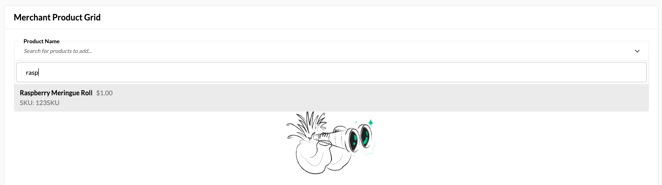
3. If you see a “No results” message, this means either there aren’t any products in your account, or they are not configured correctly. To check on this, head to Shopify or your merchant account to ensure your products are set up with an image and URL.
**Please note:** The product list displays items associated with your merchant account(s). However, a product will **only** appear as eligible if it contains both a valid **product image** and a **product URL**.
#### **Step 3: Choose Featured Items**
1. Click to add the products you wish to showcase.
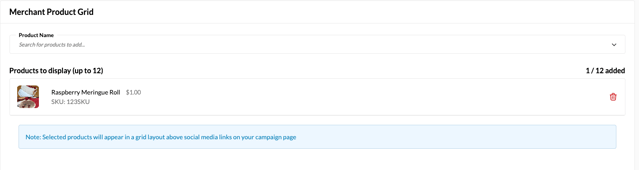
2. You can pick a maximum of **12 products** to display on a single campaign
3. Don’t forget to hit Save to apply the changes
4. Navigate to your campaign to see how the products display, and you're all set!
**Still need assistance? Please reach out to your Customer Success Team or contact [support@tradablebits.com](mailto:support@tradablebits.com)**
- [Getting started](https://resources.tradablebits.com/support/getting-started?hsLang=en)
- [Account](https://resources.tradablebits.com/support/account?hsLang=en#main-content)
- [Security](https://resources.tradablebits.com/support/account?hsLang=en#security)
- [Integrations](https://resources.tradablebits.com/support/integrations?hsLang=en#main-content)
- [Outgoing Integrations](https://resources.tradablebits.com/support/integrations?hsLang=en#outgoing-integrations)
- [Incoming Integrations](https://resources.tradablebits.com/support/integrations?hsLang=en#incoming-integrations)
- [Salesforce Marketing Cloud](https://resources.tradablebits.com/support/integrations?hsLang=en#salesforce-marketing-cloud)
- [FAQs](https://resources.tradablebits.com/support/faqs?hsLang=en)
- [Troubleshooting](https://resources.tradablebits.com/support/troubleshooting?hsLang=en#main-content)
- [CSS/JS](https://resources.tradablebits.com/support/troubleshooting?hsLang=en#css-js)
- [Reports](https://resources.tradablebits.com/support/reports?hsLang=en)
- [Engagement Campaigns](https://resources.tradablebits.com/support/engagement-campaigns?hsLang=en#main-content)
- [Campaign Basics](https://resources.tradablebits.com/support/engagement-campaigns?hsLang=en#campaign-basics)
- [Campaign Management](https://resources.tradablebits.com/support/engagement-campaigns?hsLang=en#campaign-management)
- [Creating Campaigns](https://resources.tradablebits.com/support/engagement-campaigns?hsLang=en#creating-campaigns)
- [Best Practices and Troubleshooting](https://resources.tradablebits.com/support/engagement-campaigns?hsLang=en#best-practices-and-troubleshooting)
- [UGC](https://resources.tradablebits.com/support/ugc?hsLang=en)
- [Fan CRM](https://resources.tradablebits.com/support/fan-crm?hsLang=en)
- [Sales](https://resources.tradablebits.com/support/sales?hsLang=en)
- [Idols](https://resources.tradablebits.com/support/idols?hsLang=en)
- [Trackers](https://resources.tradablebits.com/support/trackers?hsLang=en)
- [Messaging](https://resources.tradablebits.com/support/messaging?hsLang=en#main-content)
- [SMS](https://resources.tradablebits.com/support/messaging?hsLang=en#sms)
- [Email](https://resources.tradablebits.com/support/messaging?hsLang=en#email)
- [Push Notifications](https://resources.tradablebits.com/support/messaging?hsLang=en#push-notifications)
- [Instagram](https://resources.tradablebits.com/support/messaging?hsLang=en#instagram)
- [Ads](https://resources.tradablebits.com/support/ads?hsLang=en)
- [Octane](https://resources.tradablebits.com/support/octane?hsLang=en)
- [Product Updates](https://resources.tradablebits.com/support/product-updates?hsLang=en)
[](https://tradablebits.com/)
Copyright © 2026, Tradable Bits