---
title: How do I set up an Epsilon Integration?
description: Here's a quick guide on connecting your fan data to Epsilon PeopleCloud Messaging
---
[Skip to content](https://resources.tradablebits.com/support/how-do-i-set-up-an-epsilon-integration#main-content)
English
Show submenu for translations
![tradable-bits-long-logo-for-download.png\]](https://resources.tradablebits.com/hs-fs/hubfs/tradable-bits-long-logo-for-download.png?height=40&name=tradable-bits-long-logo-for-download.png)
Open main navigation
Close main navigation
- English
Show submenu for translations
How can we help?
- There are no suggestions because the search field is empty.
1. [Resources](https://resources.tradablebits.com/support?hsLang=en)
2. [Integrations](https://resources.tradablebits.com/support/integrations?hsLang=en)
3. [Outgoing Integrations](https://resources.tradablebits.com/support/integrations?hsLang=en#outgoing-integrations)
# How do I set up an Epsilon Integration?
## Here's a quick guide on connecting your fan data to Epsilon PeopleCloud Messaging.
#### **What is Epsilon?**
Epsilon PeopleCloud Messaging (formerly known as Harmony) is an enterprise-level, cross-channel marketing platform that specializes in delivering hyper-personalized communications (primarily email, SMS, and push notifications) at massive scale.
#### **Why connect Epsilon to Tradable Bits?**
Connecting your fan data to Epsilon PeopleCloud Messaging allows you to combine rich, specialized fan insights with a powerful, scalable enterprise messaging engine. This synergy enables the delivery of hyper-personalized and automated omnichannel campaigns, driving increased fan loyalty, engagement, and revenue through superior message delivery and data enrichment.
### **Set Up Steps:**
1\. To gather the credentials needed for Tradable Bits to connect to Epsilon, contact the appropriate member of your IT team or your company’s Epsilon point of contact. You will need to obtain the following information:
- Client ID
- Client Secret
- Username
- Password
- X-OUID
Store these credentials securely.
2\. Log in to Tradable Bits
3\. On the top navigation menu, hover towards the **Integration** icon and click the **Outgoing** **Integrations** submenu
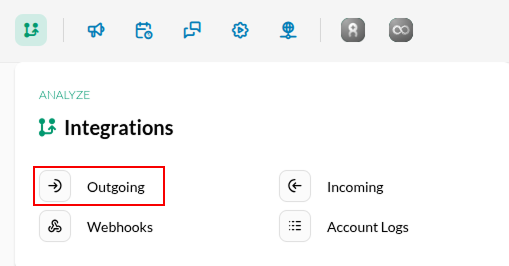
4\. Hit the **+ New** button and select **Epsilon** from the dropdown menu.

5\. Fill out **Name** field-this name must match the corresponding List or Audience or DataTable on the Epsilon side
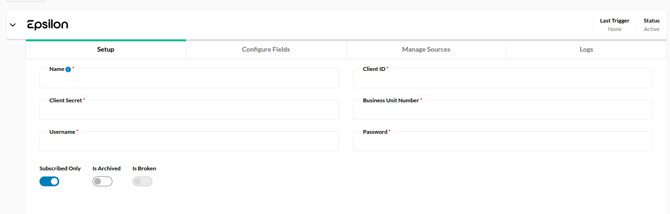
6\. Fill out the respective credentials with the ones that you retrieved earlier. (Note: X-OUID will go in the Business Unit Number input)
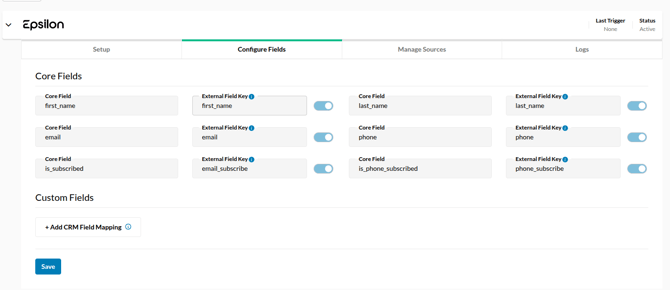
7\. Next, configure any additional custom fan data fields you would like to send over. Consult with your IT team member or your Epsilon point of contact to ensure the name of the field on Epsilon's side aligns with your objective, and then hit **Save**.
****
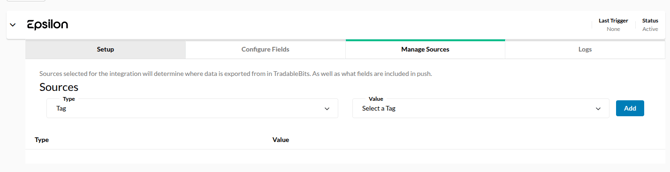
8\. Set up your audience sources. By default, the audience will include all fan data for those who have subscribed to email communication, but you may segment your fan audience further in this section.
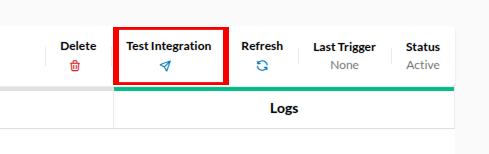
9\. Test your integration to make sure it is connected properly and you're ready to go!
If you have any further questions about using Epsilon, please reach out to your Customer Success team.
- [Getting started](https://resources.tradablebits.com/support/getting-started?hsLang=en)
- [Account](https://resources.tradablebits.com/support/account?hsLang=en#main-content)
- [Security](https://resources.tradablebits.com/support/account?hsLang=en#security)
- [Engagement Campaigns](https://resources.tradablebits.com/support/engagement-campaigns?hsLang=en#main-content)
- [Campaign Basics](https://resources.tradablebits.com/support/engagement-campaigns?hsLang=en#campaign-basics)
- [Campaign Management](https://resources.tradablebits.com/support/engagement-campaigns?hsLang=en#campaign-management)
- [Creating Campaigns](https://resources.tradablebits.com/support/engagement-campaigns?hsLang=en#creating-campaigns)
- [Best Practices and Troubleshooting](https://resources.tradablebits.com/support/engagement-campaigns?hsLang=en#best-practices-and-troubleshooting)
- [Fan CRM](https://resources.tradablebits.com/support/fan-crm?hsLang=en)
- [UGC](https://resources.tradablebits.com/support/ugc?hsLang=en)
- [Sales](https://resources.tradablebits.com/support/sales?hsLang=en)
- [Trackers](https://resources.tradablebits.com/support/trackers?hsLang=en)
- [Idols](https://resources.tradablebits.com/support/idols?hsLang=en)
- [Integrations](https://resources.tradablebits.com/support/integrations?hsLang=en#main-content)
- [Outgoing Integrations](https://resources.tradablebits.com/support/integrations?hsLang=en#outgoing-integrations)
- [Incoming Integrations](https://resources.tradablebits.com/support/integrations?hsLang=en#incoming-integrations)
- [Salesforce Marketing Cloud](https://resources.tradablebits.com/support/integrations?hsLang=en#salesforce-marketing-cloud)
- [Ads](https://resources.tradablebits.com/support/ads?hsLang=en)
- [Messaging](https://resources.tradablebits.com/support/messaging?hsLang=en#main-content)
- [SMS](https://resources.tradablebits.com/support/messaging?hsLang=en#sms)
- [Email](https://resources.tradablebits.com/support/messaging?hsLang=en#email)
- [Push Notifications](https://resources.tradablebits.com/support/messaging?hsLang=en#push-notifications)
- [Instagram](https://resources.tradablebits.com/support/messaging?hsLang=en#instagram)
- [Octane](https://resources.tradablebits.com/support/octane?hsLang=en)
- [FAQs](https://resources.tradablebits.com/support/faqs?hsLang=en)
- [Troubleshooting](https://resources.tradablebits.com/support/troubleshooting?hsLang=en#main-content)
- [CSS/JS](https://resources.tradablebits.com/support/troubleshooting?hsLang=en#css-js)
- [Reports](https://resources.tradablebits.com/support/reports?hsLang=en)
- [Product Updates](https://resources.tradablebits.com/support/product-updates?hsLang=en)
[](https://tradablebits.com/)
Copyright © 2026, Tradable Bits