---
title: How do I set up a Survey campaign?
description: Here's a quick step by step guide to set up a Survey Campaign.
---
[Skip to content](https://resources.tradablebits.com/support/survey#main-content)
English
Show submenu for translations
![tradable-bits-long-logo-for-download.png\]](https://resources.tradablebits.com/hs-fs/hubfs/tradable-bits-long-logo-for-download.png?height=40&name=tradable-bits-long-logo-for-download.png)
Open main navigation
Close main navigation
- English
Show submenu for translations
How can we help?
- There are no suggestions because the search field is empty.
1. [Resources](https://resources.tradablebits.com/support?hsLang=en)
2. [Engagement Campaigns](https://resources.tradablebits.com/support/engagement-campaigns?hsLang=en)
3. [Quiz Campaigns](https://resources.tradablebits.com/support/engagement-campaigns?hsLang=en#quiz-campaigns)
# How do I set up a Survey campaign?
## Here's a quick step by step guide to set up a Survey Campaign.
Survey Campaign is now built to support branch-style surveys where you can send fans directly to a specific follow-up question based on their answer and carve out different paths for your fans to get even more in-depth with your audience and their preferences.
The additional features added to Survey Campaign will empower your team to extract actionable insights from complex questions, map out a clear survey, and streamline the fan journey to survey completion. Previously, a follow-up question was tied to one question. Now, follow-up questions are their own independent questions that you get to drive fans to from whichever questions you like and create unlimited follow-ups based on fan answers.

### When to use Survey:
There are many ways you can utilize surveys to your advantage, such as:
- sending a survey post-event to ask fans about their experience
- collecting first-party data
- engaging directly with fans to gain their feedback
- asking more detailed prospecting questions
- understanding fan preferences and behaviours
**We're outlining some campaign-specific details below. Follow [this guide](https://resources.tradablebits.com/support/getting-started-with-campaigns?hsLang=en) for more info on General Setup and other campaign basics.**
### **Content**
**To set up survey questions and answers, follow these steps:**
1. Click **Add Question**
2. Choose your **Question Type:**
1. 1. ***Text Choice***
2. ***Image Choice***
3. ***Entry Field***
4. ***Slider***
5. ***eNPS***
3. Select where you want to send your fans to after this question
4. Input your question, and add a image (optional)
5. Input your answer(s)
#### Branch Survey Functionality
Let's walk through an example of the Branch Survey functionality.
Here we are surveying sports fans in our audience to learn more about teams they support and their level of fan engagement including purchasing behaviour.
1\. We begin by clicking + **Add Question**
2. Choose your **Question Type**:
- Text Choice
- Image Choice
- Entry Field
- Slider
- eNPS
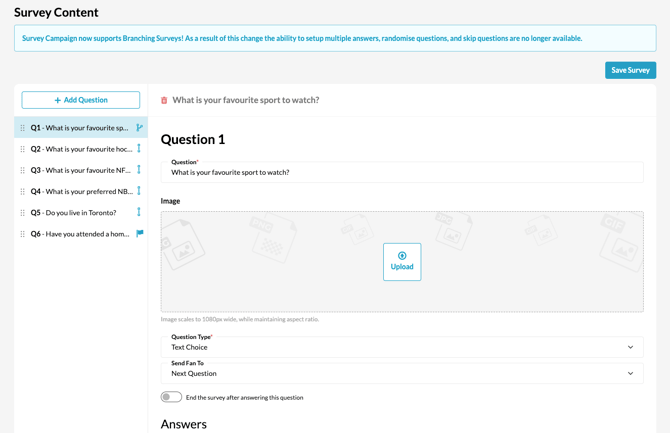
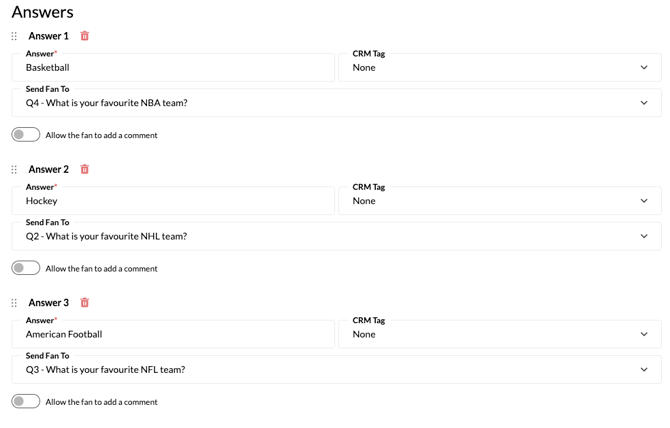
3\. Input your question, and add an image *(optional)*.
4\. Input your answer(s).
All questions need to be created before you can assign branch destinations. When you click into the **Send Fan To** field, a dropdown menu will display all existing questions and you can only select a destination from existing questions in this menu
4\. Assign **Send Fan To** destination questions
5. **Set Question Display / Flow:**
- **For Branching Logic:** Select where you want to send your fans after this question in the **Send Fan To** dropdown menu.
- **For Sub-Questions (Same Page):** Write your question as usual, then under the title field, toggle on **Secondary Question**. *(Note: Enabling secondary/sub-questions disables branching logic).*
For example, any fans that select basketball as their answer for Question 1 will skip the following questions and be sent to **Question 4 "What is your favourite NBA team?**, regardless of the question number order

7\. You can quickly see where your branches are going by hovering on a branch icon in your question list

8\. Non-Branching & Same-Page Sub-Questions
- **Sequential Surveys:** If you don't need branching, set all questions to send fans to **Next Question** to move through the survey in order.
- **Sub-Questions (Same-Page Display):** To group related questions on the same page, toggle on **Secondary Question** directly under the title field.
**Important Notes:**
- Enabling **Secondary Questions** puts sub-questions on the same page, but this **disables branching logic**.
- Conversely, if you are utilizing **Branching Logic**, questions cannot be displayed on a single page and will render sequentially.
#### Necessary Assets for Each Question Type
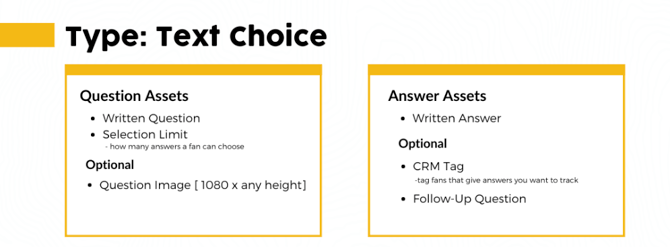

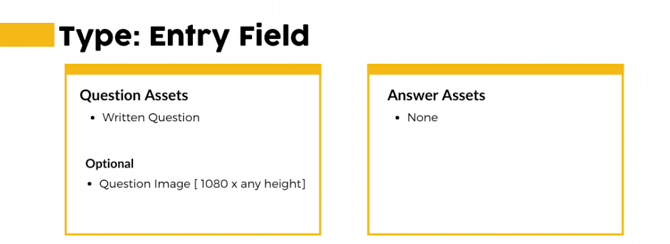
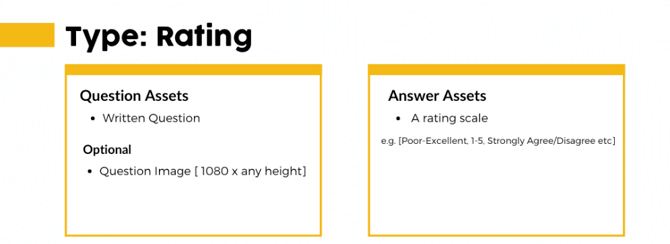
**Note:** Due to the branching logic in our survey campaigns, it's not possible to display all questions on a single page.
**Before publishing your campaign, be sure to review our[Campaign Publishing Checklist](https://resources.tradablebits.com/support/campaign-publishing-checklist?hsLang=en)for a smooth launch.**
**Still need assistance? Please reach out to your Customer Success Team or contact [support@tradablebits.com](mailto:support@tradablebits.com)**
- [Getting started](https://resources.tradablebits.com/support/getting-started?hsLang=en)
- [Account](https://resources.tradablebits.com/support/account?hsLang=en#main-content)
- [Account Admin](https://resources.tradablebits.com/support/account?hsLang=en#account-admin)
- [Security & Data Practices](https://resources.tradablebits.com/support/account?hsLang=en#security-data-practices)
- [Engagement Campaigns](https://resources.tradablebits.com/support/engagement-campaigns?hsLang=en#main-content)
- [Campaign Basics](https://resources.tradablebits.com/support/engagement-campaigns?hsLang=en#campaign-basics)
- [Campaign Setup & Configuration](https://resources.tradablebits.com/support/engagement-campaigns?hsLang=en#campaign-setup-configuration)
- [Campaign Styling & Design](https://resources.tradablebits.com/support/engagement-campaigns?hsLang=en#campaign-styling-design)
- [Lead Generation Campaigns](https://resources.tradablebits.com/support/engagement-campaigns?hsLang=en#lead-generation-campaigns)
- [User-Generated Content Campaigns](https://resources.tradablebits.com/support/engagement-campaigns?hsLang=en#user-generated-content-campaigns)
- [Music Campaigns](https://resources.tradablebits.com/support/engagement-campaigns?hsLang=en#music-campaigns)
- [Quiz Campaigns](https://resources.tradablebits.com/support/engagement-campaigns?hsLang=en#quiz-campaigns)
- [Events/Ticketing Campaigns](https://resources.tradablebits.com/support/engagement-campaigns?hsLang=en#events-ticketing-campaigns)
- [Game Campaigns](https://resources.tradablebits.com/support/engagement-campaigns?hsLang=en#game-campaigns)
- [Voting/Polling Campaigns](https://resources.tradablebits.com/support/engagement-campaigns?hsLang=en#voting-polling-campaigns)
- [Prize Giveaway Campaigns](https://resources.tradablebits.com/support/engagement-campaigns?hsLang=en#prize-giveaway-campaigns)
- [Incentivize Campaigns](https://resources.tradablebits.com/support/engagement-campaigns?hsLang=en#incentivize-campaigns)
- [Best Practices for Campaigns](https://resources.tradablebits.com/support/engagement-campaigns?hsLang=en#best-practices-for-campaigns)
- [Campaign Reporting](https://resources.tradablebits.com/support/engagement-campaigns?hsLang=en#campaign-reporting)
- [User-Generated Content (UGC)](https://resources.tradablebits.com/support/user-generated-content-ugc?hsLang=en)
- [Fan CRM](https://resources.tradablebits.com/support/fan-crm?hsLang=en#main-content)
- [Tags](https://resources.tradablebits.com/support/fan-crm?hsLang=en#tags)
- [Filters](https://resources.tradablebits.com/support/fan-crm?hsLang=en#filters)
- [Exports](https://resources.tradablebits.com/support/fan-crm?hsLang=en#exports)
- [Fan Profiles](https://resources.tradablebits.com/support/fan-crm?hsLang=en#fan-profiles)
- [Sales](https://resources.tradablebits.com/support/sales?hsLang=en#main-content)
- [Data Library](https://resources.tradablebits.com/support/sales?hsLang=en#data-library)
- [Trackers](https://resources.tradablebits.com/support/trackers?hsLang=en)
- [Idols](https://resources.tradablebits.com/support/idols?hsLang=en)
- [Integrations](https://resources.tradablebits.com/support/integrations?hsLang=en#main-content)
- [Outgoing Integrations](https://resources.tradablebits.com/support/integrations?hsLang=en#outgoing-integrations)
- [Incoming Integrations](https://resources.tradablebits.com/support/integrations?hsLang=en#incoming-integrations)
- [Salesforce Marketing Cloud](https://resources.tradablebits.com/support/integrations?hsLang=en#salesforce-marketing-cloud)
- [Ads](https://resources.tradablebits.com/support/ads?hsLang=en#main-content)
- [Meta (Facebook & Instagram)](https://resources.tradablebits.com/support/ads?hsLang=en#meta-facebook-instagram)
- [Google Ads](https://resources.tradablebits.com/support/ads?hsLang=en#google-ads)
- [Snapchat](https://resources.tradablebits.com/support/ads?hsLang=en#snapchat)
- [TikTok](https://resources.tradablebits.com/support/ads?hsLang=en#tiktok)
- [Spotify & Reddit](https://resources.tradablebits.com/support/ads?hsLang=en#spotify-reddit)
- [Messaging](https://resources.tradablebits.com/support/messaging?hsLang=en#main-content)
- [SMS](https://resources.tradablebits.com/support/messaging?hsLang=en#sms)
- [Email](https://resources.tradablebits.com/support/messaging?hsLang=en#email)
- [Push Notifications](https://resources.tradablebits.com/support/messaging?hsLang=en#push-notifications)
- [Instagram](https://resources.tradablebits.com/support/messaging?hsLang=en#instagram)
- [Automations](https://resources.tradablebits.com/support/messaging?hsLang=en#automations)
- [Custom Networks](https://resources.tradablebits.com/support/messaging?hsLang=en#custom-networks)
- [Octane](https://resources.tradablebits.com/support/octane?hsLang=en)
- [FAQs](https://resources.tradablebits.com/support/faqs?hsLang=en)
[](https://tradablebits.com/)
Copyright © 2026, Tradable Bits