---
title: How do I set up a Bracket Campaign?
description: Here's a quick guide to walk you through setting up a strong bracket engagement campaign.
---
[Skip to content](https://resources.tradablebits.com/support/bracket#main-content)
English
Show submenu for translations
![tradable-bits-long-logo-for-download.png\]](https://resources.tradablebits.com/hs-fs/hubfs/tradable-bits-long-logo-for-download.png?height=40&name=tradable-bits-long-logo-for-download.png)
Open main navigation
Close main navigation
- English
Show submenu for translations
How can we help?
- There are no suggestions because the search field is empty.
1. [Resources](https://resources.tradablebits.com/support?hsLang=en)
2. [Engagement Campaigns](https://resources.tradablebits.com/support/engagement-campaigns?hsLang=en)
3. [Creating Campaigns](https://resources.tradablebits.com/support/engagement-campaigns?hsLang=en#creating-campaigns)
# How do I set up a Bracket Campaign?
## Here's a quick guide to walk you through setting up a strong bracket engagement campaign.
Brackets were popularized in NCAA Basketball and have spread across the sports, music and entertainment worlds as a way to get fans involved in a fun, interactive vote. The Bracket Campaign is a great way to engage your fans!
**We're outlining some campaign-specific details below. Follow [this guide](https://resources.tradablebits.com/support/getting-started-with-campaigns?hsLang=en) for more info on General Setup and other campaign basics.**
### Configuration
In this section, you are able to set whether the participant's selected bracket winner is displayed below the bracket and is shareable. This is done using a toggle switch.
#### 
**Please note:** The Bracket campaign cannot be embedded into a website, due to limitations around cookies that impact the fan experience. Since fans will return to the campaign over time to check their standings, cookies help us verify their session. For this reason, it's also not possible to disable PII collectionfor this campaign type.
### Content
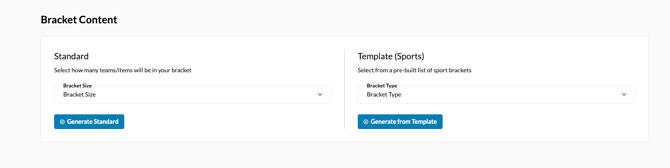
In thissection, you are able to configure your bracket size and settings. First, select if you would like a Standard or a Template bracket set up. Standard bracket is likely the format that you are already familiar with-a given number of teams that meet up for a match, with winners moving on to the next round until a winner is crowned. The template is modelled after real tournament styles from different global leagues. For more information on the Bracket styles, check out our full breakdown [here.](https://resources.tradablebits.com/support/how-do-i-use-different-types-of-brackets-in-a-bracket-campaign?hsLang=en)
### 
#### Bracket Settings
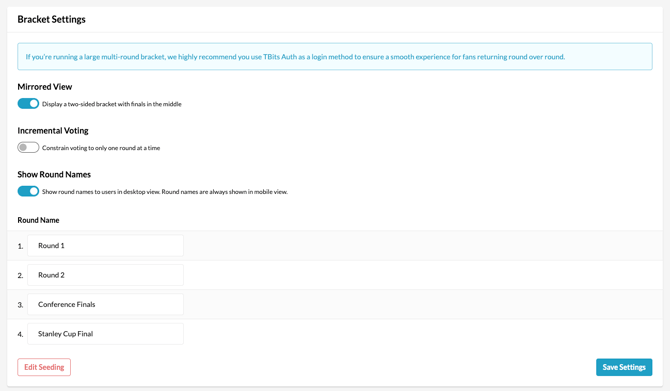
In Bracket Settings, once your bracket is generated, you can toggle incremental voting (one round at a time) on/off, as well as set the progression of bracket rounds between manual and automatic. Manual round progression requires somebody within your organization to select a winner before the next round unlocks, whereas automatic progression selects the winner at the end of the allotted time period, based on votes.
> Pro-Tip: It is recommended to Toggle "Incremental Voting" ON and to set "Round Progression" to AUTOMATIC
#### Bracket Details
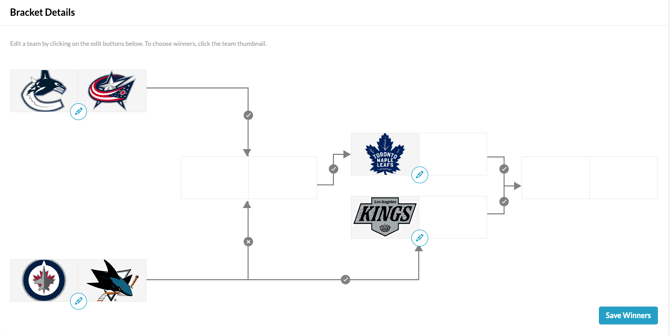
In the "Bracket Details" subsection under **Content**, images can be added to the bracket to build your teams. We recommend an image size of 720 x 630 px.
### Reporting
Head to the Reporting section to view overall stats on your campaign and the results by each fan that entered, all updated in real time as fans enter your campaign.
### Results
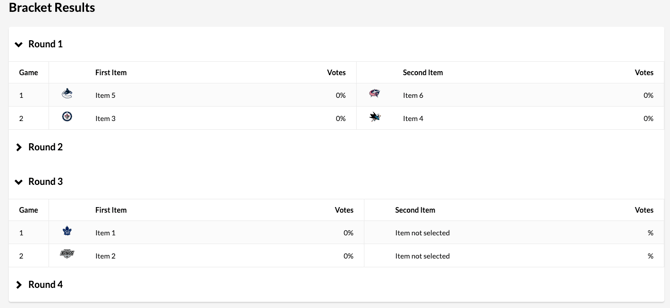
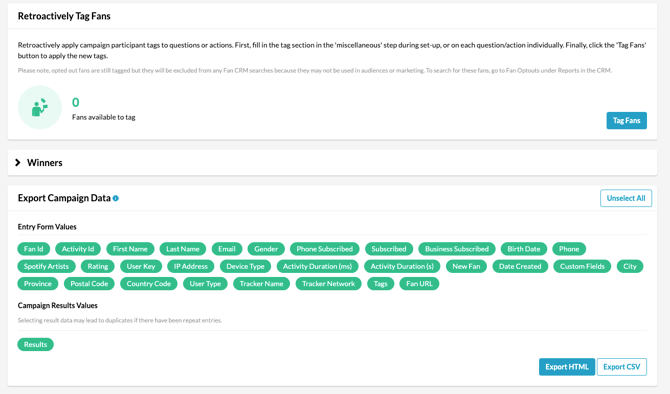
The "Results" section offers more in depth participant data. At any point in the campaign, you can also export your campaign data in a CSV file for visibility to your larger team. If your campaign is designed to have a winner, that can be auto-selected in this section as well.
**Before publishing your campaign, be sure to review our[Campaign Publishing Checklist](https://resources.tradablebits.com/support/campaign-publishing-checklist?hsLang=en)for a smooth launch.**
**Still need assistance? Please reach out to your Customer Success Team or contact [support@tradablebits.com](mailto:support@tradablebits.com)**
- [Getting started](https://resources.tradablebits.com/support/getting-started?hsLang=en)
- [Account](https://resources.tradablebits.com/support/account?hsLang=en#main-content)
- [Security](https://resources.tradablebits.com/support/account?hsLang=en#security)
- [Engagement Campaigns](https://resources.tradablebits.com/support/engagement-campaigns?hsLang=en#main-content)
- [Campaign Basics](https://resources.tradablebits.com/support/engagement-campaigns?hsLang=en#campaign-basics)
- [Campaign Management](https://resources.tradablebits.com/support/engagement-campaigns?hsLang=en#campaign-management)
- [Creating Campaigns](https://resources.tradablebits.com/support/engagement-campaigns?hsLang=en#creating-campaigns)
- [Best Practices and Troubleshooting](https://resources.tradablebits.com/support/engagement-campaigns?hsLang=en#best-practices-and-troubleshooting)
- [Fan CRM](https://resources.tradablebits.com/support/fan-crm?hsLang=en)
- [UGC](https://resources.tradablebits.com/support/ugc?hsLang=en)
- [Sales](https://resources.tradablebits.com/support/sales?hsLang=en)
- [Trackers](https://resources.tradablebits.com/support/trackers?hsLang=en)
- [Idols](https://resources.tradablebits.com/support/idols?hsLang=en)
- [Integrations](https://resources.tradablebits.com/support/integrations?hsLang=en#main-content)
- [Outgoing Integrations](https://resources.tradablebits.com/support/integrations?hsLang=en#outgoing-integrations)
- [Incoming Integrations](https://resources.tradablebits.com/support/integrations?hsLang=en#incoming-integrations)
- [Salesforce Marketing Cloud](https://resources.tradablebits.com/support/integrations?hsLang=en#salesforce-marketing-cloud)
- [Ads](https://resources.tradablebits.com/support/ads?hsLang=en)
- [Messaging](https://resources.tradablebits.com/support/messaging?hsLang=en#main-content)
- [SMS](https://resources.tradablebits.com/support/messaging?hsLang=en#sms)
- [Email](https://resources.tradablebits.com/support/messaging?hsLang=en#email)
- [Push Notifications](https://resources.tradablebits.com/support/messaging?hsLang=en#push-notifications)
- [Instagram](https://resources.tradablebits.com/support/messaging?hsLang=en#instagram)
- [Octane](https://resources.tradablebits.com/support/octane?hsLang=en)
- [FAQs](https://resources.tradablebits.com/support/faqs?hsLang=en)
- [Troubleshooting](https://resources.tradablebits.com/support/troubleshooting?hsLang=en#main-content)
- [CSS/JS](https://resources.tradablebits.com/support/troubleshooting?hsLang=en#css-js)
- [Reports](https://resources.tradablebits.com/support/reports?hsLang=en)
- [Product Updates](https://resources.tradablebits.com/support/product-updates?hsLang=en)
[](https://tradablebits.com/)
Copyright © 2026, Tradable Bits