---
title: How do I match a Tradable Bits tracker to a Performance?
description: Bring off-platform ads into one clean Performance Report.
---
[Skip to content](https://resources.tradablebits.com/support/how-do-i-match-a-tradable-bits-tracker-to-a-performance#main-content)
English
Show submenu for translations
![tradable-bits-long-logo-for-download.png\]](https://resources.tradablebits.com/hs-fs/hubfs/tradable-bits-long-logo-for-download.png?height=40&name=tradable-bits-long-logo-for-download.png)
Open main navigation
Close main navigation
- English
Show submenu for translations
How can we help?
- There are no suggestions because the search field is empty.
1. [Resources](https://resources.tradablebits.com/support?hsLang=en)
2. [Trackers](https://resources.tradablebits.com/support/trackers?hsLang=en)
# How do I match a Tradable Bits tracker to a Performance?
## Bring off-platform ads into one clean Performance Report.
### The TL;DR
You can connect [Tradable Bits trackers](https://resources.tradablebits.com/support/getting-started-with-trackers?hsLang=en)(which you can place on most ads, like those used on Reddit, Discord, news sites or even on a QR code for OOH marketing) to a **Performance** in Tradable Bits (e.g. "Darshan's 2025 Canadian Tour"). One matched, clicks, conversions and ROAS from those off-platform ads roll up into the **Performance Report -** right beside anything you ran inside Tradable Bits.
### Why you'll love this
- **One report for all your ads.** So you won't have to stitch as many CSVs together.
- **Better attribution.** You can see the real impact of external spend on your goal/event more easily
- **Cleaner storytelling.** You can say, "here's what actually drove sales for *this* show"
### What you'll need before you start
1. **A Performance** created (e.g. "Season 2025 Ticket Sales" or "Darshan's 2025 Canadian Tour")
2. **Tradable Bits trackers** placed on any **external ads** you're running, and clearly labelled (i.e. DCT - Reddit - GA Tickets).
3. **Ticketing/Merch Integrations** so you can see revenue/conversion data flowing into TBits and attributed to your trackers.
4. (**Optional) Tracker Marketing Groups,** if you want to group your trackers into neater buckets to make it easier to search for and report on
**Tip:** Use consistent naming conventions for your trackers (e.g. "YYYY-MM Channel Campaign Placement") so matching is brain-dead simple later.
### The two ways to match
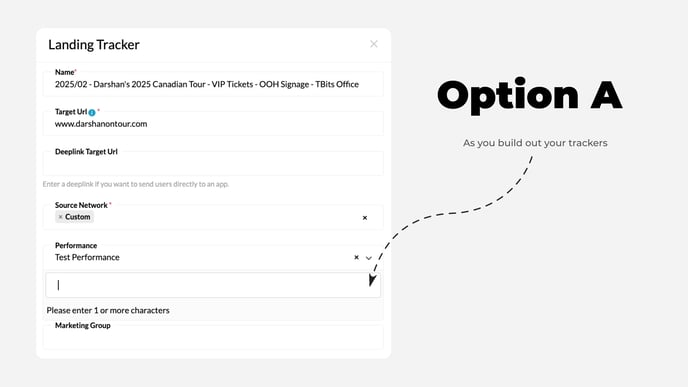
#### Option A - Match while creating a tracker (fastest)
1. Go to *Trackers --\> Create New Tracker*
2. Fill in your tracker details (destination URL, Source, Wildcards, etc)
3. In the **Performance** dropdown --\> select the matching Performance (e.g. *Darshan's 2025 Canadian Tour).*
4. Save.
**When to use this method:** You have already created a Performance and know exactly which Performance this tracker belongs to.
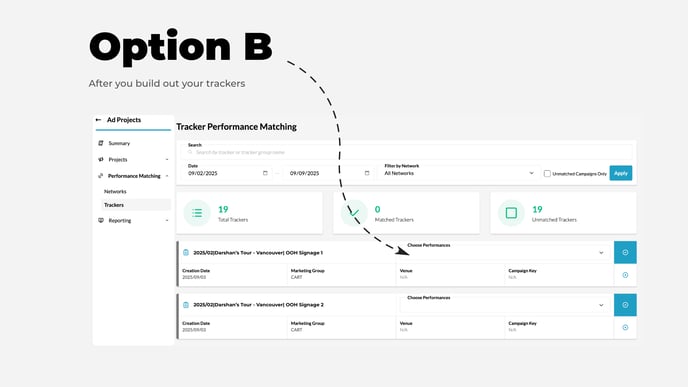
#### Option B - Retroactively match existing trackers (batch-friendly)
1. Go to *Ad Projects --\> Performance Matching --\> Trackers*
2. Use the Search bar to find your desired Trackers (by name, Tracker Group, Date, Network or by unmatched trackers)
3. Select "Choose Performance" for your desired trackers, pick your desired Performance, then click the "blue checkmark button."
**When to use this method:** you've been running external ads for a while and need to clean up history, or bulk match to a performance.
### How to confirm it worked (the fun part)
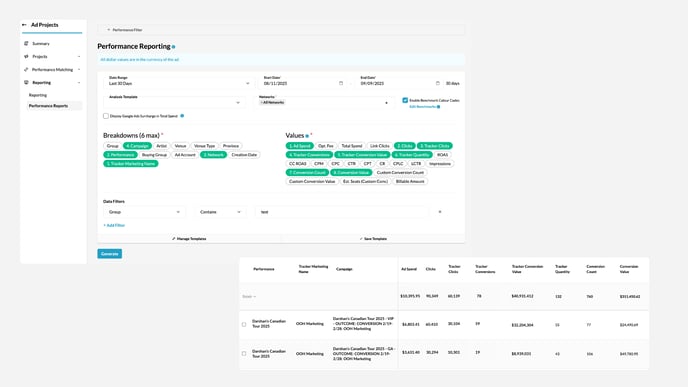
1. Go to **Ad Projects --\> Performance Reports**
2. Choose your desired date range, breakdowns and values. In the Breakdowns/Values, add:
1. **Performance**
2. **Tracker Marketing Name**
3. **Tracker Conversions,**
4. **Tracker Conversion Value,**
5. **Tracker Clicks,**
6. **Tracker Quantity**
3\. Generate your report. You should now see off-platform tracker metrics alongside any in-platform results.
**Pro Tip:** Save this performance report as a template to come back to it more easily.
#### End-to-end example:
1. You run ads for *Darshan's 2025 Canadian Tour* on Meta, Reddit, Discord, an internal newsletter and a local news site.
2. You place a **Tradable Bits tracker link** on each buy and have clearly labelled them under a Tracker Marketing Group (i.e. Darshan 2025 Tour - Reddit Campaigns) and have also linked those trackers to the **Darshan 2025 Canadian Tour Performance.**
3. In Performance Reports, you create a Report that includes Tracker Values, filtered by Performance.
4. Boom - you have one report that shows clicks, conversions and conversion value from your off-platform channels next to your TBits-run media.
- [Getting started](https://resources.tradablebits.com/support/getting-started?hsLang=en)
- [Account](https://resources.tradablebits.com/support/account?hsLang=en#main-content)
- [Account Admin](https://resources.tradablebits.com/support/account?hsLang=en#account-admin)
- [Security & Data Practices](https://resources.tradablebits.com/support/account?hsLang=en#security-data-practices)
- [Engagement Campaigns](https://resources.tradablebits.com/support/engagement-campaigns?hsLang=en#main-content)
- [Campaign Basics](https://resources.tradablebits.com/support/engagement-campaigns?hsLang=en#campaign-basics)
- [Campaign Setup & Configuration](https://resources.tradablebits.com/support/engagement-campaigns?hsLang=en#campaign-setup-configuration)
- [Campaign Styling & Design](https://resources.tradablebits.com/support/engagement-campaigns?hsLang=en#campaign-styling-design)
- [Lead Generation Campaigns](https://resources.tradablebits.com/support/engagement-campaigns?hsLang=en#lead-generation-campaigns)
- [User-Generated Content Campaigns](https://resources.tradablebits.com/support/engagement-campaigns?hsLang=en#user-generated-content-campaigns)
- [Music Campaigns](https://resources.tradablebits.com/support/engagement-campaigns?hsLang=en#music-campaigns)
- [Quiz Campaigns](https://resources.tradablebits.com/support/engagement-campaigns?hsLang=en#quiz-campaigns)
- [Events/Ticketing Campaigns](https://resources.tradablebits.com/support/engagement-campaigns?hsLang=en#events-ticketing-campaigns)
- [Game Campaigns](https://resources.tradablebits.com/support/engagement-campaigns?hsLang=en#game-campaigns)
- [Voting/Polling Campaigns](https://resources.tradablebits.com/support/engagement-campaigns?hsLang=en#voting-polling-campaigns)
- [Prize Giveaway Campaigns](https://resources.tradablebits.com/support/engagement-campaigns?hsLang=en#prize-giveaway-campaigns)
- [Incentivize Campaigns](https://resources.tradablebits.com/support/engagement-campaigns?hsLang=en#incentivize-campaigns)
- [Best Practices for Campaigns](https://resources.tradablebits.com/support/engagement-campaigns?hsLang=en#best-practices-for-campaigns)
- [Campaign Reporting](https://resources.tradablebits.com/support/engagement-campaigns?hsLang=en#campaign-reporting)
- [User-Generated Content (UGC)](https://resources.tradablebits.com/support/user-generated-content-ugc?hsLang=en)
- [Fan CRM](https://resources.tradablebits.com/support/fan-crm?hsLang=en#main-content)
- [Tags](https://resources.tradablebits.com/support/fan-crm?hsLang=en#tags)
- [Filters](https://resources.tradablebits.com/support/fan-crm?hsLang=en#filters)
- [Exports](https://resources.tradablebits.com/support/fan-crm?hsLang=en#exports)
- [Fan Profiles](https://resources.tradablebits.com/support/fan-crm?hsLang=en#fan-profiles)
- [Sales](https://resources.tradablebits.com/support/sales?hsLang=en#main-content)
- [Data Library](https://resources.tradablebits.com/support/sales?hsLang=en#data-library)
- [Trackers](https://resources.tradablebits.com/support/trackers?hsLang=en)
- [Idols](https://resources.tradablebits.com/support/idols?hsLang=en)
- [Integrations](https://resources.tradablebits.com/support/integrations?hsLang=en#main-content)
- [Outgoing Integrations](https://resources.tradablebits.com/support/integrations?hsLang=en#outgoing-integrations)
- [Incoming Integrations](https://resources.tradablebits.com/support/integrations?hsLang=en#incoming-integrations)
- [Salesforce Marketing Cloud](https://resources.tradablebits.com/support/integrations?hsLang=en#salesforce-marketing-cloud)
- [Ads](https://resources.tradablebits.com/support/ads?hsLang=en#main-content)
- [Meta (Facebook & Instagram)](https://resources.tradablebits.com/support/ads?hsLang=en#meta-facebook-instagram)
- [Google Ads](https://resources.tradablebits.com/support/ads?hsLang=en#google-ads)
- [Snapchat](https://resources.tradablebits.com/support/ads?hsLang=en#snapchat)
- [TikTok](https://resources.tradablebits.com/support/ads?hsLang=en#tiktok)
- [Spotify & Reddit](https://resources.tradablebits.com/support/ads?hsLang=en#spotify-reddit)
- [Messaging](https://resources.tradablebits.com/support/messaging?hsLang=en#main-content)
- [SMS](https://resources.tradablebits.com/support/messaging?hsLang=en#sms)
- [Email](https://resources.tradablebits.com/support/messaging?hsLang=en#email)
- [Push Notifications](https://resources.tradablebits.com/support/messaging?hsLang=en#push-notifications)
- [Instagram](https://resources.tradablebits.com/support/messaging?hsLang=en#instagram)
- [Automations](https://resources.tradablebits.com/support/messaging?hsLang=en#automations)
- [Custom Networks](https://resources.tradablebits.com/support/messaging?hsLang=en#custom-networks)
- [Octane](https://resources.tradablebits.com/support/octane?hsLang=en)
- [FAQs](https://resources.tradablebits.com/support/faqs?hsLang=en)
[](https://tradablebits.com/)
Copyright © 2026, Tradable Bits