---
title: How do I connect my Reddit ads account?
description: Streamline your billing and track real-time campaign metrics by syncing your Reddit Ads account with Tradable Bits.
---
[Skip to content](https://resources.tradablebits.com/support/how-do-i-connect-my-reddit-ads-account#main-content)
English
Show submenu for translations
![tradable-bits-long-logo-for-download.png\]](https://resources.tradablebits.com/hs-fs/hubfs/tradable-bits-long-logo-for-download.png?height=40&name=tradable-bits-long-logo-for-download.png)
Open main navigation
Close main navigation
- English
Show submenu for translations
How can we help?
- There are no suggestions because the search field is empty.
1. [Resources](https://resources.tradablebits.com/support?hsLang=en)
2. [Ads](https://resources.tradablebits.com/support/ads?hsLang=en)
# How do I connect my Reddit ads account?
## Streamline your billing and track real-time campaign metrics by syncing your Reddit Ads account with Tradable Bits.
### Features
- **Simplified Billing:** Connect your Reddit ad accounts directly to the Tradable Bits platform to streamline billing and support for managed ads services.
- **Centralized Analytics:** Track real-time reporting metrics, including overall spend, impressions, and clicks alongside your other ad networks.
**Note:** The current Reddit Ads tool is designed purely for account connection, analytics syncing, and billing support. Campaign creation and ad building must still be managed natively within Reddit.
### The How
When you arrive at the **Tradable Bits Homepage**, hover over the **Ad Accounts** section in the **Top Navigation Bar**.
Adding an Account
To connect a new Reddit Ads Account, follow the steps outlined below:
1. From the Tradable Bits Homepage, hover over the **Ad Accounts** section in the Top Navigation Bar and select **Reddit Ads**.
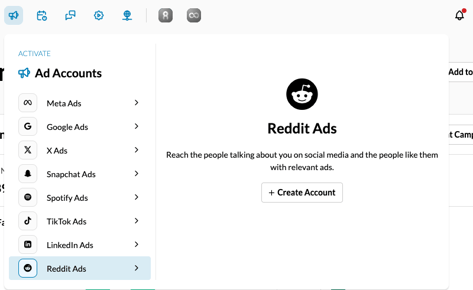
2. If you do not yet have a connected Reddit Ads account, the page will display a prompt to connect. Click the **+Create Account** button to initiate the authorization flow.
3. You will be automatically redirected to Reddit. Log in and authenticate the application to grant the necessary permissions (this requests standard `adsread` access so the platform can securely pull your reporting data).
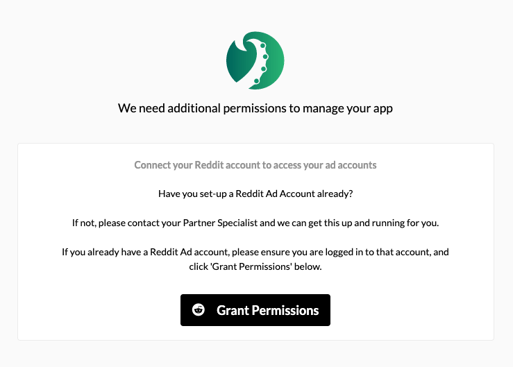
4. Once authenticated, you will be redirected back to the Tradable Bits platform, and your accounts will be successfully linked.
### Viewing Ad Analytics
Once your Reddit account is connected, you can review the performance of your campaigns directly within the platform's standard analytics view.
1. Navigate back to the **Reddit** **Ads** section via the Top Navigation Bar.
2. Select the **Analytics** option.
3. Use the filter bar to sort and review your campaign-level statistics, including overall spend, total impressions, and clicks.
**Still need assistance? Please reach out to your Customer Success Team or contact [support@tradablebits.com](mailto:support@tradablebits.com)**
- [Getting started](https://resources.tradablebits.com/support/getting-started?hsLang=en)
- [Account](https://resources.tradablebits.com/support/account?hsLang=en#main-content)
- [Security](https://resources.tradablebits.com/support/account?hsLang=en#security)
- [Engagement Campaigns](https://resources.tradablebits.com/support/engagement-campaigns?hsLang=en#main-content)
- [Campaign Basics](https://resources.tradablebits.com/support/engagement-campaigns?hsLang=en#campaign-basics)
- [Campaign Management](https://resources.tradablebits.com/support/engagement-campaigns?hsLang=en#campaign-management)
- [Creating Campaigns](https://resources.tradablebits.com/support/engagement-campaigns?hsLang=en#creating-campaigns)
- [Best Practices and Troubleshooting](https://resources.tradablebits.com/support/engagement-campaigns?hsLang=en#best-practices-and-troubleshooting)
- [Fan CRM](https://resources.tradablebits.com/support/fan-crm?hsLang=en)
- [UGC](https://resources.tradablebits.com/support/ugc?hsLang=en)
- [Sales](https://resources.tradablebits.com/support/sales?hsLang=en)
- [Trackers](https://resources.tradablebits.com/support/trackers?hsLang=en)
- [Idols](https://resources.tradablebits.com/support/idols?hsLang=en)
- [Integrations](https://resources.tradablebits.com/support/integrations?hsLang=en#main-content)
- [Outgoing Integrations](https://resources.tradablebits.com/support/integrations?hsLang=en#outgoing-integrations)
- [Incoming Integrations](https://resources.tradablebits.com/support/integrations?hsLang=en#incoming-integrations)
- [Salesforce Marketing Cloud](https://resources.tradablebits.com/support/integrations?hsLang=en#salesforce-marketing-cloud)
- [Ads](https://resources.tradablebits.com/support/ads?hsLang=en)
- [Messaging](https://resources.tradablebits.com/support/messaging?hsLang=en#main-content)
- [SMS](https://resources.tradablebits.com/support/messaging?hsLang=en#sms)
- [Email](https://resources.tradablebits.com/support/messaging?hsLang=en#email)
- [Push Notifications](https://resources.tradablebits.com/support/messaging?hsLang=en#push-notifications)
- [Instagram](https://resources.tradablebits.com/support/messaging?hsLang=en#instagram)
- [Octane](https://resources.tradablebits.com/support/octane?hsLang=en)
- [FAQs](https://resources.tradablebits.com/support/faqs?hsLang=en)
- [Troubleshooting](https://resources.tradablebits.com/support/troubleshooting?hsLang=en#main-content)
- [CSS/JS](https://resources.tradablebits.com/support/troubleshooting?hsLang=en#css-js)
- [Reports](https://resources.tradablebits.com/support/reports?hsLang=en)
- [Product Updates](https://resources.tradablebits.com/support/product-updates?hsLang=en)
[](https://tradablebits.com/)
Copyright © 2026, Tradable Bits