![tradable-bits-long-logo-for-download.png]](https://resources.tradablebits.com/hs-fs/hubfs/tradable-bits-long-logo-for-download.png?height=40&name=tradable-bits-long-logo-for-download.png)
If your campaigns are set to require sign-up with Tradable Bits authentication, it’s possible for fans to manage their subscriptions directly from within their profile in the campaign or the Loyalty Portal.
Steps:
- Sign In: Ensure you are signed in to the campaign or Loyalty Portal using your Tradable Bits account.
- Locate Profile: Look for the profile icon in the top right-hand corner of the page.
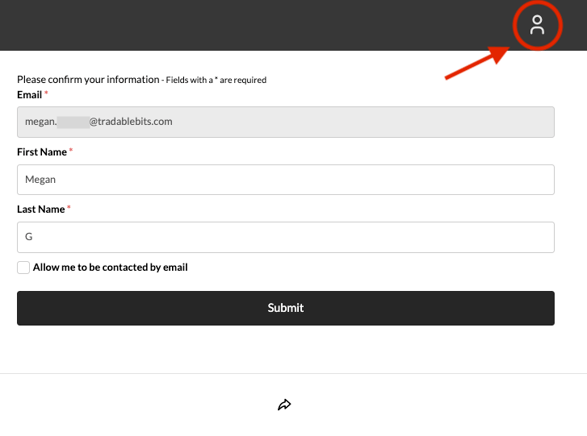
- Open Settings: Click the profile icon to open the sidebar.
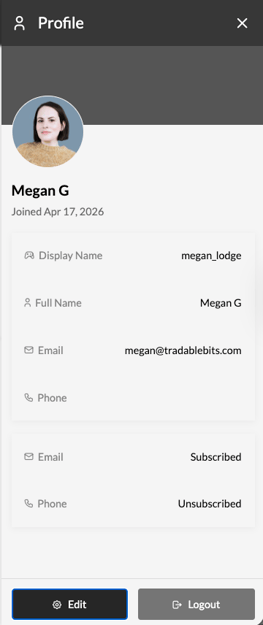
- Edit: Review your current subscription status (Email/SMS). Click Edit to update your preferences or other profile information.
Troubleshooting:
- Profile icon not visible? Check that you are logged into Tradable Bits auth. Please note that only the Loyalty Portal and campaigns configured to require this authentication method will display these profile settings.
Still need assistance? Please reach out to your Customer Success Team or contact support@tradablebits.com