---
title: How do I create a Google Smart Display Ad?
description: This guide will give you a quick overview on where and how to set up a Google Smart Display ad.
---
[Skip to content](https://resources.tradablebits.com/support/google-smart-display-ad#main-content)
English
Show submenu for translations
![tradable-bits-long-logo-for-download.png\]](https://resources.tradablebits.com/hs-fs/hubfs/tradable-bits-long-logo-for-download.png?height=40&name=tradable-bits-long-logo-for-download.png)
Open main navigation
Close main navigation
- English
Show submenu for translations
How can we help?
- There are no suggestions because the search field is empty.
1. [Resources](https://resources.tradablebits.com/support?hsLang=en)
2. [Ads](https://resources.tradablebits.com/support/ads?hsLang=en)
3. [Google Ads](https://resources.tradablebits.com/support/ads?hsLang=en#google-ads)
# How do I create a Google Smart Display Ad?
## This guide will give you a quick overview on where and how to set up a Google Smart Display ad.
To access the Smart Display Ads creation section, In the **Tradable Bits Homepage,** hover over the Ad Accounts section in the **Top Navigation Bar,** click **Google Ads,** select your desired ad account and click **Display Campaigns.** Ads Planner is the centralized location for the entire set up of Google Smart Campaigns.
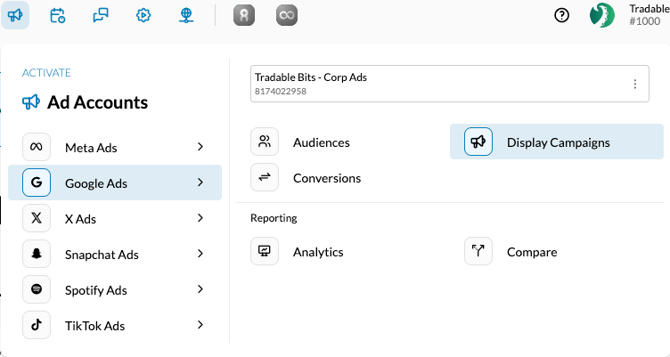
Once you do, you'll be taken to the "Google Smart Display Campaigns" page. Follow the steps below to create your ads.
1. Click New Campaign which expands the following modal.
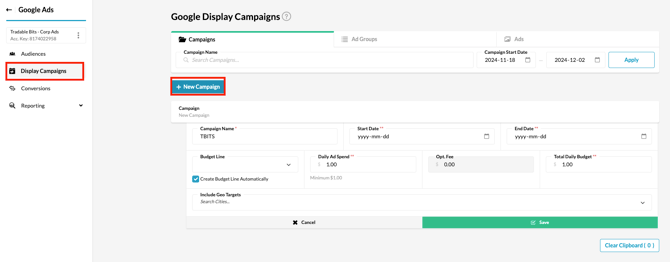
2. Enter the following details
- Campaign Name: A name for the campaign that would help you identify the campaign once it has been configured.
- Run Dates & Timezone: The run date of the campaign. If you enter an alternate timezone, then the dates are converted from the entered timezone into your account's primary timezone for ease of reporting.
- Daily Ad Spend, Opt Fee & Total Daily Budget: Total Budget refers to the total budget spent on the campaign which includes the actual Ad Spend on Google as well as the Opt Fee charged by Tradable Bits on the Ad Spend. The Opt Fee is automatically calculated based on the amount you enter in either Daily Ad Spend or Total Budget. Enter either Daily Ad Spend or Total Budget based on your budgeting structure, and the other two fields will be auto-populated.
- Include Locations: The geographic locations that you would like to specifically target if any.
3\. Click Save once done. The campaign's serving status will be "Paused" by default. You can activate this by toggling the "Active" button, or you can do this after the Ads have been configured.
4\. Click "Ad Groups" at the top of the page, and click "New Ad Group" against the corresponding campaign.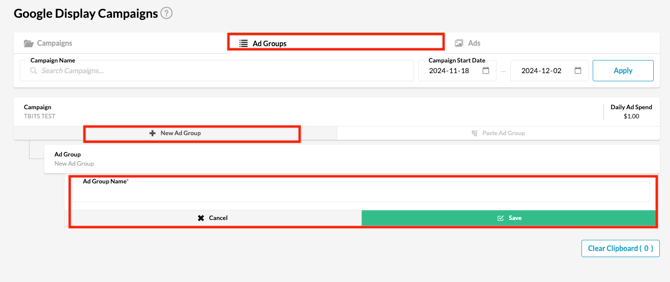
5\. Enter an Ad Group Name and click "Save". The ad groups will be "Paused" by default. You can activate this by toggling the "Active" button, or you can do this after the Ads have been configured.
6\. Click "Ads" at the top of the page and click the buttons under the corresponding group to create the relevant type of ad.
7\. Click on the button corresponding to the type of ad you would like to create from the list below to see more details about the form fields that need to be filled.
### New Display Ad
- Name: A name that will help you identify the Ad later.
- URL: The page that you would like fans to be driven to.
- Tracker: Check this box if you would like to create a tracker for the URL. We recommend doing this in order to further track the efficiency of your campaign.
- Image: The image associated with the Ad.
Click Save once done.
### New Responsive Ad
Responsive display ads are the default ad type for the Display Network. They automatically adjust their size, appearance, and format to fit just about any available ad space. They adapt assets to maximize performance.
- Short Headline: The 25-character headline to be displayed from smaller display formats.
- Long Headline: The 90-character headline to be displayed from smaller display formats.
- Description: A 90-character description that is served to users along with your ad.
- Business Name: The name of the business associated with the ad.
- Final URL: The page that you would like fans to be driven to.
- Tracker: Check this box if you would like to create a tracker for the URL. We recommend doing this in order to further track the efficiency of your campaign.
- Marketing Images: The images associated with the Ad.
Click Save once done.
### New Bulk Display Ad
\- Final URL: The page that you would like fans to be driven to.
\- Tracker: Check this box if you would like to create a tracker for the URL. We recommend doing this in order to further track the efficiency of your campaign.
\- Marketing Images: The images associated with the Ad.
Click Create All once done.
You can toggle the "Active" button against the Campaign, Ad Group and Ad once the necessary assets are created to start serving the Ads.
Happy Advertising!
**Still need assistance? Please reach out to your Customer Success Team or contact [support@tradablebits.com](mailto:support@tradablebits.com)**
- [Getting started](https://resources.tradablebits.com/support/getting-started?hsLang=en)
- [Account](https://resources.tradablebits.com/support/account?hsLang=en#main-content)
- [Account Admin](https://resources.tradablebits.com/support/account?hsLang=en#account-admin)
- [Security & Data Practices](https://resources.tradablebits.com/support/account?hsLang=en#security-data-practices)
- [Engagement Campaigns](https://resources.tradablebits.com/support/engagement-campaigns?hsLang=en#main-content)
- [Campaign Basics](https://resources.tradablebits.com/support/engagement-campaigns?hsLang=en#campaign-basics)
- [Campaign Setup & Configuration](https://resources.tradablebits.com/support/engagement-campaigns?hsLang=en#campaign-setup-configuration)
- [Campaign Styling & Design](https://resources.tradablebits.com/support/engagement-campaigns?hsLang=en#campaign-styling-design)
- [Lead Generation Campaigns](https://resources.tradablebits.com/support/engagement-campaigns?hsLang=en#lead-generation-campaigns)
- [User-Generated Content Campaigns](https://resources.tradablebits.com/support/engagement-campaigns?hsLang=en#user-generated-content-campaigns)
- [Music Campaigns](https://resources.tradablebits.com/support/engagement-campaigns?hsLang=en#music-campaigns)
- [Quiz Campaigns](https://resources.tradablebits.com/support/engagement-campaigns?hsLang=en#quiz-campaigns)
- [Events/Ticketing Campaigns](https://resources.tradablebits.com/support/engagement-campaigns?hsLang=en#events-ticketing-campaigns)
- [Game Campaigns](https://resources.tradablebits.com/support/engagement-campaigns?hsLang=en#game-campaigns)
- [Voting/Polling Campaigns](https://resources.tradablebits.com/support/engagement-campaigns?hsLang=en#voting-polling-campaigns)
- [Prize Giveaway Campaigns](https://resources.tradablebits.com/support/engagement-campaigns?hsLang=en#prize-giveaway-campaigns)
- [Incentivize Campaigns](https://resources.tradablebits.com/support/engagement-campaigns?hsLang=en#incentivize-campaigns)
- [Best Practices for Campaigns](https://resources.tradablebits.com/support/engagement-campaigns?hsLang=en#best-practices-for-campaigns)
- [Campaign Reporting](https://resources.tradablebits.com/support/engagement-campaigns?hsLang=en#campaign-reporting)
- [User-Generated Content (UGC)](https://resources.tradablebits.com/support/user-generated-content-ugc?hsLang=en)
- [Fan CRM](https://resources.tradablebits.com/support/fan-crm?hsLang=en#main-content)
- [Tags](https://resources.tradablebits.com/support/fan-crm?hsLang=en#tags)
- [Filters](https://resources.tradablebits.com/support/fan-crm?hsLang=en#filters)
- [Exports](https://resources.tradablebits.com/support/fan-crm?hsLang=en#exports)
- [Fan Profiles](https://resources.tradablebits.com/support/fan-crm?hsLang=en#fan-profiles)
- [Sales](https://resources.tradablebits.com/support/sales?hsLang=en#main-content)
- [Data Library](https://resources.tradablebits.com/support/sales?hsLang=en#data-library)
- [Trackers](https://resources.tradablebits.com/support/trackers?hsLang=en)
- [Idols](https://resources.tradablebits.com/support/idols?hsLang=en)
- [Integrations](https://resources.tradablebits.com/support/integrations?hsLang=en#main-content)
- [Outgoing Integrations](https://resources.tradablebits.com/support/integrations?hsLang=en#outgoing-integrations)
- [Incoming Integrations](https://resources.tradablebits.com/support/integrations?hsLang=en#incoming-integrations)
- [Salesforce Marketing Cloud](https://resources.tradablebits.com/support/integrations?hsLang=en#salesforce-marketing-cloud)
- [Ads](https://resources.tradablebits.com/support/ads?hsLang=en#main-content)
- [Meta (Facebook & Instagram)](https://resources.tradablebits.com/support/ads?hsLang=en#meta-facebook-instagram)
- [Google Ads](https://resources.tradablebits.com/support/ads?hsLang=en#google-ads)
- [Snapchat](https://resources.tradablebits.com/support/ads?hsLang=en#snapchat)
- [TikTok](https://resources.tradablebits.com/support/ads?hsLang=en#tiktok)
- [Spotify & Reddit](https://resources.tradablebits.com/support/ads?hsLang=en#spotify-reddit)
- [Messaging](https://resources.tradablebits.com/support/messaging?hsLang=en#main-content)
- [SMS](https://resources.tradablebits.com/support/messaging?hsLang=en#sms)
- [Email](https://resources.tradablebits.com/support/messaging?hsLang=en#email)
- [Push Notifications](https://resources.tradablebits.com/support/messaging?hsLang=en#push-notifications)
- [Instagram](https://resources.tradablebits.com/support/messaging?hsLang=en#instagram)
- [Automations](https://resources.tradablebits.com/support/messaging?hsLang=en#automations)
- [Custom Networks](https://resources.tradablebits.com/support/messaging?hsLang=en#custom-networks)
- [Octane](https://resources.tradablebits.com/support/octane?hsLang=en)
- [FAQs](https://resources.tradablebits.com/support/faqs?hsLang=en)
[](https://tradablebits.com/)
Copyright © 2026, Tradable Bits