---
title: Getting Started with Integrations
description: "Getting started with integrations\nStreamlining Your Fan Data: How Data Moves In and Out of Tradable Bits"
---
[Skip to content](https://resources.tradablebits.com/support/getting-started-with-integrations#main-content)
English
Show submenu for translations
![tradable-bits-long-logo-for-download.png\]](https://resources.tradablebits.com/hs-fs/hubfs/tradable-bits-long-logo-for-download.png?height=40&name=tradable-bits-long-logo-for-download.png)
Open main navigation
Close main navigation
- English
Show submenu for translations
How can we help?
- There are no suggestions because the search field is empty.
1. [Resources](https://resources.tradablebits.com/support?hsLang=en)
2. [Integrations](https://resources.tradablebits.com/support/integrations?hsLang=en)
# Getting Started with Integrations
## Streamlining Your Fan Data: How Data Moves In and Out of Tradable Bits
### **Incoming vs. Outgoing Data**
Tradable Bits connects or integrates with over 60 platforms across sports, music, and entertainment to help you build a 360-degree view of your fans.
To help you manage your data workflows efficiently, let’s start by exploring the two directions your data can travel within our platform: **Incoming Integrations** and **Outgoing Integrations**.
Whether you are pulling ticket sales into your Fan CRM or pushing a new segment out to an email marketing tool, this guide will help make sense of how these data pipelines work.
### **Inbound Integrations (Bringing Data In)**
Incoming integrations feed fan data from your external touchpoints directly into your Tradable Bits account. This is a key aspect of how we help you build rich, centralized fan profiles.
- **What they do:** Automatically import ticket purchases, merchandise sales, and more.
- **Common examples:** Ticketing partners (Archtics, AXS, Eventbrite), and e-commerce (Shopify, Square).
- **How they help you:** By integrating this data natively into Tradable Bits, you can immediately see who your top spenders are, what music they listen to, which games they attend, and more. Inbound integrations also help reduce the need for manual CSV uploads.
**Note:** Many incoming integrations (like ticketing feeds) refresh automatically on a daily batch schedule, while others (such as e-commerce or POS purchases) are set up to pull in data hourly.
### **Outgoing Integrations (Sending Data Out)**
Outgoing integrations allow you to take the powerful audiences and segments you’ve built inside Tradable Bits and push them out to your activation, marketing tools and business intelligence platforms.
- **What they do:** Sync smart segments, fan lists, and contact details from Tradable Bits to your external marketing platforms.
- **Common examples:** Marketing automation (Braze, Salesforce, HubSpot), Email and SMS tools (Mailchimp, Klaviyo, Attentive), and advertising platforms (Meta Ads, Google Ads).
- **How they help you:** Instead of manually exporting a list of "Fans who bought a ticket and love Country music," you can set up an outgoing integration to automatically sync that exact list to your email provider or ad account for targeted campaigns.
Now that you have an idea of how our integrations work, it’s time to go over what you need to get set up and how to verify that your data is flowing smoothly.
### **Setting up your integration**
Each platform or vendor has slight differences in their setup process. Often, there are steps you’ll need to take to configure within the third-party tool, and then steps you’ll need to follow in your Tradable Bits account to complete the integration setup.
For step-by-step instructions for each integration you’d like to set up, check out our help guides [here](https://resources.tradablebits.com/support/integrations?hsLang=en).
If you have any questions or run into any trouble in the process, please reach out to your Customer Success Team or contact [support@tradablebits.com](mailto:support@tradablebits.com)
### **Verifying and managing the flow of data**
Before you launch a campaign or rely on automated workflows, it’s important to test your integration to catch any mapping or formatting issues.
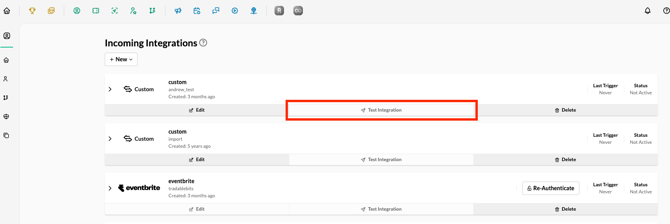
In the **Integrations \> Incoming** tab, you can review the status of your incoming integrations, view their last trigger, edit, and test the connection.
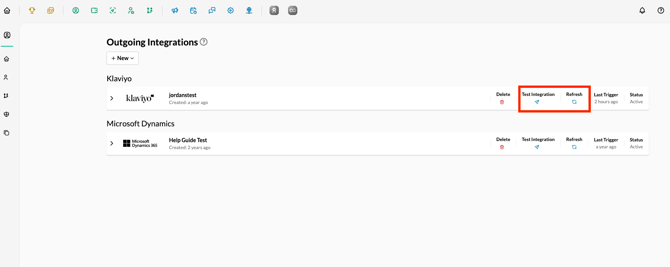
In the **Integrations \> Outgoing** tab, you can review the status of your outgoing integrations, test each one, see the last trigger, and refresh the connection between platforms.
Always make sure to test your integration promptly after setting it up to ensure your data bridge is functioning exactly as it should be.
**Still need assistance? Please reach out to your Customer Success Team or contact support@tradablebits.com**
- [Getting started](https://resources.tradablebits.com/support/getting-started?hsLang=en)
- [Account](https://resources.tradablebits.com/support/account?hsLang=en#main-content)
- [Security](https://resources.tradablebits.com/support/account?hsLang=en#security)
- [Integrations](https://resources.tradablebits.com/support/integrations?hsLang=en#main-content)
- [Outgoing Integrations](https://resources.tradablebits.com/support/integrations?hsLang=en#outgoing-integrations)
- [Incoming Integrations](https://resources.tradablebits.com/support/integrations?hsLang=en#incoming-integrations)
- [Salesforce Marketing Cloud](https://resources.tradablebits.com/support/integrations?hsLang=en#salesforce-marketing-cloud)
- [FAQs](https://resources.tradablebits.com/support/faqs?hsLang=en)
- [Troubleshooting](https://resources.tradablebits.com/support/troubleshooting?hsLang=en#main-content)
- [CSS/JS](https://resources.tradablebits.com/support/troubleshooting?hsLang=en#css-js)
- [Reports](https://resources.tradablebits.com/support/reports?hsLang=en)
- [Engagement Campaigns](https://resources.tradablebits.com/support/engagement-campaigns?hsLang=en#main-content)
- [Campaign Basics](https://resources.tradablebits.com/support/engagement-campaigns?hsLang=en#campaign-basics)
- [Campaign Management](https://resources.tradablebits.com/support/engagement-campaigns?hsLang=en#campaign-management)
- [Creating Campaigns](https://resources.tradablebits.com/support/engagement-campaigns?hsLang=en#creating-campaigns)
- [Best Practices and Troubleshooting](https://resources.tradablebits.com/support/engagement-campaigns?hsLang=en#best-practices-and-troubleshooting)
- [UGC](https://resources.tradablebits.com/support/ugc?hsLang=en)
- [Fan CRM](https://resources.tradablebits.com/support/fan-crm?hsLang=en)
- [Sales](https://resources.tradablebits.com/support/sales?hsLang=en)
- [Idols](https://resources.tradablebits.com/support/idols?hsLang=en)
- [Trackers](https://resources.tradablebits.com/support/trackers?hsLang=en)
- [Messaging](https://resources.tradablebits.com/support/messaging?hsLang=en#main-content)
- [SMS](https://resources.tradablebits.com/support/messaging?hsLang=en#sms)
- [Email](https://resources.tradablebits.com/support/messaging?hsLang=en#email)
- [Push Notifications](https://resources.tradablebits.com/support/messaging?hsLang=en#push-notifications)
- [Instagram](https://resources.tradablebits.com/support/messaging?hsLang=en#instagram)
- [Ads](https://resources.tradablebits.com/support/ads?hsLang=en)
- [Octane](https://resources.tradablebits.com/support/octane?hsLang=en)
- [Product Updates](https://resources.tradablebits.com/support/product-updates?hsLang=en)
[](https://tradablebits.com/)
Copyright © 2026, Tradable Bits