---
title: Getting Started with Incoming Webhooks
description: This guide explains how to configure Incoming Webhooks to push data from external ticketing, e-commerce, or marketing platforms (e.g., Shopify) directly into Tradable Bits
---
[Skip to content](https://resources.tradablebits.com/support/getting-started-with-incoming-webhooks#main-content)
English
Show submenu for translations
![tradable-bits-long-logo-for-download.png\]](https://resources.tradablebits.com/hs-fs/hubfs/tradable-bits-long-logo-for-download.png?height=40&name=tradable-bits-long-logo-for-download.png)
Open main navigation
Close main navigation
- English
Show submenu for translations
How can we help?
- There are no suggestions because the search field is empty.
1. [Resources](https://resources.tradablebits.com/support?hsLang=en)
2. [Integrations](https://resources.tradablebits.com/support/integrations?hsLang=en)
3. [Incoming Integrations](https://resources.tradablebits.com/support/integrations?hsLang=en#incoming-integrations)
# Getting Started with Incoming Webhooks
## This guide explains how to configure Incoming Webhooks to push data from external ticketing, e-commerce, or marketing platforms (e.g., Shopify) directly into Tradable Bits.
### Overview
Incoming webhooks allow third-party applications to push fan data, orders, and tickets into Tradable Bits in real time via **HTTP POST** requests:
- **Automated Data Ingestion:** Automatically create or update fan records whenever a purchase or sign-up occurs on an external site.
- **Custom Field Mapping:** Explicitly map fields from external incoming JSON payloads to target fields in Tradable Bits.
**Primary Identifier Requirement:** Every incoming payload must contain either an `email` or a `phone` field mapped to a fan record to create or update an entry. Unmapped payload fields are automatically ignored.
### Setup
#### Generate an Incoming Webhook Connection
Under **Ticketing or Email Platform**:
- Select your **Network** (e.g., *Shopify*).
- Select an **API Key** from the dropdown menu.
- Enter a **Data Source Name** to identify where the data is coming from (e.g., *Main Store Checkout*).
Click **Generate** on the right side of the row to create your unique webhook URL.
Copy and paste this generated URL into your external ticketing or e-commerce platform's webhook settings.
#### Configure Incoming Fan Field Mapping
To ensure data lands in the correct CRM fields, map your incoming JSON payload keys to target fields in Tradable Bits under **Incoming Fan Webhook Configuration**:
1. Enter the incoming key name from your source platform in the **Source Key** column (e.g., `user_email`).
2. Select the corresponding Tradable Bits field in the **Target Field (crm\_fans)** dropdown (e.g., `email`).
3. Click **+ Add Mapping** to add additional row mappings
4. Click **Save**.
**Note:** Only mapped fields are ingested into the CRM. Any unmapped key-value pairs present in the incoming payload will be safely ignored.
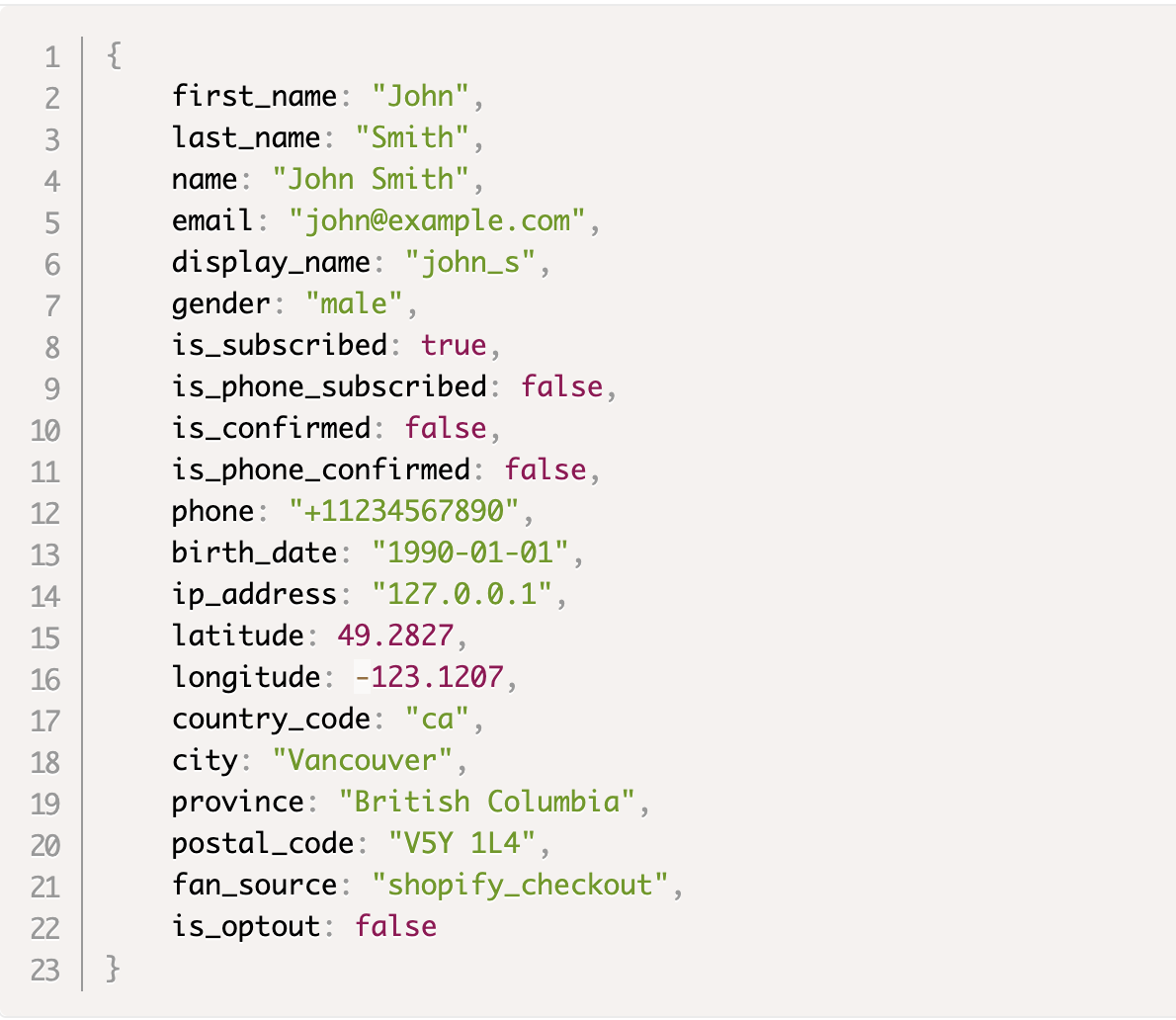
> #### Expected Payload Schema
>
> The expanded **Expected Payload** accordion displays the standard JSON structure accepted by the incoming endpoint:
>
> Ex.
>
> 
⚠️ **Important**
Webhook notifications are delivered in real time as single events. In the event of a service disruption (whether on the Tradable Bits platform or your receiving server), undelivered data will not be automatically re-sent. Webhooks attempt delivery only once.
**Still need assistance? Please reach out to your Customer Success Team or contact [support@tradablebits.com](mailto:support@tradablebits.com)**
- [Getting started](https://resources.tradablebits.com/support/getting-started?hsLang=en)
- [Account](https://resources.tradablebits.com/support/account?hsLang=en#main-content)
- [Security](https://resources.tradablebits.com/support/account?hsLang=en#security)
- [Integrations](https://resources.tradablebits.com/support/integrations?hsLang=en#main-content)
- [Outgoing Integrations](https://resources.tradablebits.com/support/integrations?hsLang=en#outgoing-integrations)
- [Incoming Integrations](https://resources.tradablebits.com/support/integrations?hsLang=en#incoming-integrations)
- [Salesforce Marketing Cloud](https://resources.tradablebits.com/support/integrations?hsLang=en#salesforce-marketing-cloud)
- [FAQs](https://resources.tradablebits.com/support/faqs?hsLang=en)
- [Troubleshooting](https://resources.tradablebits.com/support/troubleshooting?hsLang=en#main-content)
- [CSS/JS](https://resources.tradablebits.com/support/troubleshooting?hsLang=en#css-js)
- [Reports](https://resources.tradablebits.com/support/reports?hsLang=en)
- [Engagement Campaigns](https://resources.tradablebits.com/support/engagement-campaigns?hsLang=en#main-content)
- [Campaign Basics](https://resources.tradablebits.com/support/engagement-campaigns?hsLang=en#campaign-basics)
- [Campaign Management](https://resources.tradablebits.com/support/engagement-campaigns?hsLang=en#campaign-management)
- [Creating Campaigns](https://resources.tradablebits.com/support/engagement-campaigns?hsLang=en#creating-campaigns)
- [Best Practices and Troubleshooting](https://resources.tradablebits.com/support/engagement-campaigns?hsLang=en#best-practices-and-troubleshooting)
- [UGC](https://resources.tradablebits.com/support/ugc?hsLang=en)
- [Fan CRM](https://resources.tradablebits.com/support/fan-crm?hsLang=en)
- [Sales](https://resources.tradablebits.com/support/sales?hsLang=en)
- [Idols](https://resources.tradablebits.com/support/idols?hsLang=en)
- [Trackers](https://resources.tradablebits.com/support/trackers?hsLang=en)
- [Messaging](https://resources.tradablebits.com/support/messaging?hsLang=en#main-content)
- [SMS](https://resources.tradablebits.com/support/messaging?hsLang=en#sms)
- [Email](https://resources.tradablebits.com/support/messaging?hsLang=en#email)
- [Push Notifications](https://resources.tradablebits.com/support/messaging?hsLang=en#push-notifications)
- [Instagram](https://resources.tradablebits.com/support/messaging?hsLang=en#instagram)
- [Ads](https://resources.tradablebits.com/support/ads?hsLang=en)
- [Octane](https://resources.tradablebits.com/support/octane?hsLang=en)
- [Product Updates](https://resources.tradablebits.com/support/product-updates?hsLang=en)
[](https://tradablebits.com/)
Copyright © 2026, Tradable Bits