---
title: How do I create and apply custom Theme Presets?
description: This guide will walk you through how to create your first pre-set theme for campaigns. Set campaign colour themes for home, away, alternative brand colours, seasonal vibes and more!
---
[Skip to content](https://resources.tradablebits.com/support/default-themes-for-campaigns#main-content)
English
Show submenu for translations
![tradable-bits-long-logo-for-download.png\]](https://resources.tradablebits.com/hs-fs/hubfs/tradable-bits-long-logo-for-download.png?height=40&name=tradable-bits-long-logo-for-download.png)
Open main navigation
Close main navigation
- English
Show submenu for translations
How can we help?
- There are no suggestions because the search field is empty.
1. [Resources](https://resources.tradablebits.com/support?hsLang=en)
2. [Engagement Campaigns](https://resources.tradablebits.com/support/engagement-campaigns?hsLang=en)
3. [Campaign Basics](https://resources.tradablebits.com/support/engagement-campaigns?hsLang=en#campaign-basics)
# How do I create and apply custom Theme Presets?
## This guide will walk you through how to create your first pre-set theme for campaigns. Set campaign colour themes for home, away, alternative brand colours, seasonal vibes and more!
### Before You Get Started
- Theme Presets are built at the business level and can only be applied to campaigns within that specific business.
- Updating an existing Theme Preset only affects newly created campaigns moving forward.
- Live or existing campaigns will not update automatically when a preset is modified; you must re-apply the preset manually inside the campaign Theme Settings.
### How to Build a Theme Preset
1. Go to **Campaigns** and select your desired business dashboard.
2. Navigate to **Business Settings \> Theme Presets.**
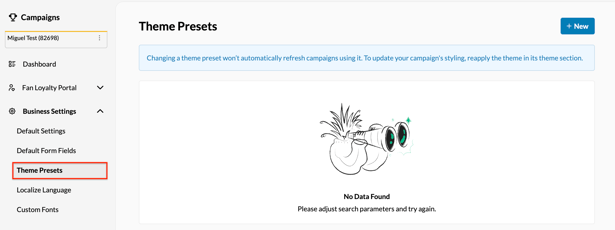
3. Click "+ New" to create a new preset.
4. Choose how to build your theme:
- - **Global Styles (Recommended):** Select your Primary Colour, Typography, Button Style, and Background settings. The system automatically uses these core selections to generate a cohesive color palette, hover states, and accent shades across all campaign elements.
- **Advanced Customization:** Manually configure specific design fields for granular control over individual UI variables.
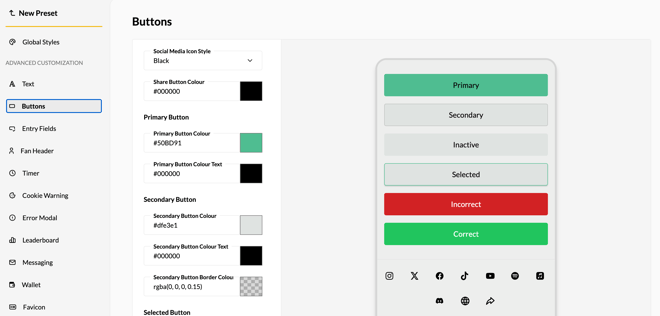
5. Click **Save** when you have finished configuring your preset. If you are editing a previously configured theme preset, you can choose to either "Overwrite" (saving over the previous iteration) or "Save as New" (saving as a new preset).
6. Review your changes in the real-time preview panel to see how your theme applies across individual components.
**Note:** From the **Theme Presets** dashboard, toggle on **"Auto-Apply"** to set this theme as the default for all new campaigns.
### How to Apply a Theme Preset
To apply a preset, navigate to **Design \> Theme Settings \> Global Styles,** select your pre-configured theme and click "**Apply Preset**".
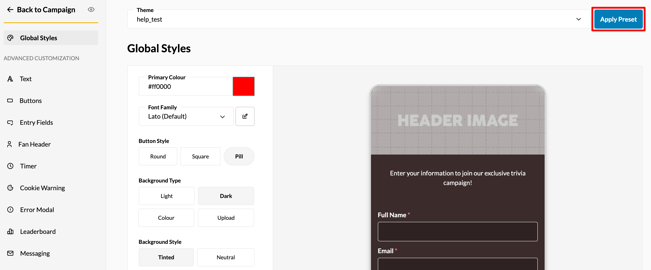
**Note**: By applying this preset, you will overwrite any customization currently applied by theme customization.
**Still need assistance? Please reach out to your Customer Success Team or contact [support@tradablebits.com](mailto:support@tradablebits.com)**
- [Getting started](https://resources.tradablebits.com/support/getting-started?hsLang=en)
- [Account](https://resources.tradablebits.com/support/account?hsLang=en#main-content)
- [Security](https://resources.tradablebits.com/support/account?hsLang=en#security)
- [Integrations](https://resources.tradablebits.com/support/integrations?hsLang=en#main-content)
- [Outgoing Integrations](https://resources.tradablebits.com/support/integrations?hsLang=en#outgoing-integrations)
- [Incoming Integrations](https://resources.tradablebits.com/support/integrations?hsLang=en#incoming-integrations)
- [Salesforce Marketing Cloud](https://resources.tradablebits.com/support/integrations?hsLang=en#salesforce-marketing-cloud)
- [FAQs](https://resources.tradablebits.com/support/faqs?hsLang=en)
- [Troubleshooting](https://resources.tradablebits.com/support/troubleshooting?hsLang=en#main-content)
- [CSS/JS](https://resources.tradablebits.com/support/troubleshooting?hsLang=en#css-js)
- [Reports](https://resources.tradablebits.com/support/reports?hsLang=en)
- [Engagement Campaigns](https://resources.tradablebits.com/support/engagement-campaigns?hsLang=en#main-content)
- [Campaign Basics](https://resources.tradablebits.com/support/engagement-campaigns?hsLang=en#campaign-basics)
- [Campaign Management](https://resources.tradablebits.com/support/engagement-campaigns?hsLang=en#campaign-management)
- [Creating Campaigns](https://resources.tradablebits.com/support/engagement-campaigns?hsLang=en#creating-campaigns)
- [Best Practices and Troubleshooting](https://resources.tradablebits.com/support/engagement-campaigns?hsLang=en#best-practices-and-troubleshooting)
- [UGC](https://resources.tradablebits.com/support/ugc?hsLang=en)
- [Fan CRM](https://resources.tradablebits.com/support/fan-crm?hsLang=en)
- [Sales](https://resources.tradablebits.com/support/sales?hsLang=en)
- [Idols](https://resources.tradablebits.com/support/idols?hsLang=en)
- [Trackers](https://resources.tradablebits.com/support/trackers?hsLang=en)
- [Messaging](https://resources.tradablebits.com/support/messaging?hsLang=en#main-content)
- [SMS](https://resources.tradablebits.com/support/messaging?hsLang=en#sms)
- [Email](https://resources.tradablebits.com/support/messaging?hsLang=en#email)
- [Push Notifications](https://resources.tradablebits.com/support/messaging?hsLang=en#push-notifications)
- [Instagram](https://resources.tradablebits.com/support/messaging?hsLang=en#instagram)
- [Ads](https://resources.tradablebits.com/support/ads?hsLang=en)
- [Octane](https://resources.tradablebits.com/support/octane?hsLang=en)
- [Product Updates](https://resources.tradablebits.com/support/product-updates?hsLang=en)
[](https://tradablebits.com/)
Copyright © 2026, Tradable Bits