![tradable-bits-long-logo-for-download.png]](https://resources.tradablebits.com/hs-fs/hubfs/tradable-bits-long-logo-for-download.png?height=40&name=tradable-bits-long-logo-for-download.png)
To ensure your campaign aligns with your brand and legal requirements, you can customize the cookie warning and privacy policy links. Follow the steps below to update these settings.
Steps to Customize your Cookie Warning
Go to your desired Campaign > Setup > Tracking and locate the Privacy Settings section.
By default, campaigns link to the Tradable Bits privacy policy. To use your own:
-
Add your Privacy Policy URL: This will override the default link with your own.
-
Enter your Business Name: If you use a custom policy, providing your business name is required for legal transparency.
Tip: Always preview your changes to ensure the user interface remains clean and readable. To preview your cookie warning, access your campaign using incognito mode or clear your cookies.
Before & After
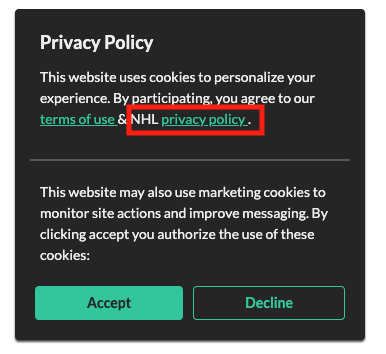
Before: The default warning uses standard Tradable Bits branding and policy links.
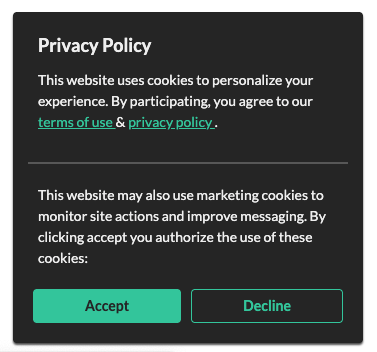
After: The warning will reflect your specific business name and link directly to your internal policy.
Advanced Cookie Controls
You have two additional options for managing user consent, though they impact how data is collected:
-
Disable Cookie Warning: You can turn the warning off entirely.
Note: Doing so will disable all tracking for marketing and audience targeting purposes.
-
GDPR Compliance Toggle: You can choose to block the ability for users to opt out of marketing pixels and analytics cookies.
Ensure you consult with your legal team before enabling this to ensure compliance with local data protection laws (like GDPR or CCPA).
Cookie Theme Settings
To ensure your cookie consent banner feels like a natural extension of your site, navigate to your desired campaign and select Design, > Theme Settings > Cookie Warning on the right hand menu.
Still need assistance? Please reach out to your Customer Success Team or contact support@tradablebits.com