---
title: How do I create and edit a share link for my Campaign?
description: This guide will walk you through what a share link is, how it can help your campaigns succeed, and some best practices to help you build a successful campaign built to share.
---
[Skip to content](https://resources.tradablebits.com/support/create-a-share-link#main-content)
English
Show submenu for translations
![tradable-bits-long-logo-for-download.png\]](https://resources.tradablebits.com/hs-fs/hubfs/tradable-bits-long-logo-for-download.png?height=40&name=tradable-bits-long-logo-for-download.png)
Open main navigation
Close main navigation
- English
Show submenu for translations
How can we help?
- There are no suggestions because the search field is empty.
1. [Resources](https://resources.tradablebits.com/support?hsLang=en)
2. [Engagement Campaigns](https://resources.tradablebits.com/support/engagement-campaigns?hsLang=en)
3. [Campaign Management](https://resources.tradablebits.com/support/engagement-campaigns?hsLang=en#campaign-management)
# How do I create and edit a share link for my Campaign?
## This guide will walk you through what a share link is, how it can help your campaigns succeed, and some best practices to help you build a successful campaign built to share.
#### **What is a share link:**
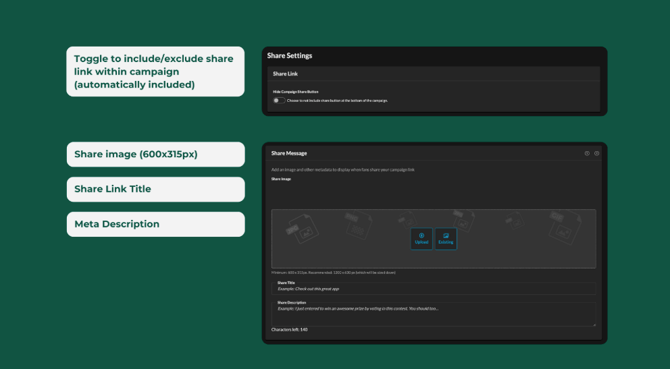
A share link is the link created when you make any Tradable Bits campaign. Fans who access your campaign can copy or share directly using the share button on the bottom of any campaign. Share links are automatically included in every TBits campaign, but can be toggled off in campaign settings.
#### **Where can I find it?**
You can find the link in the **Publish** tab of your Campaign setup. If you'd like to customize it (to something other than a Tradable Bits URL) you can to this in Miscellanous\> Virtual Domain section and selet one from the drop-down. If you'd like to add a new virtual domain to your account please reach out to your Customer Success Manager.
#### **How can I adjust the default Image and copy?**
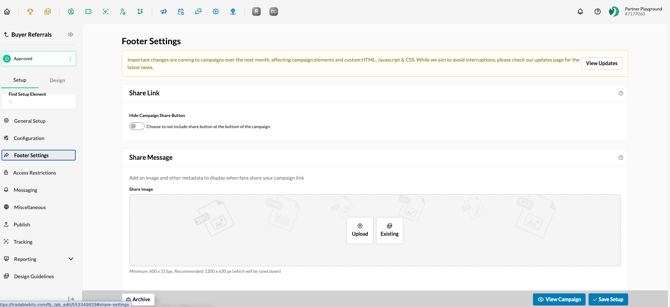
To adjust the default image and description that gets shared (via social media, Whatsapp etc), you can find all customizations at the individual campaign level under **Setup\>Footer Settings.**
****
#### **Why use share links?**
Promoting your campaign through direct shares is a great way to not only drive engagement but to expand your audience in a meaningful way. Now you can see who your fans are connected to, and gain a better understanding of who the influencers are within your fanbase.
#### **When should you use them?**
There’s rarely an instance when you’ll want to toggle off the ability for fans to share. However, some campaigns are designed specifically around a share link to create campaign virality. If you’re looking to create a campaign that spreads like wildfire, you can incentivize fans to share and then track those shares and redemptions in Tradable Bits. This gives you the ability to expand your fanbase using your existing fan networks.
#### **Share link best practices:**
The Tradable Bits FanCRM now allows you to track share link redemptions to help you uncover micro-communities in your fanbase. And although these new capabilities don't require any additional setup, you will need to be more intentional about your copy and imagery. Every campaign is automatically set to include a share link and will automatically track redemptions of it, which you can find in your campaign’s results section.
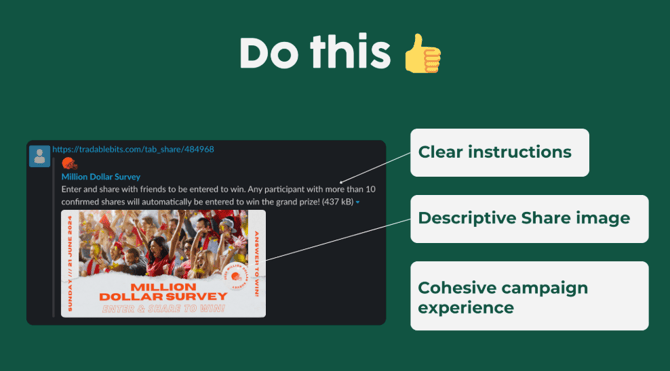
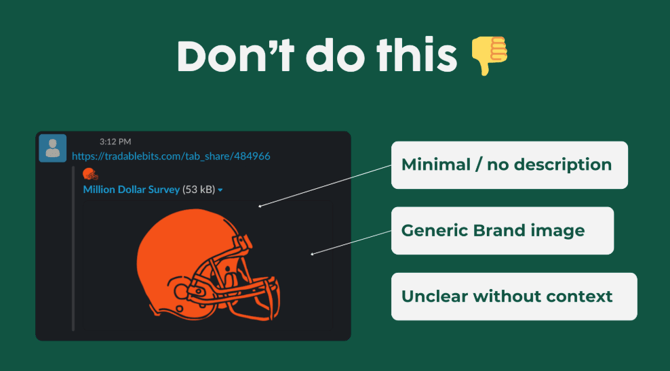
To help your campaign get more eyeballs and drive engagement, it helps to make a strong share link description and image. Here are our top tips:
- Be concise, but include the good stuff (like prizes)
- Keep your share image on brand with the rest of the campaign
**Still need assistance? Please reach out to your Customer Success Team or contact [support@tradablebits.com](mailto:support@tradablebits.com)**
- [Getting started](https://resources.tradablebits.com/support/getting-started?hsLang=en)
- [Account](https://resources.tradablebits.com/support/account?hsLang=en#main-content)
- [Security](https://resources.tradablebits.com/support/account?hsLang=en#security)
- [Engagement Campaigns](https://resources.tradablebits.com/support/engagement-campaigns?hsLang=en#main-content)
- [Campaign Basics](https://resources.tradablebits.com/support/engagement-campaigns?hsLang=en#campaign-basics)
- [Campaign Management](https://resources.tradablebits.com/support/engagement-campaigns?hsLang=en#campaign-management)
- [Creating Campaigns](https://resources.tradablebits.com/support/engagement-campaigns?hsLang=en#creating-campaigns)
- [Best Practices and Troubleshooting](https://resources.tradablebits.com/support/engagement-campaigns?hsLang=en#best-practices-and-troubleshooting)
- [Fan CRM](https://resources.tradablebits.com/support/fan-crm?hsLang=en)
- [UGC](https://resources.tradablebits.com/support/ugc?hsLang=en)
- [Sales](https://resources.tradablebits.com/support/sales?hsLang=en)
- [Trackers](https://resources.tradablebits.com/support/trackers?hsLang=en)
- [Idols](https://resources.tradablebits.com/support/idols?hsLang=en)
- [Integrations](https://resources.tradablebits.com/support/integrations?hsLang=en#main-content)
- [Outgoing Integrations](https://resources.tradablebits.com/support/integrations?hsLang=en#outgoing-integrations)
- [Incoming Integrations](https://resources.tradablebits.com/support/integrations?hsLang=en#incoming-integrations)
- [Salesforce Marketing Cloud](https://resources.tradablebits.com/support/integrations?hsLang=en#salesforce-marketing-cloud)
- [Ads](https://resources.tradablebits.com/support/ads?hsLang=en)
- [Messaging](https://resources.tradablebits.com/support/messaging?hsLang=en#main-content)
- [SMS](https://resources.tradablebits.com/support/messaging?hsLang=en#sms)
- [Email](https://resources.tradablebits.com/support/messaging?hsLang=en#email)
- [Push Notifications](https://resources.tradablebits.com/support/messaging?hsLang=en#push-notifications)
- [Instagram](https://resources.tradablebits.com/support/messaging?hsLang=en#instagram)
- [Octane](https://resources.tradablebits.com/support/octane?hsLang=en)
- [FAQs](https://resources.tradablebits.com/support/faqs?hsLang=en)
- [Troubleshooting](https://resources.tradablebits.com/support/troubleshooting?hsLang=en#main-content)
- [CSS/JS](https://resources.tradablebits.com/support/troubleshooting?hsLang=en#css-js)
- [Reports](https://resources.tradablebits.com/support/reports?hsLang=en)
- [Product Updates](https://resources.tradablebits.com/support/product-updates?hsLang=en)
[](https://tradablebits.com/)
Copyright © 2026, Tradable Bits