![tradable-bits-long-logo-for-download.png]](https://resources.tradablebits.com/hs-fs/hubfs/tradable-bits-long-logo-for-download.png?height=40&name=tradable-bits-long-logo-for-download.png)
Optimize your campaign’s visual performance with our mobile-first design guidelines. Learn how to leverage theme presets, professional background settings, and strategic asset placement to drive better results for your brand and sponsors.
Campaign images
Check out our design guidelines for a full breakdown of all campaign asset specifications.
- In the guidelines, you can select your desired campaign and see the campaign-specific, standard and option assets.
- All assets are listed with their:
- Location
- Recommended width and height (in px)
- Supported file types.
Best practices
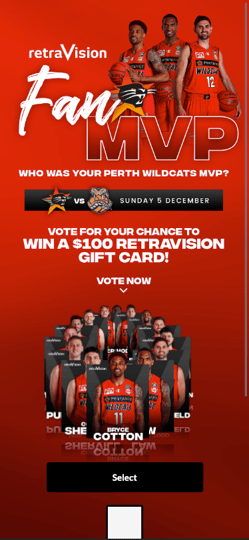
- For headers: use transparent images at a mobile-responsive size (i.e. at least 1000px deep). Keep fonts big and bold and include important info above the fold.
- Avoid static backgrounds. Use textured or gradient images, or try a video background.
Mobile-first approach
-
Deep header: 1000 - 1200px height
-
Large font: Reads better when scaled down.
-
Details: Includes players, sponsors, and prize details
Additional tips
- Theme Presets: create and custom themes to keep things consistent and make campaign builds easier.
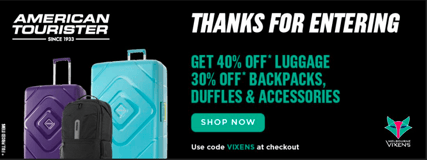
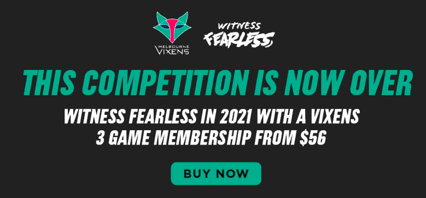
- Thank you page: Streamline these pages by reusing your existing design with altered copy. Additionally, the thank you page is a location to place your team or sponsor CTAs while you have fans' attention. Check out some examples of this below.
- Reduce, re-use, engage: finding ways to recycle creative assets can drastically reduce campaign build time.
-
Minimal text: Try to minimize text while making things clear and concise.
Theme Customizations
-
Navigate to Campaigns Dashboard > Business Settings > Theme Customization. Set up a custom theme with your brand colours—customize everything from backgrounds and buttons to footers, fonts, and more. Plus, you can make as many as you want! To get started, we recommend one dark & one light theme.
-
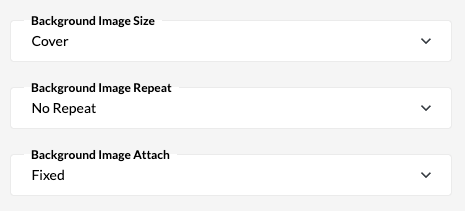
Background Settings: These are the settings we generally recommend for the best results. You can always play around with different settings to see what works best, or try something new!
Note: When you are creating a new campaign, all you have to do is select one of your themes from the dropdown menu, and it will populate all of your custom settings. Ta-da!
To learn more about Theme Presets, check out our guide.
Still need assistance? Please reach out to your Customer Success Team or contact support@tradablebits.com