![tradable-bits-long-logo-for-download.png]](https://resources.tradablebits.com/hs-fs/hubfs/tradable-bits-long-logo-for-download.png?height=40&name=tradable-bits-long-logo-for-download.png)
When you're setting up a campaign in Tradable Bits, such as a quiz, contest, poll, or lead-generation activation, adding clear legal language protects your organization, builds fan trust, and keeps the entry process smooth.
This guide covers best practices for Privacy Policy and Terms of Use setup in the Legal Setup section on the General Setup tab. If your campaign awards prizes, involves a sweepstakes or contest, or uses Bonus Entries tied to a prize draw, pair this setup with our Official Rules guide.
Disclaimer: This guide provides general product and operational best practices for campaign setup and does not constitute legal advice. Please always have your legal team review your policies and rules for your target regions.
How the Privacy Policy, Terms of Use & Official Rules Work Together
To start, open your campaign editor and navigate to the General Setup section. Scroll down to Legal Setup. 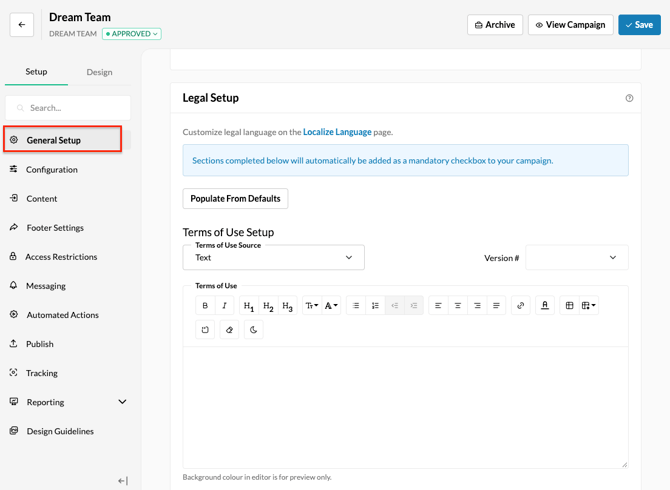
Before configuring the Legal Setup section, make sure you are putting the right information in the right place:
- Terms of Use: This section sets the rules for accessing and interacting with the campaign itself. This would typically include intellectual property rights, permitted user behaviour, anti-bot/fair-play rules, and platform or technical liability disclaimers.
- Privacy Policy: This section should explain what personal information (PII) is collected (such as email, name, birthday, phone number, etc.), why it is collected, how it is stored or shared, how fans can opt out or request deletion, and how marketing consent is handled.
- Official Rules: This section governs sweepstakes, contests, giveaways, or prize draws (including bonus-entry draws). We recommend keeping contest dates, eligibility, entry limits, prize details, winner selection, and region-specific terms (like Canada's no purchase necessary and skill-testing question requirements) in the Official Rules rather than including them all in the general Terms of Use section. See our Official Rules guide for more information.
Terms of Use Best Practices
Cover Intellectual Property & Fan Submissions
- If appropriate, state clearly that campaign branding, logos, roster assets, and other media remain the property of your organization or its licensors.
- You may also wish to clarify if fans submit picks, lineups, votes, or user-generated content (UGC), what rights you have to display, feature, or share those submissions (for instance, on leaderboards, recaps, or social channels).
Set Fair-Use & Platform Disclaimers
- You may want to note the prohibition of automated bots, scripted entries, impersonation, or attempts to manipulate campaign mechanics, and reserve the right to remove invalid or abusive entries.
- You can also include standard disclaimers stating that the campaign is provided on an "as is" basis without guarantees of uninterrupted availability, technical error-free operation, or third-party network uptime.
Privacy Policy Best Practices
Be Specific About What You Collect and Why
- Make sure to align your privacy disclosures with the exact fields you've set up under Entry Form Fields (and any social authentication networks you've enabled in the Authentication section).
- Clearly state whether data is used solely to run the campaign, personalize fan experiences, analyze engagement, or send marketing messages.
Keep Marketing Consent Separate and Opt-In
- Under privacy and anti-spam frameworks such as GDPR, CASL (Canada), and CCPA/CPRA, marketing subscriptions should be clearly separated from basic campaign participation and left unchecked by default.
- Explain how your fans can unsubscribe or withdraw their consent later, and if you have opt-out links, enable the Show Opt-out Links section in your campaign.
Disclose Data Processing & Third-Party Tools
- You might note that campaign submissions may be processed through Tradable Bits and connected marketing, analytics, or CRM systems used by your organization.
- You might include a contact address or form where fans can ask privacy questions or submit data access/deletion requests.
Configuring Legal Setup in Tradable Bits
It's worth noting that, under Legal Setup (in your campaign's General Setup tab), filling out any policy (Privacy Policy, Terms of Use, or Official Rules) automatically adds a required checkbox that fans must accept before submitting:
- Choose the Right Source Format:
- URL: This is the best option for evergreen organization-wide Terms of Use or Privacy Policy pages hosted on your website, so that any updates stay consistent across your campaigns without having to manually copy and paste them.
- Text or PDF: These can be helpful when a specific campaign or partner activation requires standalone or customized legal copy directly inside the campaign.
- Use Default Business Settings & Version Tracking:
- If your Privacy Policy and Terms of Use stay consistent across most campaigns, you can pre-set your default legal links and text once in your Business Settings; see our Default Business Settings guide for setup instructions.
- Once configured, click Populate From Defaults inside any campaign to pull in your business-level legal settings and save yourself setup time.
- Use the Version # selector to track policy revisions, and toggle Always require new legal consent when you want returning fans who previously agreed to an older version to accept the updated terms.
- Customize Checkbox Labels:
- Update the legal checkbox wording or labels on the Languages tab so the prompt is clear and makes sense for your audience. Check out our guide to updating your legal language section to learn how.
- Update the legal checkbox wording or labels on the Languages tab so the prompt is clear and makes sense for your audience. Check out our guide to updating your legal language section to learn how.
Pre-Launch Quick Checklist
Before you go live with your campaign, here's a quick list of things to check to make sure all your bases are covered:
- [ ] Business settings are populated (if using default business-wide policies), and the Version # is up to date.
- [ ] Privacy Policy & Terms of Use match the active form fields, auth options, and campaign mechanics.
- [ ] Marketing opt-in is unchecked by default and distinct from required legal acceptance.
- [ ] Hosted URLs / PDFs / Text load cleanly and all point to current documents.
- [ ] Official Rules are configured in line with the Official Rules guide if prizes or prize draws apply.
- [ ] Legal counsel has reviewed your final text or policy links before publishing.
Remember, this guide provides general product and operational best practices for campaign setup and does not constitute legal advice. Please always have your legal team review your policies and rules for your target regions.
Still need assistance? Please reach out to your Customer Success Team or contact support@tradablebits.com